





EggMan
Members
-
Joined
-
Last visited
-
so set it to zfs, let it rebuild, and then copy and recoverable data back. Did i get that right?
-
Gotcha. So.. when the replacement drive comes in... just pop it in and let it rebuild (Just to get the array back to normal operation)? Does the file system in the disk settings matter at this stage since it is getting rebuilt from parity?
-
Gotcha. Do you see any downside to installing a separate 16tb drive into the array, in place of the one I formatted, and having it rebuild to see if unraid would rebuild it "into the drive from before all this"
-
potentially adding some clarity to the timeline of events and what I did: Stop Array go to Disk 3 Settings Change "File system type" from "XFS" to "ZFS" Applied changes Start Array data rebuild starts, disk 3 shows "Unmountable: Unsupported or no file system". There are high writes to disk 3, and high reads on disks 1, 2, and parity. Stop Rebuild I Format disk 3 it formats it as ZFS I restart the server I start the array data rebuild starts. disk 3 shows that it is mounted and There are high writes to disk 3, and high reads on disks 1, 2, and parity, just like before. I try to start mailcow. I notice files are missing. I stop the rebuild. I stop the array. I go back to the settings for disk 3 and change the file system type from "ZFS" to "XFS" I start the array in maintenance mode I press the "Sync" button to initiate the data rebuild once again data rebuild starts. disk 3 shows "Unmountable: Unsupported or no file system". There are high writes to disk 3, and high reads on disks 1, 2, and parity, just like before. I let it do its thing for a bit it reaches ~5.5% rebuilt I still dont see the mailcow files, so my belief that the data is all still there is very gone I decide that I've probably done enough damage and should really not be winging it and I reach out here. Another thought im having is: Since I formatted the drive AFTER making unraid start rebuilding data the first time, would it have possibly kept the parity drive in like a read-only mode, keeping it unchanged since unraid was using it to restore disk 3 with the file system type change?
-
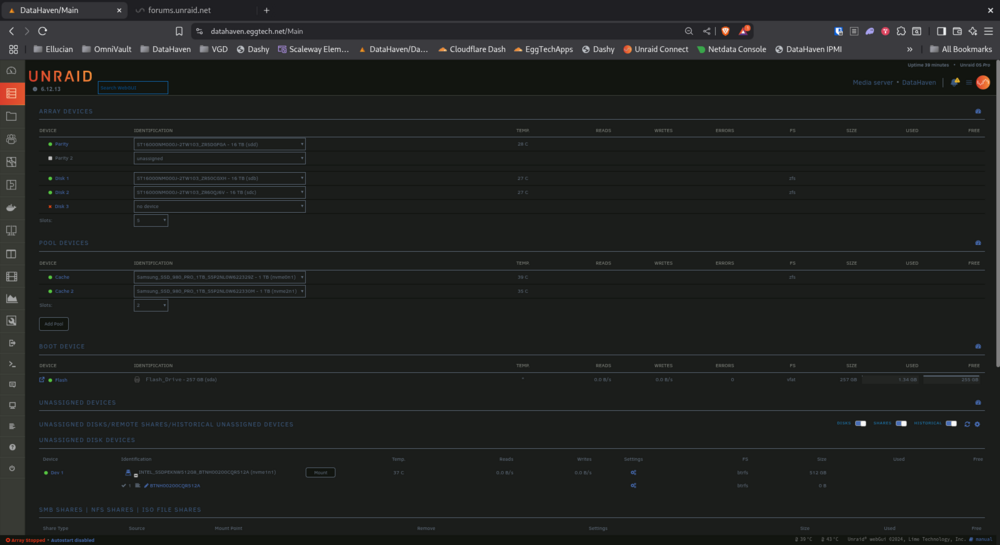
with how it is setup in the image above, would I be able to safely let unraid rebuild the array using parity? or would parity have been changed when I formatted disk 3? some more questions regarding this: does the selected disk file system matter? (zfs vs the original xfs) when it is rebuilding, should I expect to see valid "USED" and "FREE" calculations? or should I expect to the the "Device unmountable: no valid file system" message during the rebuild? the only thing i've noticed right away as far as missing data is some docker compose files regarding an instance of mailcow, but then again, I haven't dug too far. If said files aren't showing when the missing disk is being emulated, is it safe to assume that they wont reappear after the full data rebuild? P.S. - I really appreciate your help! Thank you!
-
Here's the setup. Disk 3 is the one that i've lost the data on. I've removed it from the server for the time being. Array is stopped. The most I allowed it to "rebuild" the array is ~5%, so I'm hopeful that there is still a significant amount of data remaining hidden on disk 3
-
Also, am i right in assuming that there is no way to tell which specific files were lost? Asides from browsing the remaining files and trying to remember what used to be there?
-
Ill get that asap after i get back. I shut the server down because i wanted to halt any more screwing up
-
sorry for the misunderstanding. All 4 drives are a part of the same "pool" (i forget what the unraid technology is called that doesn't stripe the data and just distributes the files via most empty disk first) 1 parity calculated against 3 drives
-
What would the correct parity setup look like? When i formatted the drive, would that have caused the parity to update then and there? I would expect that large of a change to take essentially 14TB of parity recalculation, but i could definitely be mistaken
-
Gotcha. How much we talking? I lost a good 14TB of data here that i dont think there's a way to tell which files were lost..
-
Dang. Gotcha. If theres a tool that rebuilds the file table, would i be able to run that on the drive and then recalculate parity? Would unraid pick up the files and put them with the rest in the /mnt/user folder? Or would my best shot be getting a seperate drive to put in place of the formatted one, recover files on a pc, and transfer them onto the fresh drive/array?
-
EggMan joined the community
-
So i did a very dumb thing. I have 4 16TB drives in my unraid server, 3 data, and 1 parity. 2 zfs, 1 xfs, 1 parity. I wanted to convert the remaining xfs drive to zfs. I recalled doing this early on when i had 1zfs and 2 xfs. So i stopped the array, removed the xfs drive from the config, and started the array, and it emulated the missing drive like usual. I then stopped the array, added the xfs drive back, and changed the fs type to zfs in the config, and started the array. The disk showed not mountable, so, and heres the dumb dumb move, i formatted it. I now have missing files. Is there any hope? It does try to rebuild data, but from what im reading, formatting a drive kinda nukes the parity of said drive. PLEASE HELP! Am i SOL??
