





Coban64
Members
-
Joined
-
Last visited
-
Formatted and back in business team. Thank you very much.
-
If you have a sec, could you explain parity disk to me? I was under the impression that it was the most important drive. Originally I had all of my data on a 8T drive. I added three, 12T drives and created a 1 parity 12T, with three disks, 8T, 12T & 12T Unraid server. So is all of my data spread across the four drives or only the 8T? Is the 8T the most important drive here?

-
Understood, since disk1 is working and I can access my data, can I use the Format box to fix disk2 and 3?

-
I ran the command for both disks for about 10min with nothing returned.

-
Its been 17hs and its still looking for secondary superblock. Zip diagnostics attached. tower-diagnostics-20260317-1359.zip
-
I will let it run for 24hs and report afterwards. Thanks,
-
Creating a two parity is just something I wanted to do in case parity1 drive failed. It was not something I thought was not going to resolve my disk2 and 3 unmout problem. Since parity 1 and disk1 drives are functional is my only option to check off format button and format disk2 and 3 again? Or can I resolve this issue another way? Anything telling in diagnostics? Thanks,
-
Thanks for helping! Tower diagnostics attached. tower-diagnostics-20260316-1325.zip
-
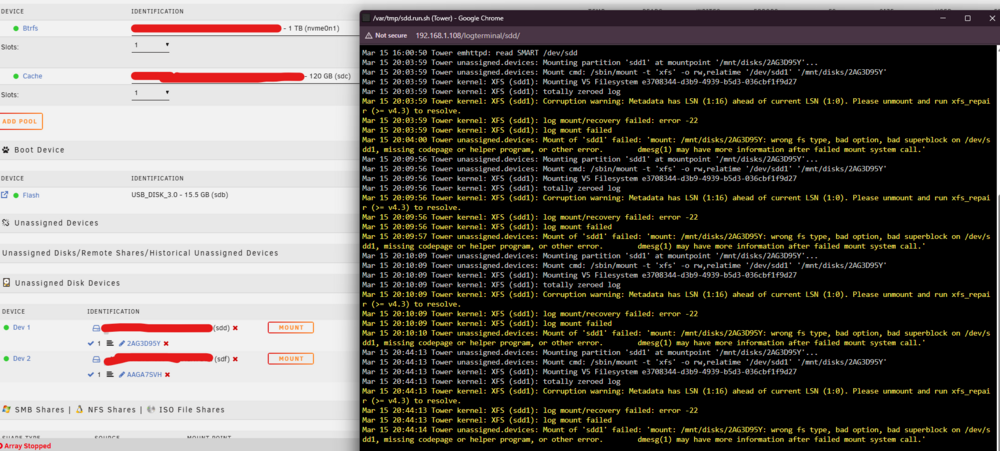
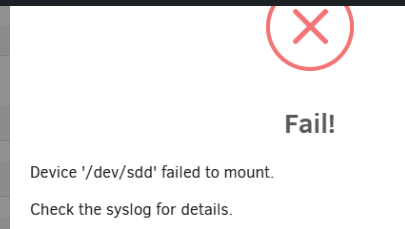
Team, Hope the weekend went well, I am having two issues with my Unraid v7.2.3 server. 1) I've been having issues with running my Unraid NAS server in headless mode, causing me to have to shutdown, add the graphics card back in and keep editing BIOS settings to see the URL will load. While doing this I noticed Disk 2 and Disk 3 showing up as unmoutable, wrong or no file system. I stopped the array and unassigned both disks and tried the mount button, but it came back with failed, check syslogs. Next I added them both back and started the array in maintenance mode, tried Check Filesystem Status for both disks. xfx_repair status did not get past, attempting to find secondary superblock. I checked PHP Settings logs and they are empty. Before I click format both drives I wanted to reach out and see if there is anything I missed or another step to take. My parity drive and disk1 are both valid and working properly, no data has been lost. I also shut down the system from web URL and reset SATA cables at the motherboard but that did not resolve my issue. 2) I cant seem to edit Parity/array around. I want to create Parity1 & Parity2 with disk1 and disk2. When I unassign and create the new setup, I get a configuration not valid. I also cant edit the slot tab from 5 to 4. Ideas?


-
JorgeB Correct to the timing, the system would drop the IP at that time and kick me out. Making me have to do a full power reboot. No I haven't started an array due to this IP loss issue. And my HDDs not being seen by the motherboard. But my ssd is seen on all 5 sata ports.
-
Frank, First log is from yesterday 7/10 and second is from today syslogsyslog
-
JorgeB, No, once the router drops Tower IP I am unable to login and run diagnostics, so I have to reboot the server first. Its on now, I will let it run for 24h and post the logs. That I can pull from the USB drive.
-
Bump
-
trurl Diagnostics downloaded. tower-diagnostics-20250703-1933.zip
-
Team, Built a NAS and setup unraid this week for the first time. I connected it to my AXE5400 Tri Band Wifi 6E router, 1m CAT5 cable. IP is assigned, tower comes right up and I added it to DHCP Reservation as well. After an hour or so the IP drops if I am working in it or not, I cannot connect back. NIC light is showing solid green and server is running. I log into tower terminal, run ipconfig and all showing dead. Just dropped both logs and previous logs if anyone can take a look! Also all four of my 8T HDDs are not showing up, could that be a part of this issue as well or separate? syslog-previoussyslog Thank you all very much in advance!



