




Skip to content
View in the app

A better way to browse. Learn more.

Unraid

A full-screen app on your home screen with push notifications, badges and more.

To install this app on iOS and iPadOS
  1. Tap the Share icon in Safari
  2. Scroll the menu and tap Add to Home Screen.
  3. Tap Add in the top-right corner.
To install this app on Android
  1. Tap the 3-dot menu (⋮) in the top-right corner of the browser.
  2. Tap Add to Home screen or Install app.
  3. Confirm by tapping Install.

Wpq

Members
  • Joined

  • Last visited

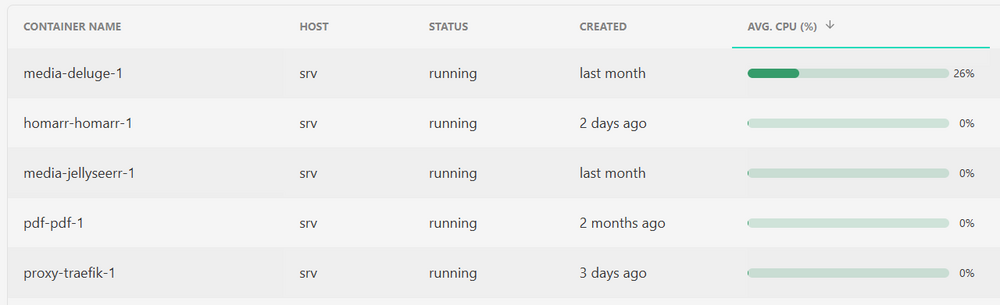
  1. (I am here because I have a question regarding DelugeVPN, but unrelated to Unraid, hope this is still the right place) I use DelugeVPN for years on a Debian server (so not Unraid). It works great. I noticed that it uses quite a lot of CPU, nothing spectacular but still 3-5 times the usage of other containers. This is not a problem but I am curious if this is expected. I can imagine that the CPU usage comes from the en/decryption of the traffic but I checked right now and it is south of 0.5 Mbps. Again - everything works fine, it is more a curiosity from my side (and who knows, maybe something to tweak to bring the number down?)
Account

Navigation

Search

Search

Configure browser push notifications

Chrome (Android)
  1. Tap the lock icon next to the address bar.
  2. Tap Permissions → Notifications.
  3. Adjust your preference.
Chrome (Desktop)
  1. Click the padlock icon in the address bar.
  2. Select Site settings.
  3. Find Notifications and adjust your preference.