




Skip to content
View in the app

A better way to browse. Learn more.

Unraid

A full-screen app on your home screen with push notifications, badges and more.

To install this app on iOS and iPadOS
  1. Tap the Share icon in Safari
  2. Scroll the menu and tap Add to Home Screen.
  3. Tap Add in the top-right corner.
To install this app on Android
  1. Tap the 3-dot menu (⋮) in the top-right corner of the browser.
  2. Tap Add to Home screen or Install app.
  3. Confirm by tapping Install.

obi1ginobli

Members
  • Joined

  • Last visited

  1. Oh awesome that would be very helpful! bossnass-diagnostics-20250724-2235.zip
  2. Oh man, you were absolutely right. It is a very very old gpu, i cant even remember its name 😅 But yes I logged into the router and found it there and was able to log into the web gui. Thanks!
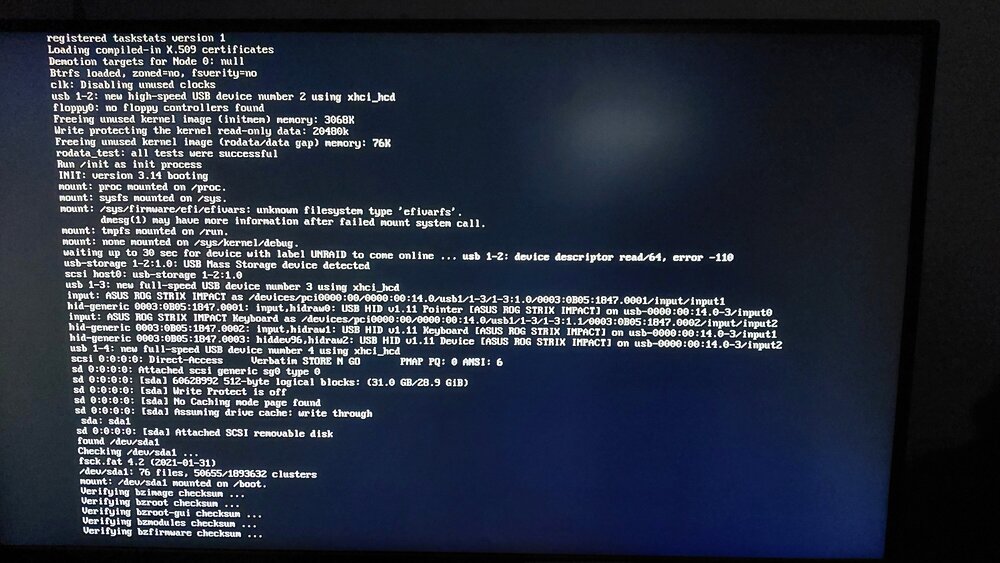
  3. Hey everyone, Super new to this so hopefully I can get some help. Trying to do initial install of unraid on a pc but keeps crashing shortly after it gets to the point seen in the image. It runs more lines then screen just goes black Tried uefi and non-uefi Vt-d enabled Primary boot, disabled others Tried 2 different usbs I have a gigabyte h310m mobo. Been at it for hours so really hope someone can help!
Account

Navigation

Search

Search

Configure browser push notifications

Chrome (Android)
  1. Tap the lock icon next to the address bar.
  2. Tap Permissions → Notifications.
  3. Adjust your preference.
Chrome (Desktop)
  1. Click the padlock icon in the address bar.
  2. Select Site settings.
  3. Find Notifications and adjust your preference.