





gigios
Members
-
Joined
-
Last visited
-
First of all, thanks for the answer! Fan control on your model All clear, thanks Overview like the LED plugin Yes, I didn't explain myself clearly. I meant on the UnRaid overview page, where the view is compact. I'd prefer an option to have either the compact view or a slightly expanded view similar to the one in the plugin's overview, so that the temperature is visible. But that's just my preference. Could fan control work on your model one day? Here are the results of the commands you asked me for. I hope you find them useful: root@UnRaid:~# cat /sys/class/dmi/id/product_name /sys/class/dmi/id/board_name /sys/class/dmi/id/board_vendor DXP8800 Plus Default string Default string root@UnRaid:~# for h in /sys/class/hwmon/hwmon*; do echo "$h: $(cat $h/name)"; ls $h | grep -E '^(fan|pwm)' | tr '\n' ' '; echo; done /sys/class/hwmon/hwmon0: nvme /sys/class/hwmon/hwmon1: nvme /sys/class/hwmon/hwmon2: acpitz /sys/class/hwmon/hwmon3: spd5118 /sys/class/hwmon/hwmon4: spd5118 /sys/class/hwmon/hwmon5: eth0 /sys/class/hwmon/hwmon6: eth1 /sys/class/hwmon/hwmon7: coretemp /sys/class/hwmon/hwmon8: it8613 root@UnRaid:~# lsmod | grep -iE "it87|it86|nct|ite|coretemp" it87 102400 0 hwmon_vid 16384 1 it87 coretemp 16384 0 root@UnRaid:~# grep -iE "002e|004e|0a20|0a30|0290|0295" /proc/ioports 0a20-0a2f : pnp 00:00 0a30-0a3f : pnp 00:00 root@UnRaid:~# dmesg | grep -iE "it87|it86|ite|nct67|super.?i/o" | head [ 0.315977] Performance Events: XSAVE Architectural LBR, PEBS fmt4+-baseline, Alderlake Hybrid events, AnyThread deprecated, 32-deep LBR, full-width counters, Intel PMU driver. [ 0.899619] pci 0000:56:00.0: 15.752 Gb/s available PCIe bandwidth, limited by 8.0 GT/s PCIe x2 link at 0000:00:1c.0 (capable of 63.012 Gb/s with 16.0 GT/s PCIe x4 link) [ 0.900230] pci 0000:57:00.0: 15.752 Gb/s available PCIe bandwidth, limited by 8.0 GT/s PCIe x2 link at 0000:00:1c.4 (capable of 63.012 Gb/s with 16.0 GT/s PCIe x4 link) [ 0.900824] pci 0000:58:00.0: 15.752 Gb/s available PCIe bandwidth, limited by 8.0 GT/s PCIe x2 link at 0000:00:1c.6 (capable of 63.012 Gb/s with 16.0 GT/s PCIe x4 link) [ 0.950629] UDP-Lite hash table entries: 32768 (order: 9, 2097152 bytes, linear) [ 3.056945] sd 8:0:0:0: [sda] Write Protect is off [ 3.057796] sd 8:0:0:0: [sda] Write cache: disabled, read cache: enabled, doesn't support DPO or FUA [ 4.514875] sd 0:0:0:0: [sdb] Write Protect is off [ 4.515070] sd 0:0:0:0: [sdb] Write cache: enabled, read cache: enabled, doesn't support DPO or FUA [ 4.959538] sd 1:0:0:0: [sdc] Write Protect is off
-
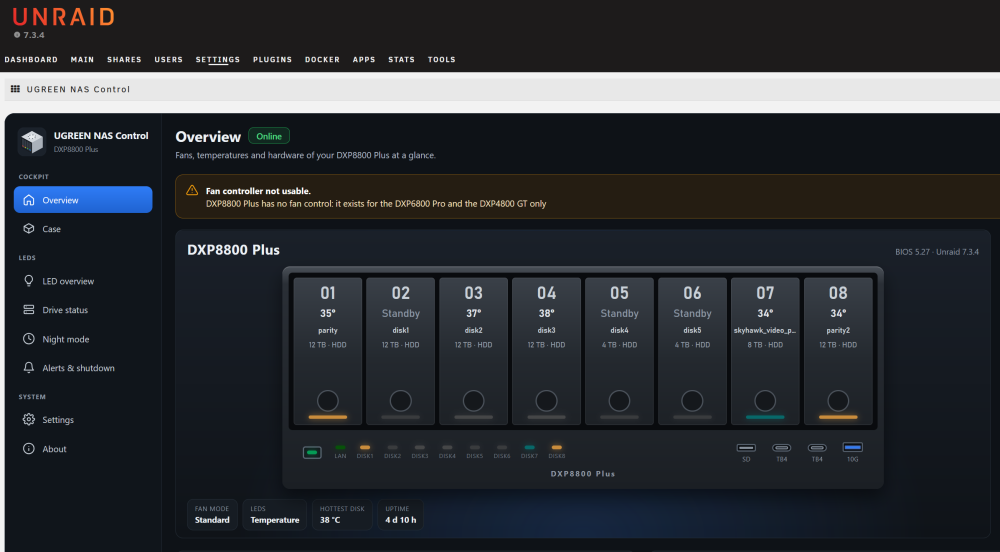
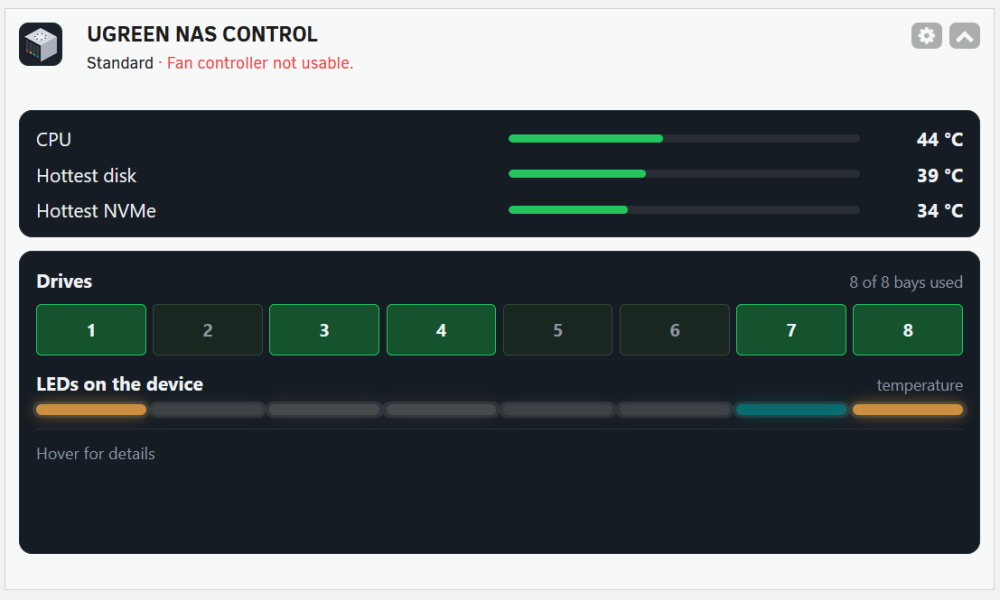
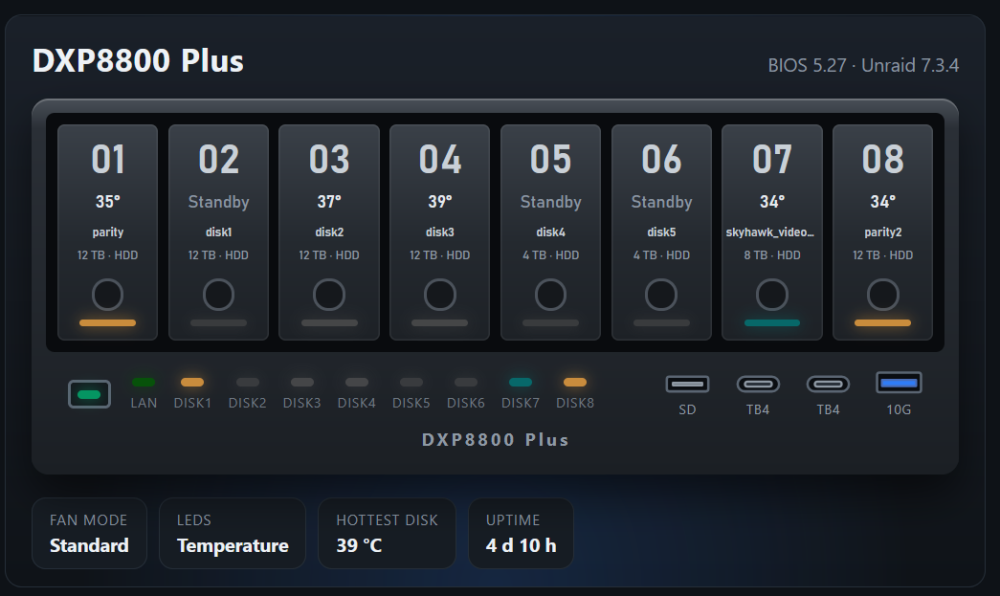
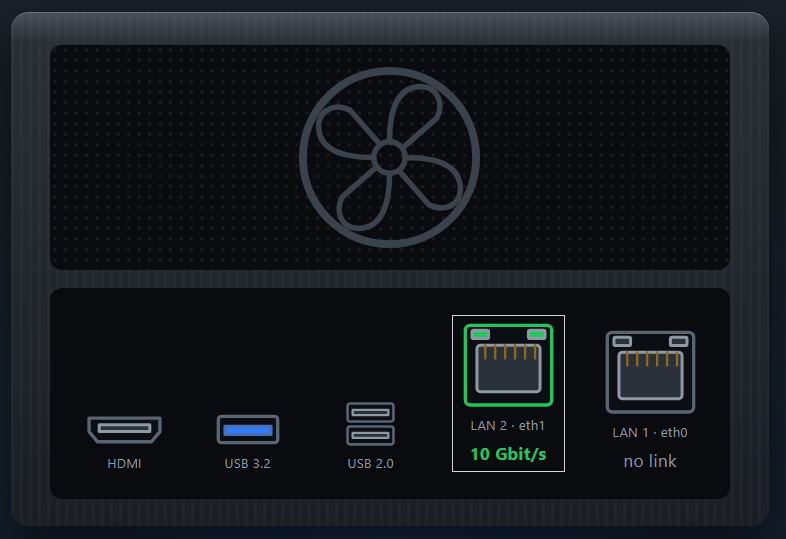
I installed the plugin on my DXP8800 Plus. I followed the instructions from migrating from the LED plugin (importing the settings and uninstalling the LED plugin) I checked to see if there was a setting to disable fan control, since, if I understand correctly, this feature isn't supported on my nas, but I couldn't find any such setting. Is it possible to implement the option to choose how the plugin is displayed on the overview page, similar to the previous plugin where the temperature was visible in the disk slot? This is the current view This is the plugin's settings screen, and in my opinion, it's best to show it in the overview, even in a slightly more compact format if desired For the rear of the case, the DXP8800 Plus has two fan, not only one: Anyway, good job
-
I'm using a DXP8800 Plus
-
You suggest to switching to your new plugin. I have a question about fan control, since I'm currently using FanCtrl Plus (https://forums.unraid.net/topic/191722-plugin-fancrtl-plus) and it works well for me (for example, I use the rear fan to increase the speed even when the CPU reaches high temperatures). Is it possible to install the new plugin and use only the LED control?
-
Perfect, thanks. I had forgotten about the brightness setting in standby mode. Now that all the drives are active, I can actually see them all at the same brightness. Thanks
-
The problem isn't solved! I still have an LED that reverts to its previous level. What I'm seeing is that when I change the brightness value, the LED changes, but shortly afterward (I think one or two seconds later), the brightness reverts to its previous value—even if I change the brightness on the overview page. I ran the test in “Status mode.” If I try it in manual mode, changing the percentage in the overview, it seems to work. As soon as I return to status mode, the LED goes back to the previous value. grep brightness.txt
-
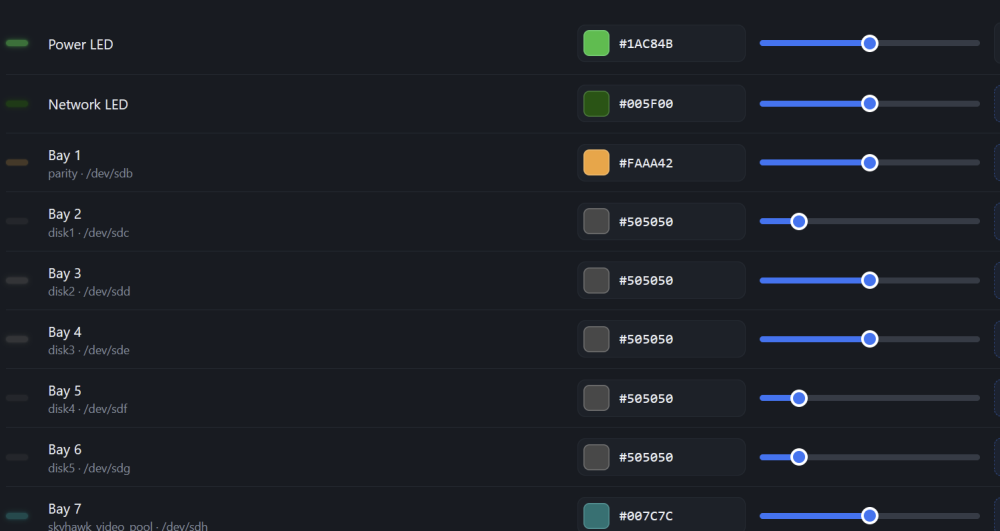
I'm testing version 0.19 and have noticed (though this was also present in version 0.17, which I tested previously) some issues with setting the brightness of individual LEDs. If I set one or two LEDs to a certain value (for example, 50%) and then try to do the same for the following ones, the previous values revert to their original settings shortly afterward, and the same thing happens in other cases as well. I also tried setting the brightness to the same level for all the LEDs on the overview page, where it seems to apply the settings as soon as you set them, but after about two seconds, some of the LEDs revert to their previous values.
-
Now it's perfect!!! The preview works after changing the hex values, and it's a great improvement for anyone who imports values from the old plugin. Thanks again for the quick response and the update!
-
I can confirm that it works on the DXP8800 Plus! Now I just need to get a little more familiar with the customization options and effect, which aren't entirely clear to me yet, but everything else is working perfectly! Thanks for this plugin! I really appreciate the ability to customize the colors from the UI I have seen one small issue with the refresh: if you change a color by entering the hexadecimal value directly, the color preview doesn't update. Ciao
-
gigios changed their profile photo
-
I opened a request on GitHub, you can find it here: https://github.com/ck9393/fanctrlplus/issues/21 Please add your own request, which makes perfect sense, to have separate calculations.



