





cam.only.bruh
Members
-
Joined
-
Last visited
-
Hi ich777 — I think I've hit a packaging/registration issue with the AMD Vendor Reset plugin on my kernel version. I've narrowed it down fairly far before posting; details and exact command output below. System Unraid 7.3.1 Kernel: 6.18.33-Unraid Board/CPU: ASRock Rack ROMED8-2T / EPYC 7543P GPU (passthrough target): AMD reference RX 6900 XT, Navi 21, all four functions stubbed to vfio-pci from boot via vfio-pci.cfg Host boots on onboard ASPEED VGA; video=efifb:off on the append line so the host never touches the 6900 XT. Symptom The plugin installs and the module loads (hook reports installed), but the reset method never becomes device_specific — it stays bus, and writing device_specific fails with write error: Invalid argument. This happens even with the card idle, no VM running, in a clean vfio-bound state. Exact output Kernel and module (vermagic matches the running kernel): # uname -r 6.18.33-Unraid # modinfo vendor_reset filename: /lib/modules/6.18.33-Unraid/updates/vendor-reset.ko.xz version: 0.1.1 author: Adam Madsen <[email protected]> author: Geoffrey McRae <[email protected]> license: GPL v2 srcversion: 9DB935EFAD3315A519FE253 depends: name: vendor_reset retpoline: Y vermagic: 6.18.33-Unraid SMP preempt mod_unload parm: install_hook:bool Package folder matches the kernel: # ls /boot/config/plugins/amd-vendor-reset/packages/ 6.18.33/ Hook reports installed: # dmesg | grep -i vendor [ 67.711636] vendor_reset_hook: installed Reset method stays bus and rejects device_specific: # cat /sys/bus/pci/devices/0000:07:00.0/reset_method bus # echo device_specific > /sys/bus/pci/devices/0000:07:00.0/reset_method bash: echo: write error: Invalid argument GPU (all four functions, vfio-pci bound): # lspci -nnk -s 07:00. 07:00.0 VGA compatible controller [0300]: Advanced Micro Devices, Inc. [AMD/ATI] Navi 21 [Radeon RX 6800/6800 XT / 6900 XT] [1002:73bf] (rev c0) Subsystem: Advanced Micro Devices, Inc. [AMD/ATI] Radeon RX 6900 XT [1002:0e3a] Kernel driver in use: vfio-pci Kernel modules: amdgpu 07:00.1 Audio device [0403]: Advanced Micro Devices, Inc. [AMD/ATI] Navi 21/23 HDMI/DP Audio Controller [1002:ab28] Kernel driver in use: vfio-pci 07:00.2 USB controller [0c03]: Advanced Micro Devices, Inc. [AMD/ATI] Device [1002:73a6] Kernel driver in use: vfio-pci 07:00.3 Serial bus controller [0c80]: Advanced Micro Devices, Inc. [AMD/ATI] Navi 21 USB [1002:73a4] Kernel driver in use: vfio-pci Boot command line: # cat /proc/cmdline BOOT_IMAGE=/bzimage initrd=/bzroot video=efifb:off What I've ruled out Wrong/mismatched module: vermagic is 6.18.33-Unraid, matching the running kernel exactly; package folder is 6.18.33/. vfio-lock / timing: I unbound 07:00.0 from vfio-pci and the write still failed with Invalid argument; rebound it to vfio-pci (clean state) and it still fails. Same result in both states, card idle, no VM. Unsupported card: Navi 21 1002:73bf is reported working with vendor-reset elsewhere (same device IDs). Conflicting local config: removed earlier manual go-file reset_method write and a modprobe.d softdep; go is back to stock, only zfs.conf remains in modprobe.d. My read (could be wrong) The hook installs, but the module's device_specific handler does not appear to register into the kernel PCI reset infrastructure on this kernel — the kernel rejects device_specific as invalid for the device even when idle and regardless of bind state. This looks like it could be a build/registration issue with the pre-built package for 6.18.33-Unraid, rather than a config problem on my end. Question Is the pre-built vendor-reset package for 6.18.33-Unraid known-good, or might it need a rebuild against this kernel? Anything else I can check to confirm whether the handler is registering? Happy to provide full diagnostics or test a rebuilt package. unraid-diagnostics-20260630-2029.zip
-
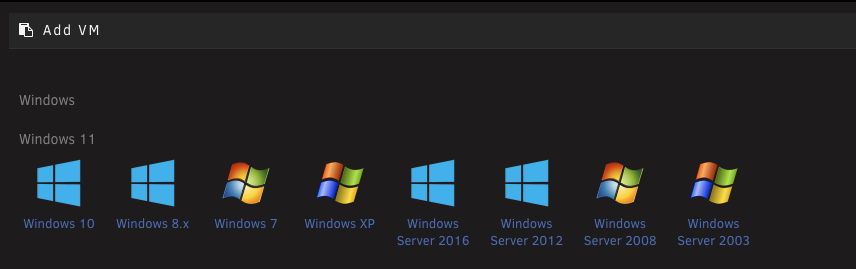
Little back story. I have 2x NVMe drives, one 1 TB drive that I labeled NVME and used for VMs. and one 4 TB drive labeled cache. The goal was to swap these so that I would have more space for my VMs. I tried to manually copy the data from the 4 TB drive which consisted of appdata, domains, and system. Appdata and system copied over to my hdd's just fine, but I always had an error with Windows 11 vdisk1.img. I eventually used SMB to copy the folders overe to my hdd's and then assigned a new config. To my surprise, the data stayed on the NVME drives after moving the 4tb to NVME pool and the 1tb to CACHE pool. I then went to shares and changed appdata, domains, and system to do a move from cache to nvme. It moved the data with the exception of my domains. It just wouldnt move. I formatted the cache drive and physically copied over my appdata, domains, and system to the NVME pool. The VM's showed up just fine and so did my docker containers. I can goo into HA vm and Debian VM just fine. I had a recovery issue with Windows 11 and could never get it to boot correctly. Using chatgpt, it said that i didnt copy the VARS file. Weirdly enough, I didnt find such file on the NVME drive. Thats the only thing I touched. I tried to delete the windows 11 vm so i could just start fresh and use my old vdisk1.img file. Unraid would not delete it for some reason it just hung. Chatgpt had me enter in "virsh undefine "Windows 11" --nvram" This deleted the VM. Now when I go into create a new VM, there is no Windows 11 template. It shows windows 10 and Windows 11 populates right above it, but not clickable. How do I fix this?
-
Currently running 1.84.0 on unraid and 1.84.1 on Mac. Could this be my issue?
-
Yes. Everything works 100% when im in the network and not using tailscale. I have also verified that tailscale works on a windows based computer so it appears the issue is only with mac at this time.
-
Looks like im out of luck. Bios is updated and the nic is brand new and i do not see any firmware options on the web.
-
I have tailscale installed on a Mac computer and Windows. I have 192.168.20.2 shared from Unraid so that I can attempt to promote smb access. I can ping and access the smb share on a Windows computer, but I can only ping through Apple and cannot connect to the smb server. Any ideas?
-
Motherboard bios is fully up to date.
-
Recently picked up one of the new Unifi 10gbe Thunderbolt 4 adapters. I disabled the onboard lan (Intel 2.5) and ran the 10gbe for my main connection. After some downloading, maybe 15 minutes if I had to guess, the network adapter shut down and kicked me off the net. I have it plugged directly into the motherboard thunderbolt 4 slot.unraid-diagnostics-20250724-2128.zip
