





behem0thuk
Members
-
Joined
-
Last visited
-
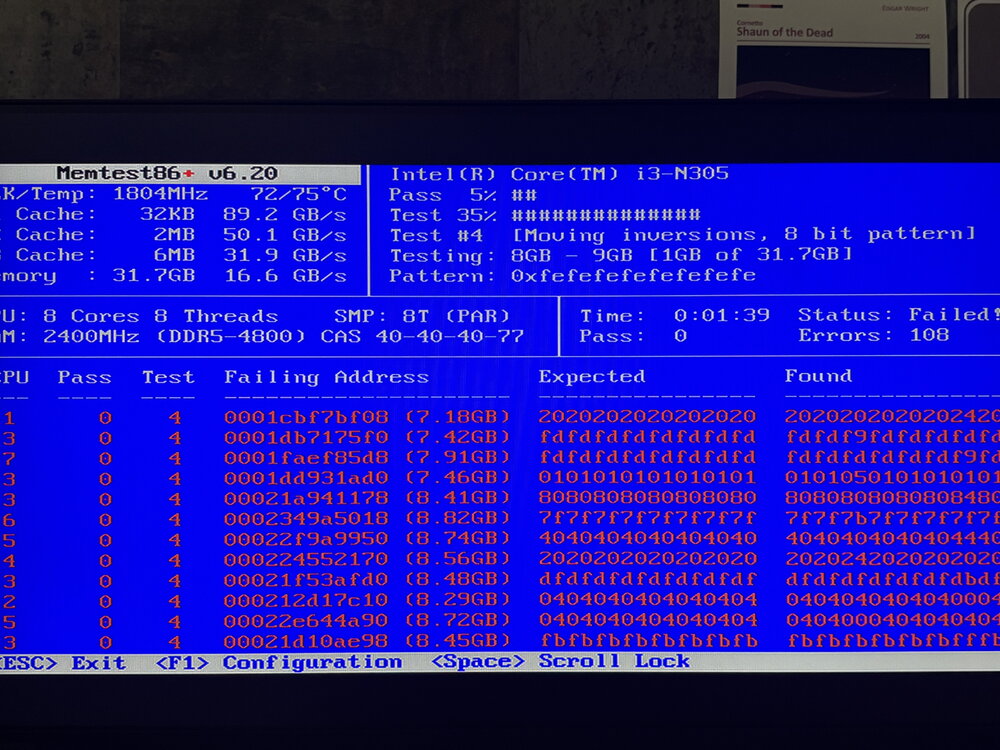
sorry to waste peoples time. Turns out a good old Memtest caught the issue straight away didn't even get passed 3% before it failed.
-
Hey, So I am having an issue with UNRAID crashing under load with my new NAS. Works great on my F4-423 so wondering if any one can help me pin point what is going on. Running things in Docker seems to be ok and doesn't cause a crash, however anything more intensive or copying large files over the network causes it to hang. (stays powered on) but i cant get to the UI, Ping etc. Latest crash was earlier today, I have a Windows Server VM with Veeam, and I was attempting to back up my Ally. Here is the Tail of my Syslog before right as it crashed during the copy / transfer process: Aug 17 12:51:33 Bellatrix kernel: x86/split lock detection: #AC: CPU 1/KVM/216541 took a split_lock trap at address: 0xfffff801d0892d2c Aug 17 12:57:02 Bellatrix kernel: BUG: scheduling while atomic: swapper/4/0/0x00000000 Aug 17 12:57:02 Bellatrix kernel: Modules linked in: cmac cifs cifs_arc4 nls_ucs2_utils cifs_md4 dns_resolver veth xt_CHECKSUM ipt_REJECT nf_reject_ipv4 ip6table_mangle iptable_mangle vhost_net vhost vhost_iotlb tap macvlan nf_conntrack_netlink xt_nat xt_conntrack xfrm_user xfrm_algo xt_addrtype xt_MASQUERADE xt_tcpudp xt_mark tun nf_tables nfnetlink ip6table_nat iptable_nat nf_nat nf_conntrack nf_defrag_ipv6 nf_defrag_ipv4 md_mod zfs(PO) spl(O) ntfs3 tcp_diag inet_diag joydev input_leds ip6table_filter ip6_tables iptable_filter ip_tables x_tables efivarfs bridge stp llc bonding tls r8169 realtek led_class xe drm_gpuvm drm_exec gpu_sched drm_ttm_helper drm_suballoc_helper intel_rapl_common x86_pkg_temp_thermal intel_powerclamp coretemp i915 kvm_intel kvm iosf_mbi drm_buddy ttm i2c_algo_bit drm_display_helper crct10dif_pclmul crc32_pclmul crc32c_intel ghash_clmulni_intel sha512_ssse3 sha256_ssse3 sha1_ssse3 drm_kms_helper aesni_intel crypto_simd cryptd drm mei_pxp mei_hdcp rapl nvme i2c_i801 igen6_edac intel_gtt intel_cstate wmi_bmof Aug 17 12:57:02 Bellatrix kernel: intel_uncore agpgart mei_me i2c_smbus nvme_core ahci edac_core mei tpm_crb i2c_core libahci tpm_tis tpm_tis_core thermal fan tpm video libaescfb wmi ecdh_generic ecc backlight acpi_pad acpi_tad button [last unloaded: realtek] Aug 17 12:57:02 Bellatrix kernel: Preemption disabled at: Aug 17 12:57:02 Bellatrix kernel: [<0000000000000000>] 0x0 Aug 17 12:57:02 Bellatrix kernel: CPU: 4 UID: 0 PID: 0 Comm: swapper/4 Tainted: P O 6.12.24-Unraid #1 Aug 17 12:57:02 Bellatrix kernel: Tainted: [P]=PROPRIETARY_MODULE, [O]=OOT_MODULE Aug 17 12:57:02 Bellatrix kernel: Hardware name: retsamarret 000-F4424Pro-CN36-2000/M-ADLN01, BIOS MADN0101.V06 11/01/2024 Aug 17 12:57:02 Bellatrix kernel: Call Trace: Aug 17 12:57:02 Bellatrix kernel: <TASK> Aug 17 12:57:02 Bellatrix kernel: dump_stack_lvl+0x47/0x70 Aug 17 12:57:02 Bellatrix kernel: __schedule_bug+0x85/0xa0 Aug 17 12:57:02 Bellatrix kernel: __schedule+0x63/0x760 Aug 17 12:57:02 Bellatrix kernel: ? flush_smp_call_function_queue+0x49/0x70 Aug 17 12:57:02 Bellatrix kernel: schedule_idle+0x1e/0x30 Aug 17 12:57:02 Bellatrix kernel: cpu_startup_entry+0x29/0x30 Aug 17 12:57:02 Bellatrix kernel: start_secondary+0xec/0xf0 Aug 17 12:57:02 Bellatrix kernel: common_startup_64+0x13e/0x148 Aug 17 12:57:02 Bellatrix kernel: </TASK>
