





kzfdjbzf
Members
-
Joined
-
Last visited
-
@anyone ?
-
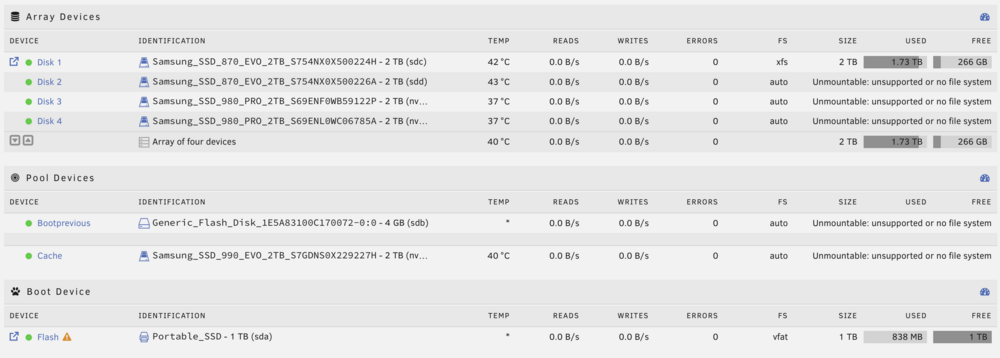
Ok so I set up the array again and I have 5 disks showing as unmountable... :/ I'd like to retrieve sdb as it's the previous flash drive. fdisk -l /dev/sdb fdisk -l /dev/sdb Disk /dev/sdb: 3.75 GiB, 4026531840 bytes, 7864320 sectors Disk model: Flash Disk Units: sectors of 1 * 512 = 512 bytes Sector size (logical/physical): 512 bytes / 512 bytes I/O size (minimum/optimal): 512 bytes / 512 bytes Disklabel type: gpt Disk identifier: 319E168E-53D4-42BB-B677-7E2F16E822D0 Device Start End Sectors Size Type /dev/sdb1 64 7864286 7864223 3.7G Linux filesystem
-
How can I set sdb as boot partition? sda is current temporary unraid installer. sdb is original Flash Drive partition but I can't find anything on it. Tried to check fstab but nothing of interest.
-
ok so lsblk shows all my disks, sda and sda1 (boot) are still there
-
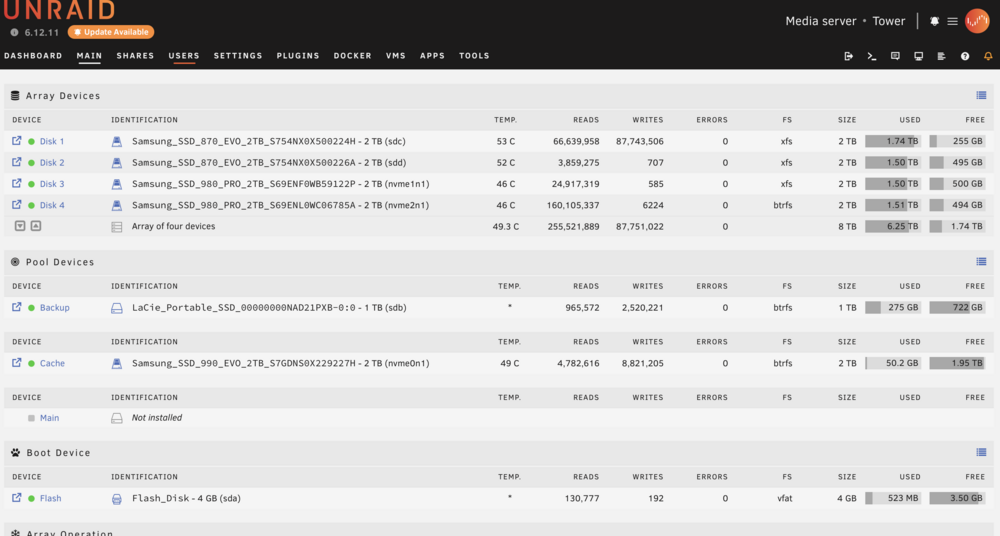
Pretty sure it wasn't, here is the config, the drive that had issues was 'backup' Flash disk is sda and wasn't removed. I flashed the old backup disk, installed Unraid and booted from it. Now able to check the drives, config, etc, not sure how I could re-establish/correct boot process from now on though
-
Hi, Had the same issue as described here: https://forums.unraid.net/topic/190454-upgraded-to-712-and-two-of-my-drives-unmountable-solved/ It only concerned one external SSD I ran as backup. I ran the command sgdisk -g -o -a 8 -n 1:32K:0 /dev/sdb but the array was running... Rebooted and lost the whole server, it won't boot, show shares on network, web UI, SSH, nothing... Have I just lost it all?

