





VALOR
Members
-
Joined
-
Last visited
Everything posted by VALOR
-
When I first tried these commands, the wipefs worked, but I didn't have the sgdiskd, so i installed that program, which when then used gave an error about Partition(s) 1 - 64 have been written, but were unable to inform the kernel of the change. Then advice me to reboot before making any changes. So i used the power off cmd from before, unplugged the drive, plugged it back in, tried again, same error. So i restarted my pc with the usb attached, and it gave me the same error again. After which, i looked into the Partition Manager, where i realized that the sdX i was using was for the partition, the drive itself had a separate one, so i used that one, but then that said the secondary partition overlaps the last partition by 33 blocks. So i deleted the second partition, retried, and it gave no error. Tried the usb creator again, same error. Stopped udisks2, same error. Tried to run it in sudo, same error. Tried running the wipefs/sgdisk command pair, then running it in sudo, same error again. From what i can see, the usb creator is trying to mount the drive to write the files into the partition, but cant mount for whatever reason. So i looked at the partition manager again, and when i give the unused 3Mib a fat32 partition, there's 512 mb used. looked at it, and saw that it was somehow my other drives that i had mounted. Which then brought me to look at the mount points of both partitions, and while the path is the same for both, which should just create their own "directories" attached to the end of that file path, they were somehow wedging themselves in front of the other drives, which were given the same mount point. While none of the other drives unmounted or anything. So i used unmounted the other drives, deleted the folders in the usb stick, and was finally able to get the usb creator to actually finish. NGL, I might be missing some things that I did during the process, but I'm writing most of this after the fact, not during. I truly appreciated your help with this, and I doubt I could've gotten to this solution without you. I hope you have a wonderful day, and cheers!
-
Also, if i try to extended the UnRaid partition to encompass the excess space, it fails as well, but sadly doesn't tell me anything beyond "Operation Failed"
-
Bus 001 Device 008: ID 0930:6545 Toshiba Corp. Kingston DataTraveler 102/2.0 / HEMA Flash Drive 2 GB / PNY Attache 4GB Stick is what my terminal is telling me when i use he command lsusb -v -d 0930:6545 But neither set of sommands worked, running it as sudo put its logs into the terminal, where it got stuck trying to mount the drive. Specifically, this Error mounting: "Error mounting system-managed device /dev/sdX: wrong fs type, bad option, bad superblock on /dev/sdX, missing codepage or helper program, or other error" appeared 10 or so times before the usb creator gave up on it. However, when I go into my partition manager, 3MiB are set as unknown, or part of no partition, with the rest being part of the UnRaid partition, which i can manually mount, and access, but if i try to mount the drive as a whole, it fails. This sounds to me like theres bad sections of the drive that it cant access, but is still trying to partition and mount. And I'm using Garuda Linux x86_64 with the KDE Plasma i believe.
-
That did give me the data, the name says Kingston DataTraveler 102/2.0 / HEMA Flash Drive 2 GB / PNY Attache 4GB Stick under idProduct, in my file system. The usb creator still failed to write to the drive, same error the whole time. I even tried using my own partition for it, to see if that was the issue, but no such luck. The commands were exectucted succesfully, i either got an return line or its mounting state changed visibly in my file manager.
-
I cant see the pny output, theres a bunch of other information that it might be buried under. Is there an argument to add thatll look at just the usb device? Also, when i try to use the usb creator with a flash backup from my server onto the new drive, it fails, and says "Error Formatting (through udisks2)" Do you know why its doing that?
-
How else would i use the plugin for the dockers then? Cause the only time I can select that is when the plugin gets added, which has each docker install tailscale depending on the specifications you define. This also would pull up a status icon next to your docker name to tell you things like connection status, Tailnet IP, server/funnel, and more I probably forgot about. And for whatever reason, it gets defined as a separate instance by my tailnet, so unless i use a auth key, it just makes more ghost connections. Unless you mean the tailscale docker, then use the docker network type in the template settings. But I haven't been able to get that working, although i think that's more of just a "IDK what I'm doing" type of thing. That sounds like its more difficult, if not annoying and time consuming. I might still use the DDNS just bc the IP of the server likes to change on me, and thatll help with accessing the dockers without needing to give them static IPs, which they dont seem to like for whatever reason.
-
I run a linux os for my main pc, is there an equivalent service i can run, or no? i do have access to a windows pc i can use, but if i dont need to, id rather not honestly.
-
Thank you so much for your help, found it and made an offer, honestly was expecting it to be more pricey, but i wont say no to this. Again, thank you so much, and while I'm sure it wont be much of a noticeable difference, I'm sure it'll be wonderful in the long run.
-
As i mentioned in the wall of text, id rather not use a reverse proxy server because that would require me to mess with my router, which caused a whole different headache last time I tried to access it to change some settings. So if you have another option to provide, please feel free to read to wall first, then respond so you don't make another comment that I had already covered.
-
I don't have any drives that old, unfortunately. Ill try to look around on Ebay, but if you wouldn't mind pointing out at least specific things i should search for, that'd be wonderful, I truly appreciate your help here.
-
I'm going to take a gander and say the one I got isn't great, because I cant find much info on it, besides it being a Team Group 3.2 Gen 1 32gb drive with up to 75mb/s transfer speeds and a rating of C186, unsure what that actually means tho. There does seem to be a model number, but that's just a repeat of the info I've already said. Its also 10 bucks on newegg, and i was just going for anything that'd work to get the server up and running, cause I knew I'd still have server problems to address before I could properly use it, and wanted to get a jump on it. Before buying this one, i do try to do some research of my own and came across at least a similar thread to the one you posted, but i wasnt able to find anything thatd looked actually worth the effort.
-
I'm trying to gain access to my server from the wider web, and am running into issues, and just asking which of the paths would be the best for me to proceed down, apologies if this is not the best place to post or if there's already a topic about it, and I've been unable to find anything helpful in the relevant documentations. So far, I've come across a few different approaches to achieve this goal. 1. Reverse proxy servers, which sounds like a custom DNS server, where someone can enter a custom URL, which routes to the proxy, then connects to the servers IP through a database or dictionary type of thing, then relays the relevant data back to your PC. Tailscale plugin, or other such VPN service, which allows a docker to directly connect to your tailscale network, which you can configure to be accessible to the outside world through their built in funnel system via a custom URL or IP, which tailscale provides. And 3rd, Tailscale docker, which is close to the first, but instead of each docker connecting separately, they all route their traffic through the docker, which then connects to your tailscale network. Lastly, of which I don't fully understand i think, is using some kind of API like unraid connect and port forwarding to allow services to reach outside networks, but this requires an SSL certificate from the CA, and while i can get, if I don't need one, id rather not go through the bureaucracy of it. If there is any i misses, please let me know, and i will check it out and amend this topic to keep all the pathways in one spot for others encountering the same issue. So far, I've tried using the tailscale plugin the most, as it seemed the best and easiest option. However, I've ran into some issues. Unless i add a auth key, i would need to go into the logs and manually connect each one to my tailnet, and id like for it to auto-connect, but i haven't been able to get that function to work. I assume it has to do with inside your tailnet, selecting add device, select server, and configure to your liking, which you would need to allow the reusable argument, and optionally add a tag and set it as a temporary connection, but i haven't been able to get that to work properly, it just fails in the docker logs, and I'm unsure why. The next issue I'm encountering is that when the docker restarts, my tailnet considers it a separate connection each time, and the number of "connected services" just compounds, which is just more annoying than anything. Then, when its connected, I'm unable to access both versions of the GUI, both the basic and tailscale versions, but when i start one without tailscale enabled, it works just fine. For the reverse proxy server, that requires what seems to be a complicated setup, limited ports(also a problem for the Tailscale docker, but unsure if that actually affects data transfer speeds), requires port forwarding which I'm unsure if i can easily do, as we've router problems in the past, and I don't want to reopen that can of worms if I don't need to, and this method seems to be only semi secure if hackers know where to look for the domain. It also might require an SSL certificate, unsure atm. And, like i mentioned before, if i don't absolutely need one, I'd rather not have to worry about getting one. Tailscale docker and API services like unraid connect haven't been able to get working or just seem to be very poor security. While I'm not too worried about the security aspect, i still don't want to take chances with a potential hacker being able to access my server and network and being able to infect other connected devices. So far, the only things I'm actually planning on using it for, is a media server, like Jellyfin or Plex, and a custom minecraft server me and some friends can play on without needing to pay a third party server. TL:DR; want to be able to use docker services without needing a closed tailnet server for me and select friends to access, how should i best go about that? If i missed anything, or there's some additional info youd like me to clarify on, please let me know so i can assist.
-
I did use it quite a decent amount for things like my bios and os installations before i used it for unraid, so total time was probably about a year of semi constant use. While my server was powered off for like 4 of the 5 months i was using it for unraid, i think either it just used a lot of the overwrites i had on it, or it got a random power surge, but given nothing else seems to be damaged in the process, i doubt that was the case. But regardless, it had lost access to one of the bz files it needs to boot properly, and given that it also wouldnt let me reinstall a new version, i think a sector got corrupted or smth, but idk how to check that manually. And i think i got a decent replacement, definitely going to be only using this new drive for unraid tho, with lots of backups.
-
Apparently, you didn't even need access to the original flash drive, you can just go to your account, Manage Purchases, copy the key file url, install it into the new installation, then itll give you an option to replace the key and blacklist your previous drive, which was nowhere in the docs for switching out your flash drive. If someone who can add it, could, thatd be wonderful for new people who arent as "what does this button do?" as me, cause i just started doing random things.
-
Left the installer running for a while, after about 30mins or so, this popped up: But the same installer was able to complete the process just fine with the other one.
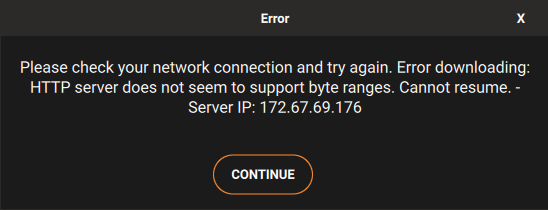
-
I originally started my unRaid journey about 5 months ago, but had issues with it repeatedly being usaccessible for some reason, so i just it sit, powered off until i had more time to work on it. Recently i had the time, tried to get back into my unraid system, but it couldnt start outside safe mode bc there was a file that failed the checksum. At first i thought unRaid just got corrupted somehow, and tried to reinstall it on the same drive, but the installer would get stuck at 74% specifically. I even tried restarting the process to see if i could get it to work, but nothing i could do would get it past 74%. So i figured the drive itself i was using got damaged or corrupted somehow, making it unusable. So i got a new flash drive, instal went perfectly, but now i need to transfer my license key to the new drive, which is impossible bc i didnt think about flash backups, and i cant get the installation to complete on the old drive to properly trasnfer it. So is there a way to either get the installation to complete, or transfer the key to my new flash drive? Im not planning on using the old drive past this for unraid, so i dont mind the blacklist, but i wasnt able to find anything online about a transfer without the old drive usable. Any help is appreciated, and please let me know if i am missing any information. Solution to the original problem is in the second reply, the solution to the second problem solve in this topic is marked.
-
@JorgeB After some testing and waiting, it seems like the docker for Jellyfin is causing the issues. I can send the logs again so you can see if anything is logged this time if youd like. It does seem like the docker only crashes when it gets autostarted, bc when i first turned it on after the system had been on for a few days without a crash, it lasted longer than it normally does. but when i did a clean shutdown with the auto start enabled, itd work fine for the first day or so, then crash.
-
Alright, all i have for dockers that im actively using is a jellyfin server. Ive also got tailscale and maybe smb shares, idk if i actually got that setup on the server side. But i will try disabling those, and report back if anything changes.
-
The system went down last night, just booted it up, and pulled the syslog file. there was only 1. I did read that the syslog can contain sensitive information, but all i have removed are any ip addresses, even though it looks like theyre only accesible locally, but i didnt want to take any chances. If the full un-edited version is needed for whatever reason, then i can provide that as well. syslog-Olympus.log
-
I have set the power setting, bios are only a version or 2 behind, but im using my only 32gb flash drive for my unraid system, and this motherboard cant detect partitions, so i wasnt able to update it to the newest version. It says i updated them back in march last. I believe i have it setup now, so lets see if it record anything. if it does, would i post the most recent file in here after my server breaks again?
-
I have no idea what is happening, all i know is that after some time, around a few days to a week after i do a manual check on my server, it just suddenly is inaccessible. None of my docker services are available, no gui is accessible, even the one for the server, but all the lights are on and it appears to be functional, expect for the fact that it wont display anything when i connect a display. When this happens, i have to force a restart with the case buttons, and it seems to restart just fine. but i just restarted it probably about an hour ago, and now all the logs for my dockers are just lines of color that vaguely look to be in the shape of what they normally look like. I tried to see if i could see anything obvious in my syslog file, but nothing looks out of place. I cant get a ups atm, but will in the future. Doubt its a power failure, as nothing else is affected. Currently, ive got a 2400g with 8gigs of ram on a B450M-HDV motherboard, no dedicated gpu, and was on 7.2.2 this morning, but its been happening since i was on 7.1.4 i believe. Ive attached the diagnostics.zip file i got from after i got they system up. Can anyone help to see if its a solvable issue, or what i can do to prevent it? Or if i need to provide anything else? (Edit: Sorry, i accidently put that i had a 3200g installed, it is a 2400g, apologies. olympus-diagnostics-20250908-1424.zip
-
Im trying to use this docker for external access to my servers and other dockers, but they keep giving me this error: "Unraid Docker Hook script throw an error!" forcing the docker to start without tailscale, and preventing external access. What is causing this problem, and how do i fix it?
-
While i do appreciate you breaking things like this down for me, I have some, if limited knowledge of the more advanced side of computers. I was part of a cyber security club in highschool and while i mainly used Ubuntu, i did a little bit with the windows images, so I do understand that, but the issue is that the shares arent showing up unless I use the .local address or the IP address in the search bar. What im unable to see and the main thing im still having the issue with is the actaul device that is automatically discovered by my windows pc over the network is showing up, but im unable to access the shares from that. I dont mind having the shortcut pinned with one of the known addresses, i was simply just trying to get the automatic discovery to work, if not how to remove that device from showing up and how to get the shortcuts to appear under the network tab. Im sorry for any confusion my previous comments have made.
-
I am able to see it, but it cant find the file path to access the shares within. It is showing up under Network, but im not able to actaully access the shares unless i manually type it in, or unless i make a shortcut to it. Is there a way to delete that login confirmation from the system memory, or force a different credential to be used?
-
im now able gain access using \\*servername*.local, but in the network tab that shows my server, it gave me the credentials tab once, came back as wrong even though they were definitely right, and now its back to the same error of the network path not being found. This is the diagnostics file from after i have connected through the .local path, but if possible, id like to be able to use the network tab, but i wont stress if its not plausible. server-diagnostics-20250908-1424.zip

