SE_Lain
Members
-
Joined
-
Last visited
Everything posted by SE_Lain
-
Downgraded to 7.0.0 and tried with the manually partitioned disk again now it worked I think, so the bug is that the manually partitined disks only work as new drives and not replacements it seems?? Anyhow, thanks for the suggestion to downgrade I will mark solved once everything rebuilt and is working.
-
Edit: yeah I just need to select "next" insted of stable oop pretty scary warning though, I think I might just downgrade. How can I upgrade to 7.2, it says im up to date. Also would that allow me to replace the missing disk with a new one or only add new data disks, it still says "Disk in parity slot is not biggest.", if I try to replace the missing disk with a new formatted at 2048.
-
I didnt commit the change but manually formatting data disks to start at 2048 it no longer said "Disk in parity slot is not biggest." but instead "New data disk(s) detected." Are you sure that would fail due to a bug? Also why did unraid format all my disks as starting at 2048 in the first place. I think I started out on an early 7.0 release of some kind so maybe that was an issue there. I still am not sure how to move forward from here.
-
It seems if I manually format the new drives to have a partition starting at 2048 I can add them as new data disks, but I still cant use them to replace the missing disk. But maybe that opens up some options?
-
using fdisk -l /dev/sdx I see that the data disks partitions also start at sector 2048. I didnt change anything from default so I dont know why unraid would configure it like that and now complain about it. The 2 segates should end up being parity again since they are the only cmr drives in addition to the WDC_WD40EFRX. Can I not move forward with new disks also starting at sector 2048? If I do have to parity swap to get the sector start to be 64, should the same be done for the data disks?
-
I think I kind of see the issue perhaps, the disks all report being 4,000,787,030,016 bytes in size, but going into the disk settings the partition shows as being Partition size: 3,907,017,540 KB or 4,000,785,960,960 bytes Could this be the issue? Curiously even unassigning an existing data disk and trying to assign it to data disk 4 is triggering the issue. Also curiously, unraid does let me add the disks as new disks, just not as replacement for the 3tb disk that died.
-
I edited the original post to add the diagnostics.zip file
-
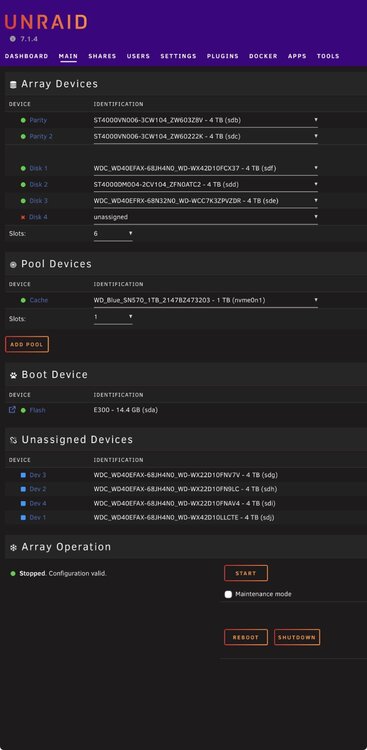
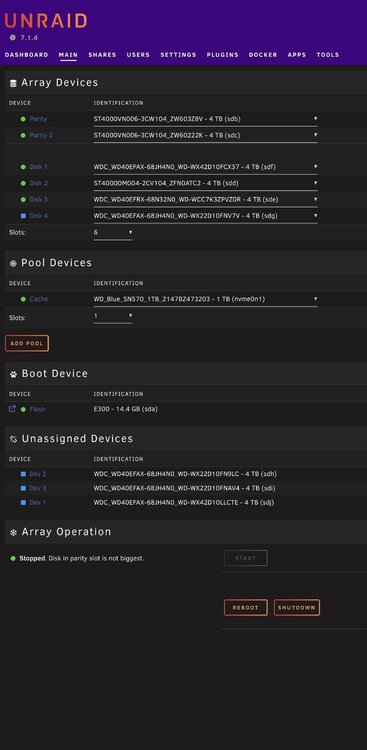
I had 5 4tb and 1 3tb drives. The 3 tb drive died and so I decided to steal 4 new 4tb drives from another nas to consolidate. Drives: Parity 1&2 ST4000VN006-3CW104_ZW603Z8V - 4 TB (sdb) ST4000VN006-3CW104_ZW60222K - 4 TB (sdc) Data 1-3 WDC_WD40EFAX-68JH4NO_WD-WX42D10FCX37 - 4 TB (sdf) ST4000DM004-2CV104_ZFNOATC2 - 4 TB (sdd) WDC_WD40EFRX-68N32N0_WD-WCC7K3ZPVZDR - 4 TB (sde) MISSING DRIVE OLD 3 TB New Drives WDC_WD40EFAX-68JH4N0_WD-WX22D10FNV7V - 4 TB (sdg) WDC_WD40EFAX-68JH4NO_WD-WX22D10FN9LC - 4 TB (sdh) WDC_WD40EFAX-68JH4NO_WD-WX22D10FNAV4 - 4 TB (sdi) WDC_WD40EFAX-68JH4NO_WD-WX42D1OLLCTE - 4 TB (sdj) I ran hdparm -N /dev/sdx on all of them: /dev/sdb: max sectors = 7814037168/7814037168, HPA is disabled /dev/sdc: max sectors = 7814037168/7814037168, HPA is disabled /dev/sdd: max sectors = 7814037168/7814037168, HPA is disabled /dev/sde: max sectors = 7814037168/7814037168, HPA is disabled /dev/sdf: max sectors = 7814037168/7814037168, HPA is disabled /dev/sdg: max sectors = 7814037168/7814037168, HPA is disabled /dev/sdh: max sectors = 7814037168/7814037168, HPA is disabled /dev/sdi: max sectors = 7814037168/7814037168, HPA is disabled /dev/sdj: max sectors = 7814037168/7814037168, HPA is disabled I can start the array normally, with the 4th data drive missing, but if I assign any of the new drives as a replacement for the 4tb data drive, unraid conplains: Array Operation Stopped. Disk in parity slot is not biggest. What am I missing?? EDIT: added diagnostics.zip lnas-diagnostics-20250911-1419.zip