MexicanSkywalker
Members
-
Joined
-
Last visited
Everything posted by MexicanSkywalker
-
Nope. I was able to move the files to a disk in the array. I am about to reformat the cache drive and move the files over again. Should I do this with cp -a command or use the Shares tab in the webui? How do I go about deleting the /temp folder (mkdir /temp) and unmounting the drive (mount -o rescue=all,ro /dev/nvme0n1p1 /temp)
-
I sure did! lol If it comes to using the link you provided for data recovery. Is there a more detail guide I can follow? I am still learning about unraid and linux in general. For example for the first step, am I able to run those commands from the terminal in the dashboard webui? Does the array need to be in maintenance mode? In my case since it's the nvme cache drive, I should replace sdX1 for nvme0n1p1? When mounting the cache drive as read-only, will it mount it as an SMB? After am able to recover the data (if possible) should I just replace that drive or the corruption was mainly caused by the RAM failing? Probably easy questions for someone that has a deeper knowledge on this system, but for starters like me feels like a maze lol breakingnas-diagnostics-20250919-2035.zip
-
Changed the RAM, ran 1 pass on memtest and passed with new RAM. Tried mounting the array, same error on the cache disk. Here are the updated diagnostics.
-
I am doing a single pass memtest. Already over 50 errors in the first half of the test. I will be replacing the RAM when it completes. How does a RAM failure prevent the cache drive to mount?
-
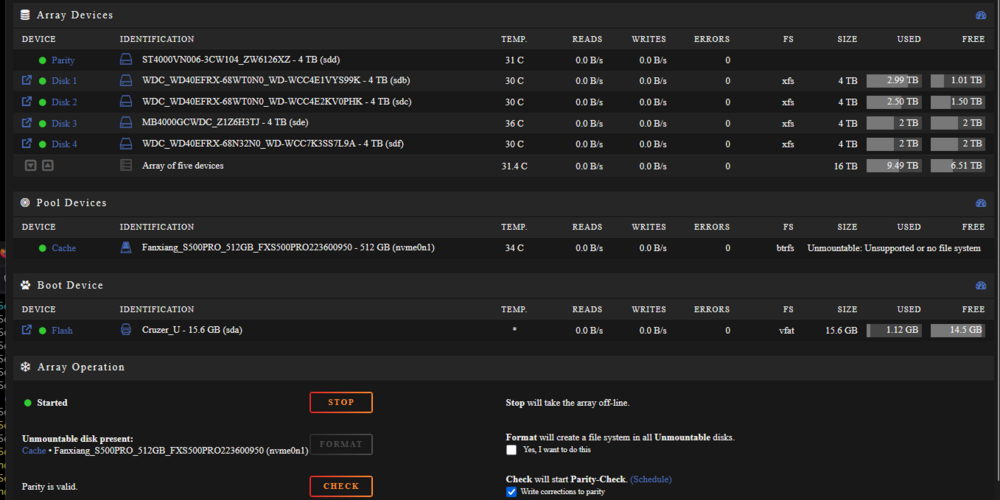
I updated UNRAID from 6.12.5 to 6.12.15 just now, and I was able to mount all disk just fine. It randomly crashed after 30 or so minutes. After restarting the array, it now says my cache drive is Unmountable: Unsupported or no file system I have read similar issues on the forums, but seen that same error is caused by different issues. I have attached my diagnostics if someone can help me out figure this out :) breakingnas-diagnostics-20250918-2319.zip