amaduro
Members
-
Joined
-
Last visited
Everything posted by amaduro
-
@bmartino1 Thanks a bunch for your detailed explanation. It helped me so much to understand the way Unraid deals with ZFS. I was not using zfs master plugin (I tried to remain as native to the newest unraid as possible). I tried all your pointers, however what solved the issue and made the ghost entry ultimately disappear was running zpool labelclear -f /dev/nvme0n1p1 which according the the pool was the "only" remaining disk that was still alive in the pool. The moment I did this, when i ran zpool import the ghost disappeared. I do have to say that I ran the zpool import -f -o cachefile=/etc/zfs/zpool.cache 64182623996842760 orion which should have overwritten the cache, but this did not remove the ghost entry. So I dont think it was an issue with the cache, but the nvm disk which I was using as cache probably had some metadata remaining which was removed by the labelclear. Once again, thanks a bunch for the extensive explanation and help! <3
-
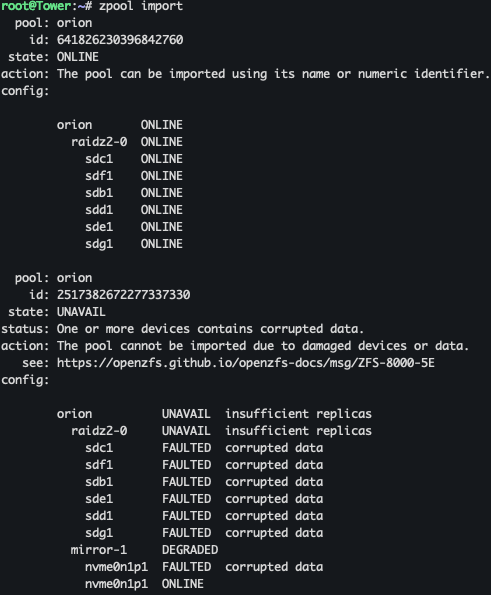
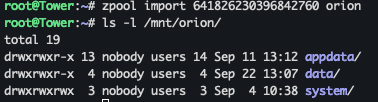
original post on reddit; Hi All, I am using Unraid 7.1 and am facing a bit of an issue with the ZFS pool. Lets start with how i got here; I have an Ugreen NAS (DXP6800) have 6 drives configured in raidz2 and have an SSD configured as read cache. I wanted to replace the read cache drive with a different drive which I had lying around (bigger) and so I turned off the NAS and replaced the drive. After replacing the drive I went looking in the zpool and removed the cache through the terminal seeing as the UI was not really helping things along. I have been tinkering with the zpool and the UI for some time now and I have reached a point where I need to ask for help/pointers as the zpool is kind of borked. If i do zpool import it looks like this: I have 2 references to my zpool. First one (64xxxx) I am able to properly import using zpool import <id> orion and am still able to access all the files under /mnt/orion however the unraid UI is completely borked as I am not able to browse anything in there and it does not recognize the pool etc. I have tried many things to try to import the "invalid" pool to try to remove it, but no success as I cannot import a pool where the devices are corrupted. Any help/pointers would be appreciated PS: I do have to say that I attempted the "new config" method to see if the unraid feature for importing existing zfs pools would do the trick, but this also didnt work. Everything works fine if I do it command line. I have attached the diagnostics as well. #pray tower-diagnostics-20250923-1903.zip