





roadgator
Members
-
Joined
-
Last visited
-
Thank you both! Now it clicked! Reducing Min Free Space per share is doing the trick. The Mars pool which is the long term storage is spinners so I was simply trying to move the wear and tear onto the SSD's and let the mars pool spin down. All is well!
-
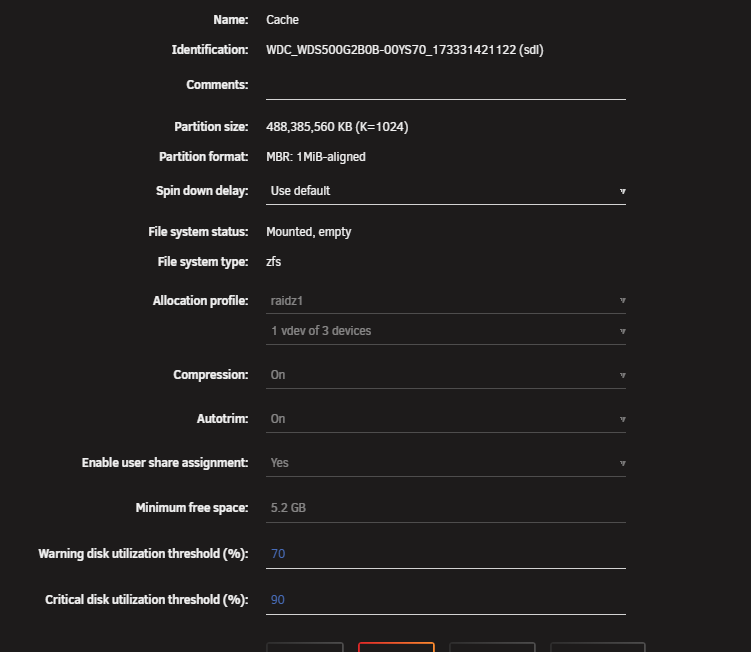
I've got the min free space of the pool set at 5.2GB... roughly 10% of the pool capacity. The default was 0 when I created it, but I did bump it thinking it was the initial issue. Diagnostics information is attached and I do appreciate the guidance! I noticed the Common Problem tool indicating an out of memory issue which surprised my, but I believe is unrelated. I have a container running a periodic sync tool and I believe it is leaking ram. The system as about 15GB accessible ram (Integrated Ryzen GPU), and I have the container capped at 4G of ram. Thanks! unraid-diagnostics-20251019-0544.zip
-
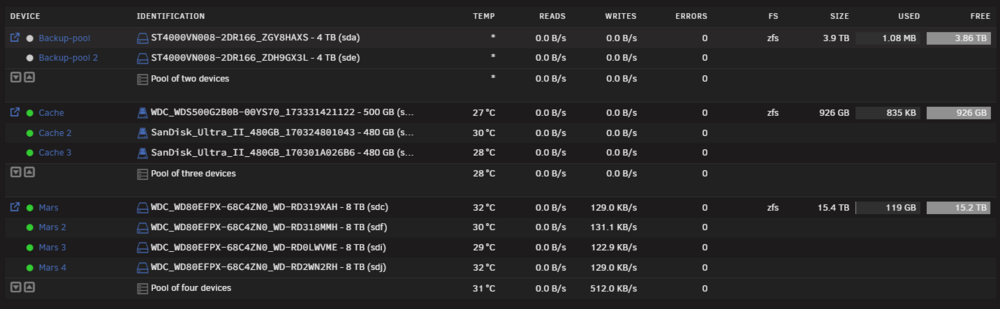
I'm in process of setting up a new system and new to Unraid. I installed using 7.2.0-rc.1 and ran into issues with ultimately three of four new Seagate drives failing in the array. Having not gotten far, I jumped to 7.2.0-rc.2 and with new drives in hand I went the route of a ZFS RaidZ2 pool using 4 discs for my primary storage and deleted the array. I have several 500G'ish NVME and SSDs around, so I proceeded to use three to create a ZFS RaidZ1 pool for cache. I have created a couple of shares with the cache as primary and the Z2 pool as the secondary and the mover is scheduled to move files a couple of times a day. I kicked off a long sync process to backup some cloud storage onto the share and I noticed it's going directly to the Z2 array and not touching the cache. The cache actually "spins" down to inactivity. Looking at the syslog, I am getting share cache full notices, but the 926GB cache shows 0% utilization. I installed and ran the Common Problem tool and I'm not sure I'm following what it's saying. If I look at the Cache folder, it's empty and does not have any folders in it and if the destination pool is mars, that it should have files and folders. I expected to find something in the Cache folder which is perplexing. What am I doing wrong? Thanks! Oct 18 16:01:09 Unraid emhttpd: shcmd (38626): /usr/local/sbin/mover start &> /dev/null & Oct 18 16:01:15 Unraid emhttpd: shcmd (38627): /usr/local/sbin/mover start &> /dev/null & Oct 18 16:01:34 Unraid root: Fix Common Problems Version 2025.08.07 Oct 18 16:01:38 Unraid root: Fix Common Problems: Warning: Share filen set to use pool cache, but files / folders exist on the mars pool Oct 18 16:01:38 Unraid root: Fix Common Problems: Warning: Share Files set to use pool cache, but files / folders exist on the mars pool Oct 18 16:01:38 Unraid root: Fix Common Problems: Warning: Share system set to use pool cache, but files / folders exist on the mars pool Oct 18 16:04:58 Unraid shfs: share cache full Oct 18 16:04:58 Unraid shfs: share cache full Oct 18 16:05:16 Unraid shfs: share cache full Oct 18 16:05:16 Unraid shfs: share cache full Oct 18 16:05:16 Unraid shfs: share cache full Oct 18 16:05:16 Unraid shfs: share cache full Oct 18 16:05:34 Unraid shfs: share cache full Oct 18 16:05:34 Unraid shfs: share cache full
-
I took the array off line, moved the drive to a different slot / controller which was a recommended ASM1166 controller and each successive extended smart test results in the test stopping at about 10% with a new reallocated sector error. I may bite the bullet and pick up a WD Red locally and the drive replacing this failing drive will be added as storage later. Thanks!
-
I'm a new Unraid user moving from a QNAP 2 disk device running TrueNAS. After several instances of some bizarre behavior with the TrueNAS server wigging out and adopting my firewall/router IP address and creating general havoc and knowing the drives in it are 4 years old but going strong with no smart errors, I built a new system with more drive capacity and much faster CPU. I wanted to make the most of the usable life of the older drives and have the protection of Parity drives. I created the Array with the 2 4-year-old Ironwolf 4TB drives and because they have been pain free, I picked up a new 8TB Ironwolf as the Parity drive with the intent to and a 2nd 8TB parity drive in a few weeks for extra redundancy. At about 11 hours into the parity sync operation, I noticed warnings of uncorrectable / reallocated sector errors on the new 8TB Parity drive. I ran a smart test without stopping the parity sync process and it's now showing 14 reallocated sectors with a threshold of 10. The motherboard in use has only ever had 1 NVME installed and was trouble free for a couple of years before being repurposed for NAS duty. The NVME was left installed was configure as a parity couple with a couple of SSDs to create a cache. I'm assuming this means the new drive is near infant mortality? I'm assuming despite any potential motherboard SATA hardware related issues, if there is any, it would not result in sector failures? Anyone with similar experience? The last time I had drive issues was my 10GB WD many years ago. I normally replace a drive when it hits the 3-4 year mark. I've attached the smart report. It does indicate the drive passed, but Unraid indicates otherwise. Is this a monitor and see if it gets worse, or atypical of drives today? Not that many years ago, sector reallocations were acceptable. I'm debating on reaching out to Seagate to warranty replacement, but if the smart report says it's passing, I'm not certain what their level of support is like. Thanks! ST8000VN004-3CP101_WWZ9QDSW-20251010-1935.txt

