





Ayanefan
Members
-
Joined
-
Last visited
-
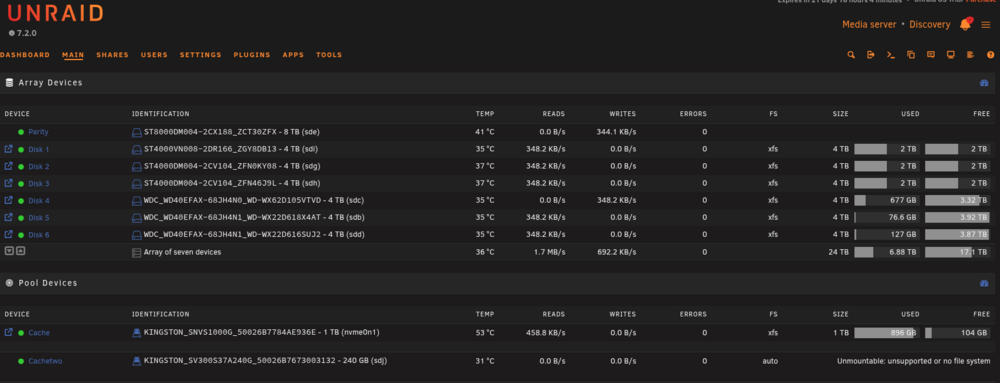
I put a floor fan in front of the unraid server and cooled the drives down below 42c. When they hit 35c and under, the errors went away. I just got peeved because I asked for some general troubleshooting, requested that I do the work myself and then I get the "Post your logs here" message. Not what I wanted, it doesn't force me to learn. Ayanefan
-
All good. Issue resolved!
-
Hey everyone, I just need to ask for guidance on troubleshooting steps, not really looking for deep dive in logs etc for now. My Unraid is setup with a 2 x 4tb IronWolf CMR drives and a combination of 6 SMR and CMR 4tb drives for the Data drives. I have noticed that after the weekly parity checks, the Parity Errors are fairly large. The first check from a couple of weeks ago I had over 70,000 errors and this week it's over 56,000. Now I did a quick smart check on all the drives and they are all coming back clean. I am now doing a Extended Self Check and the first Parity drive came back with no errors and I am testing the 2nd one now. So I checked around and I have a few things I was told to check by AI: Check the SMART on all drives (all came back "no errors" check the cables for each drive to be sure they are well connected check the ram If none of the above is an issue, then SMR slowness may be the problem. So I know a couple of things, my SATA cables are new, I purchased them a month ago because I thought I could have had SATA 1 or 2 cables. Swapped them all for new SATA3. The ram is not ECC but they are 64gb (4x16gb) of the same make and model kit. I may have 2 or 3 shucked drives from external HDDs that I put in, they would be Seagate Barracuda drives. No smart errors. If I were to take your advice and look at logs or other secret locations, where should I start looking. Once I have a path I'm sure I can start sleuthing and looking for clues and solutions. Thanks all! Jacques.
-
Hey everyone, This is not a problem but a possible solution for people who's USB key seems to be corrupt after doing maintenance on their Unraid Server. PLEASE TAKE NOTE OF THE USB PORT YOU HAVE INSTALLED YOUR UNRAID BEFORE YOU REMOVE THE USB KEY FROM THE COMPUTER!!!. I can't stress that enough. I suspected my USB key to have malfunctioned a 2nd time but, in both cases I suspect, after a couple of hours of looking for my backup file and testing a new USB key, I found that the key was connected to the wrong USB slot. When that happens, the system will tell you that it can't read the config files, or there will be other configuration read errors. For NOOBS like me, would have been nice to know. Thanks Ayanefan.
-
Ok, testing complete, bulletpoints: DO NOT use SMR drives as a parity drive. Things go well until a few Gigabytes get written then the constant read/write/check will kill the speed if copying directly to the array. This can be from 140MB/s then down to 2MB/s in my case. Switching to CMR has fixed that issue, the writes are consistent once the disks speeds from copying on the array saturate and slow the array down. I am surprised that this is not in BIG, BOLD, RED letters anywhere. Your array will be only as fast as your slowest disk when accessed. So in my case, I have 2 parity CMR drives, 1 CMR in the Array and 5 SMR drives. When initially copying to the CMR, speed stays consistent around 120MB/s. When the disk hit the half-way full mark, it moved to the next SMR drive. After 20 minutes, the speed slowed down to around 20 - 40MB/s . Significant drop. Mine is a budget build using hardware I had on hand. I will replace the SMR drives with CMR slowly over time. SMR drives are perfectly fine if you are using it as long term storage and do not need to do constant writes to them. Read times are fine, write actions are not. Definitely use a NVMe drive or other fast sata drives to cache your copies, set your mover to run every night if you are not moving this over all the time. Use the system idle time to do things like trimming, moving or parity checks. If you are not there, you won't care.
-
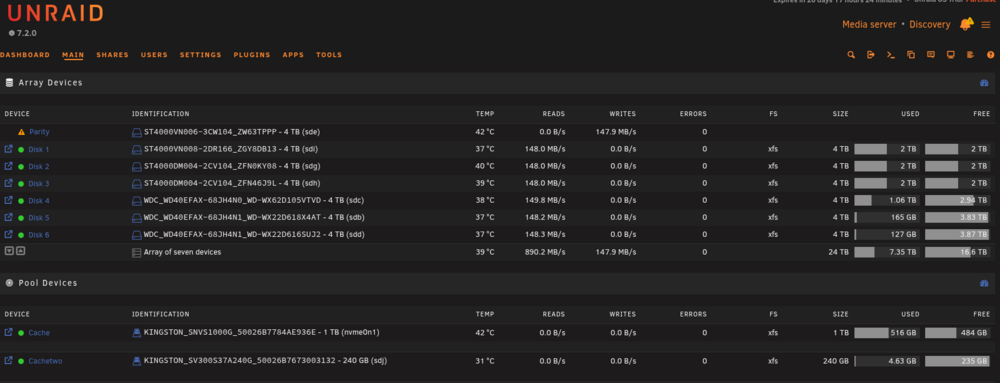
a couple of hours in and still solid.
-
Popped in a 4tb WD ST40000VN006, CMR for the Parity. It is running at 120MB/s for the Parity rebuild. I guess I will let you know tomorrow if things are much better.
-
I will pick up a couple of IronWolf 4tb drives today and replace the 8tb Parity with a 4TB, no worries, the largest disk is 4TB. They are on sale now for CAD $120 which is about $85 USD. Even Grok is telling me that SMR could be my weakness but it told me to get a 8TB SSD instead (money much?). I only have 1 CMR in the whole setup at the moment. I'll let you know how it goes.
-
discovery-diagnostics-20251108-1612.zip I've attached the diagnostics. I did a quick run-through but I'm not sure what I'm looking for. J
-
Hi again, I'm trying to figure out if this is normal or not. I upgraded the CACHE from a 512gb to a 1TB nvme drive. After changing the share to go to Cache and then Array, moving files to the NVME is great, I'm getting 140MB/s and then slows to about 113MB/s over time. Now, when the NVME is full, I stop the transfer and manually start the Mover in the Scheduler. The speed varies, 130kb/s, then 0, then goes to max 9MB/s then 0, back to 130ish... over and over. So, question to anyone out there, where do you think the bottleneck is? I would suspect that the array would happily take the files and move them at a consistent speed, especially from the NVME. The files range from 200MB to 1.3GB in size. Again, I tried many.... many steps including disabling the Parity check (which I don't think works), changing the disk to Reconstruct Write and things I forget. Is this data copy slowness normal?? Thanks, Jacques.
-
I removed the cache drives last night and just let it go. This morning I started transferring 4TB of data over and it has been steady at 88ish MB/s . I did the same this afternoon with another 2TB. Same consistent speed. I don't know. Maybe it was fixing parity while I was moving the files from cache to drive? So many questions still remain. I was about to blame the X99 mobo and maybe some cheap electronics. At least it's consistent, just not super fast as I expected over a 2.5gbit line. It's averaging 680ish mebits/s . So today I will: Move my 8TB drive data over (maybe it will take more than a day) Add a 3TB spinner and a 2TB SSD drive to use as a Pool and not array (VMs and such) Add some more power to the Sata line. Order a CPU fan from Amazon to get the 2nd CPU connected.
-
Hey all, As per the title, I'm sure many of you have seen this issue and it's really getting to me. At the moment, I setup an array of 6 - 4tb HDDs, mix of Seagate Barracudas and WD reds. The Seagates twirl at 5400 rpm and the WDs around 5900. (ST4000VN008 and DN004, WD40EFAX-68JH4N0 and N1s) I have a 8TB Barracuda parity drive. I run a Xeon e5-2698 with 64GB Ram, a 512GB nvme, 2.5Gb networking card. So, I'm trying to empty the nvme cash which had 320GB of data on it. I'm using Unbalanced and set the NVME to write to all disks. lt started off great with sustained writes at 170MB/s or so and would be done in an hour or 2. That was almost 7 hours ago. The speed slowed down to 35MB after about 1 hour then steadily kept slowing to currently 10MB/s and sometimes dips to 1 or 2 MB/s So currently it shows 20GB left and 32 minutes to go. Well, it's been going up and down so who knows how much time is left. I'm just wondering why it would take so long to go from an NVME attached to the mobo to move over to the HDs. I purchased 6 new SATA 3 cables thinking that some cables may be old and defective but that didn't change anything. There are no Sector Errors on any disk. The drives are set to never spin down. (however i'm contemplating covering pin 3 on the drives) I set the Tunable MD write to Reconstruct Write I even disabled Parity for now. My CPUs stay around 1% or 2% usage and will sometimes go to 100% on one or 2 cores but will last about 10 seconds. I rebooted the Unraid server which helps but seems to reset the copy from Unbalanced so I have to start over. But this happens when copying files from SMB or NFS shares. Starts at 98MB/s then slows and will stay at 30MB/s then, after an hour or so, will drop to 10 and below. This is really frustrating and I still have about 12TB of data to move over. I have seen many posts about this issue and various answers that seem to help me on the short term. I though the nvme was the answer as it let me copy to over 130MB/s but then totally slow when the NVME got to 90% full. Then it looked like it bypassed the NVME and went straight to the array. The nvme would never dump it's content to the array. That's why I'm using to Unbalanced to empty it then I will remove the NVME as a cache and let it sit until I get a better result. My shares are (well, were set) set to use the Cache then copy to the Array. I am not sure if the array is limited to the speed of the Parity disk or not. All drives individually seem to work properly. What am I missing. Thanks all for any help. Jacques
-
Hey everyone, New to Unraid and had a heck of a time starting out but didn't take long to figure things out. Here's what I learned in the last few days of a noob with Unraid. Background: I stared my trek about 4 years ago when I converted an old HP i3 42xx somthing processor with 7 hard drives crammed into a pc case designed for 4 drives. At the time I used TrueNAS, the free one, and was fairly happy but never really did anything special except to store all my media, important files and run Plex on it. Well, until 6 or so months ago, everything was fine until the Plex server wouldn't transcode anymore and after concluding that I need a better processor and a GPU to transcode, I started looking into my options. My BIG issue is that you couldn't just add hard drives to the array if you wanted to add more space. I was going to get this nice acrylic, 7 bay, drive enclosure and add a SATA PCI card but this would have meant creating different pools and split the NAS into 2 or 3 different segments unless I wanted to delete the whole thing and start over. Nah. Too limiting. So, a few months back is started reviewing all the different types of NAS software. Criteria: 1: Add as many drives I want, when I want and not have to split the storage. 2: GPU transcoding 3: Plugin for Jellyfin. 4: Setup a HomeLab for my IT education. All working seamlessly. So I ended up choosing Unraid. I then decided to work the hardware around it. In my mind, I needed CPU Cores.... LOTS of them. I don't need that much in performance as it is not my main rig I work on, I just need to spin up Jellyfin, a few VMs with Linux and Windows for testing and just throw all sorts of VMs or Docker images. Fun stuff. Hardware (cheap overkill or just cheap?) I purchased a 4U case and plugged in a X99 Motherboard with Dual CPU slots, 64GB of rams (expecting a total of 128GB), 2x E5-2698v3 CPUs (16 cores each, only 1 plugged in at the moment) and 2x 8TB parity drives, 8x 4TB Seagate Barracuda's/WD NAS Red drives. 2.5Gb network card, 2.5Gb switch and a 850w power supply... I was ready! Problem 1: X99 mobos are finicky with RAM. The first 64GB didn't work, only 2 chips were recognised. I thought it was a board problem so I sent it back (thanks Amazon). I ordered a 2nd board from Amazon, never arrived. In the meantime, my CPUs came in from AliExpress. Ordered the Dual X99 from Aliexpress and I thought it would take a month, came in a week later. YAY!. Price up to now (all in $CAD) Mobo: $109 Case: $138 CPU: cpu 1 - $24 , cpu 2 - $26 2.5 Gb 8 port switch with 1x 10gb port - $68 Ram - 64Gb (free but at the time it was $170 from Newegg) (pre pandemic pricing) HDs - 7x 4TB ($80 each) 2 x 8TB ($129 each) (pre pandemic pricing) 2.5Gb network card - $30 Power supply - $180 CPU fan - $15 Aliexpress Not counting the drives and ram that I already had, about: $590 If I add the drives and a license for Unraid that I have not purchased yet: $1541 So how did thing go up to now??? Bullet points with solutions coming: Installing the drives in a 4U case with a board stretching under the drive chassis was annoying and difficult to keep the connectors connected. These Chinese X99 boards do not come with a manual, you have to Google everything. Especially which CPU is slot 1 and Slot 2. Grrrrrr. As mentioned, I had to use a set of 4x Jigsaw ram as the board did not like TFORCE ram. When switched, everything came up. X99 board is "Battery Not Included" so I had to get a CR2036 from the Dollar Store. Installing the Unraid was easy enough but then as soon as my configuration was up and running, I kept getting errors and configuration save errors. The USB stick was corrupt and couldn't be written to. Thank you Unraid forum for confirming that I can just get a new key, reload the thing an restart the trial. Setting up the (Un)Raid was easy with quick searches. Using GROK to help was a total nightmare, kept giving me outdated version 6 setup info and I cursed at "her" at the end of the night and called "her" useless. She felt bad. Once I had everything up and running, I started to move my saved data from my external portable drives to the array. Woo... 110mb/s write speeds.... WHAT!!!??? on a 2.5Gb? Well, ends up that it could be the write buffers on the drives that fill up too quickly and can't write fast enough to the disk.... terminal test shows 2.3gb transfer speeds. SMB??? Not really, I used Unbalanced and found that the drive starts out fast (130mb/s and then quickly deteriorates down to 2mb/s after 20 minutes. Not good. After trying many, many tests and even trying to connect the USB directly to the Unraid, nothing worked. The only nagging thing was the disk 1 was running hot (48 - 50 celcius), other drives stay at 36. So I decided to replace the drive. NOT SO FAST!!! I need another drive! After opening the case, I found that 1 of my WDs was not plugged in. So I had 6 disks in the array instead of 7. Believe it or not, that's good news. I can just replace the drive and get it running again. (to be continued) I got really tired of the slow transfer and I thought, if the drive to drive transfer is slow, why don't I add a SSD NVMe and use that as a cache drive. I found a 512Gb nvme, connected it into the board and setup the drive as a CACHE. So once it was cached, I disabled writes to disk 1 from all my drives, set all the shares to use the Cache then copy to the disks. I used the Unbalanced Plugin to move the rest of the data from disk1 over to the cache. BAM!!!! 160MBs... slowing.... slowing..... slow...oh wait!!! It settled at mround 103MB/s ... dipping down to the high 80s but there there was my solution. A fast cache drive. Now even my SMB is steady copying at around 65 - 75MB/s, rarely going under it. I'm not knocking it, it's better than the 2 or 4MB/s transfer after 20 minutes of copying. Last but not least, this happened about 3 hours ago. I decided to fully empty out disk1 and take it out of the array. I couldn't get the last 70GB out and I didn't think that the VM and Docker images were the culprits. I decided to remove the drive anyway. Stopped the Array, removed Disk1 and replaced Disk1 with the WD red 4TB. Started the array back up and I got a Emulated Disk message. Ummmm, ok. Then after 3 or 4 minutes, I see all the drives writing over to Disk1, OMG!!! I think I just simulated a failed drive and replacement. The array is now rebuilding the drive!!!! Oh, that was an unexpected surprise and as I can see, so easy to do if one of my drives fail, I'll already know what do!! BONUS!! So that's my whole ordeal since Thursday. What I can say now is this: If I need to rebuild this again, instead of 3 days of head scratching and sobbing, I can confidently rebuild the whole unit in under 1 hour. Can I get a discount for my Unraid???? LOL!! Thanks everyone. Jacques.Thank you! Jacques



