





Moker-Vet
Members
-
Joined
-
Last visited
-
ok, i will read onto the ways on how to do this and once i have done it succesfully i will post the new diagnostics!
-
moker-vet-diagnostics-20260227-0941.zip here is a new diagnostics just in case
-
i have moved all files except moker-vet of the pool. im ready to proceed.
-
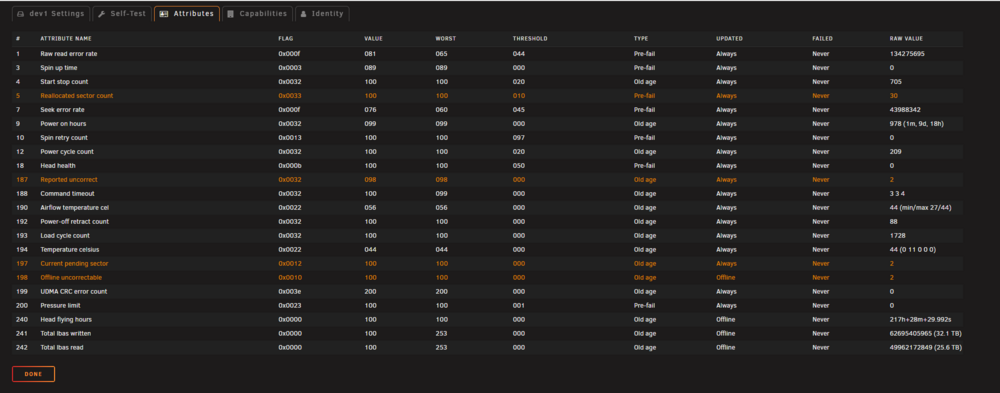
moker-vet-diagnostics-20260226-0857.zip Hi Trurl, sadly the 22tb disk is not valid for a parity disk as it shows smart errors, i bought it second hand for a really cheap price (100€). i think we can use it as a temporal storage and later i could use it as a spare disk for transfer. but i dont feel comfortable to have it in the array for now. what do you think? it also doesnt let me do a smart test. i am at the last 1 tb moving and then we can start moving the moker-vet pool, and moving the disks. i have the new 22tb as a unassigned device ready to be used as transfer storage.
-
Hi Trurl, Yes, For some reason my mover didnt move it so i started doing it by hand with unbalanced. currently moving the chunks. i will update you when its done, i expect the new 22tb disk today so i will install it inmeadly in the array as parity
-
Hi Trurl, A in between update, i managed to purchase 1 more 22tb hdd disk. i will try to get one more but that might take some weeks, this will relieve the burden abit i suppose. this does mean that i have to replace another disk for the 22tb one. i will try and replace a 2tb and a 4tb disk for these 2.
-
yeah this is what i figured to, also i have a busy job so i have a few hours each day being able to respond, apologies if this is more time consuming this way. thats great, lets work towards that its in progress! i will post when its done
-
the issue i am seeing coming up, with the array i can move data of a specific disk one by one. but with the moker-vet pool i cannot. i cannot see one disk, its just the entire storage pool so i cannot move the data of one disk to another and exclude it from using. how would i overcome this?
-
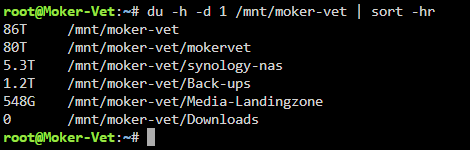
I have set all shares (except moker-vet) that exist on moker-vet pool to move to array, this includes: backup downloads media-landingzone synology-nas i have not yet set the moker-vet share to start to move to the array.
-
i have already fixed this by manually moving these files. for some reason my mover didnt do his job right, as it was already set for a long time as "Secondary storage:array: Mover action:cache->array". so i believe this is resolved. i also dont see warnings for this anymore
-
moker-vet-diagnostics-20260217-0912.zip Hi Trurl, i have restarted and new diagnostics!
-
i believe it all has finished moker-vet-diagnostics-20260216-1341.zip
-
Hi Trurl, Thank you for your explanation! i already had these settings set but i think something went wrong, so i removed these shares and added them again with the same settings. then i ran unbalanced to move the remaining files on wrong disks and now the warnings have dissapeared! i think we are ready to move to the next phase! moker-vet-diagnostics-20260213-0939.zip
-
Hi Trurl, This is what i am unable to fix, as i cannot find an option to change the share to be on array or on the cache. i can change the storage location but that doesnt make a share to be a cache only share, or an array only share i have found. i dont see a checkmark to make a share a cache only or something like that. how do i deal with this?
-
i have disabled most of my containers, i have 21 running right now, if i would disable those i will feel some impact of it. so i left them running

