





Moker-Vet
Members
-
Joined
-
Last visited
Everything posted by Moker-Vet
-
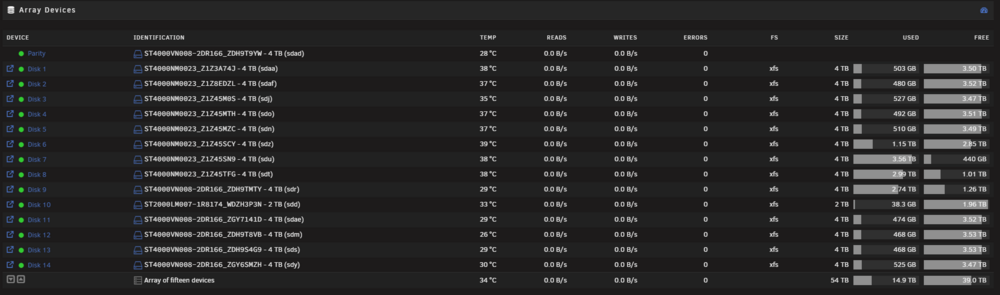
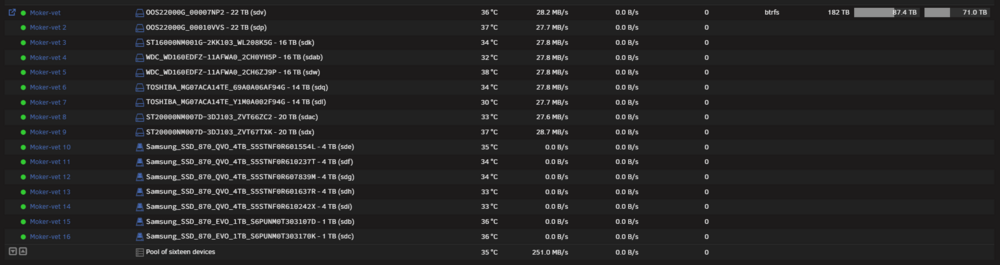
I want to thank all of you for the help so far! i am currently waiting for the last command to finish.. but i think some screenshots can help showing what i have and have left: CACHE POOL ZFS: Primary use: fast storage for plex database, docker containers and any performance hungry application. storage pool 1: ARRAY XFS storage pool 2: pool BTRFS the storage pool 1 & 2 act as a storage pool for my movie files and they move the files with mover. this is not ideal and it would be great going to one. my question is, should i move it all to the array and use 2 parity disks and use a xfs? or move the array to the btrfs pool? and what should i do with the SSD disks i have? can you explain to me how i would need to set it up? is it possible that i can remove disks one by one from the btrfs pool and add them to the array? i can move one disks data content to the other disk in the BTRFS pool and then remove it and add it to the array and work like that.


-
moker-vet-diagnostics-20260203-1311.zip
-
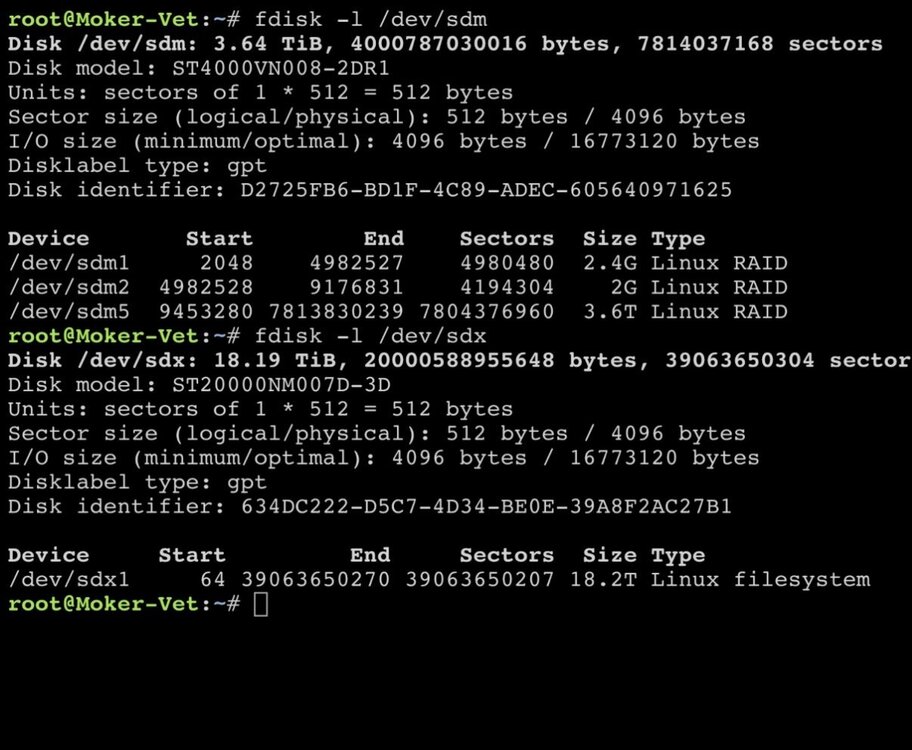
Hi Trurl! i get this output root@Moker-Vet:~# fdisk -l /dev/sdaa fdisk -l /dev/sdaf fdisk -l /dev/sdo fdisk -l /dev/sdn fdisk -l /dev/sdt fdisk -l /dev/sdae fdisk -l /dev/sdm fdisk -l /dev/sds fdisk -l /dev/sdy Disk /dev/sdaa: 3.64 TiB, 4000787030016 bytes, 7814037168 sectors Disk model: ST4000NM0023 Units: sectors of 1 * 512 = 512 bytes Sector size (logical/physical): 512 bytes / 512 bytes I/O size (minimum/optimal): 512 bytes / 16776704 bytes Disklabel type: gpt Disk identifier: E1C614B2-30BD-458C-B782-DB9316C7E606 Device Start End Sectors Size Type /dev/sdaa1 34 2081 2048 1M Microsoft LDM metadata /dev/sdaa2 2082 32767 30686 15M Microsoft reserved /dev/sdaa3 32768 7814037134 7814004367 3.6T Microsoft LDM data Disk /dev/sdaf: 3.64 TiB, 4000787030016 bytes, 7814037168 sectors Disk model: ST4000NM0023 Units: sectors of 1 * 512 = 512 bytes Sector size (logical/physical): 512 bytes / 512 bytes I/O size (minimum/optimal): 512 bytes / 16776704 bytes Disklabel type: gpt Disk identifier: 9BC472F6-F2D9-4EAD-BE4D-BC0E5855B71A Device Start End Sectors Size Type /dev/sdaf1 34 2081 2048 1M Microsoft LDM metadata /dev/sdaf2 2082 32767 30686 15M Microsoft reserved /dev/sdaf3 32768 7814037134 7814004367 3.6T Microsoft LDM data Disk /dev/sdo: 3.64 TiB, 4000787030016 bytes, 7814037168 sectors Disk model: ST4000NM0023 Units: sectors of 1 * 512 = 512 bytes Sector size (logical/physical): 512 bytes / 512 bytes I/O size (minimum/optimal): 512 bytes / 16776704 bytes Disklabel type: gpt Disk identifier: 81E5586B-9CDE-479D-B57A-54C708BB82C0 Device Start End Sectors Size Type /dev/sdo1 34 2081 2048 1M Microsoft LDM metadata /dev/sdo2 2082 32767 30686 15M Microsoft reserved /dev/sdo3 32768 7814037134 7814004367 3.6T Microsoft LDM data Disk /dev/sdn: 3.64 TiB, 4000787030016 bytes, 7814037168 sectors Disk model: ST4000NM0023 Units: sectors of 1 * 512 = 512 bytes Sector size (logical/physical): 512 bytes / 512 bytes I/O size (minimum/optimal): 512 bytes / 16776704 bytes Disklabel type: gpt Disk identifier: 57CC1D2D-12DB-4052-A703-EB057BAD1CB6 Device Start End Sectors Size Type /dev/sdn1 34 2081 2048 1M Microsoft LDM metadata /dev/sdn2 2082 32767 30686 15M Microsoft reserved /dev/sdn3 32768 7814037134 7814004367 3.6T Microsoft LDM data Disk /dev/sdt: 3.64 TiB, 4000787030016 bytes, 7814037168 sectors Disk model: ST4000NM0023 Units: sectors of 1 * 512 = 512 bytes Sector size (logical/physical): 512 bytes / 512 bytes I/O size (minimum/optimal): 512 bytes / 16776704 bytes Disklabel type: gpt Disk identifier: C7312661-B512-4D4E-B76B-1A9392957B58 Device Start End Sectors Size Type /dev/sdt1 34 2081 2048 1M Microsoft LDM metadata /dev/sdt2 2082 32767 30686 15M Microsoft reserved /dev/sdt3 32768 7814037134 7814004367 3.6T Microsoft LDM data Disk /dev/sdae: 3.64 TiB, 4000787030016 bytes, 7814037168 sectors Disk model: ST4000VN008-2DR1 Units: sectors of 1 * 512 = 512 bytes Sector size (logical/physical): 512 bytes / 4096 bytes I/O size (minimum/optimal): 4096 bytes / 16773120 bytes Disklabel type: gpt Disk identifier: 9CCD2F4E-EB54-4087-BF22-9285F9682AC4 Device Start End Sectors Size Type /dev/sdae1 2048 4982527 4980480 2.4G Linux RAID /dev/sdae2 4982528 9176831 4194304 2G Linux RAID /dev/sdae3 9437184 7813832351 7804395168 3.6T Linux RAID Disk /dev/sdm: 3.64 TiB, 4000787030016 bytes, 7814037168 sectors Disk model: ST4000VN008-2DR1 Units: sectors of 1 * 512 = 512 bytes Sector size (logical/physical): 512 bytes / 4096 bytes I/O size (minimum/optimal): 4096 bytes / 16773120 bytes Disklabel type: gpt Disk identifier: D2725FB6-BD1F-4C89-ADEC-605640971625 Device Start End Sectors Size Type /dev/sdm1 2048 4982527 4980480 2.4G Linux RAID /dev/sdm2 4982528 9176831 4194304 2G Linux RAID /dev/sdm5 9453280 7813830239 7804376960 3.6T Linux RAID Disk /dev/sds: 3.64 TiB, 4000787030016 bytes, 7814037168 sectors Disk model: ST4000VN008-2DR1 Units: sectors of 1 * 512 = 512 bytes Sector size (logical/physical): 512 bytes / 4096 bytes I/O size (minimum/optimal): 4096 bytes / 16773120 bytes Disklabel type: gpt Disk identifier: FC1BA328-65D1-4B1B-9441-995275B82F75 Device Start End Sectors Size Type /dev/sds1 2048 4982527 4980480 2.4G Linux RAID /dev/sds2 4982528 9176831 4194304 2G Linux RAID /dev/sds5 9453280 7813830239 7804376960 3.6T Linux RAID Disk /dev/sdy: 3.64 TiB, 4000787030016 bytes, 7814037168 sectors Disk model: ST4000VN008-2DR1 Units: sectors of 1 * 512 = 512 bytes Sector size (logical/physical): 512 bytes / 4096 bytes I/O size (minimum/optimal): 4096 bytes / 16773120 bytes Disklabel type: gpt Disk identifier: 01635A6D-7B09-44CD-BDE2-A3C6D65A0DA3 Device Start End Sectors Size Type /dev/sdy1 2048 4982527 4980480 2.4G Linux RAID /dev/sdy2 4982528 9176831 4194304 2G Linux RAID /dev/sdy3 9437184 7813832351 7804395168 3.6T Linux RAID
-
Yes, the first command is the fdisk -l /dev/sdm
-
Hi Jorge, In the second command you see the sdx command
-
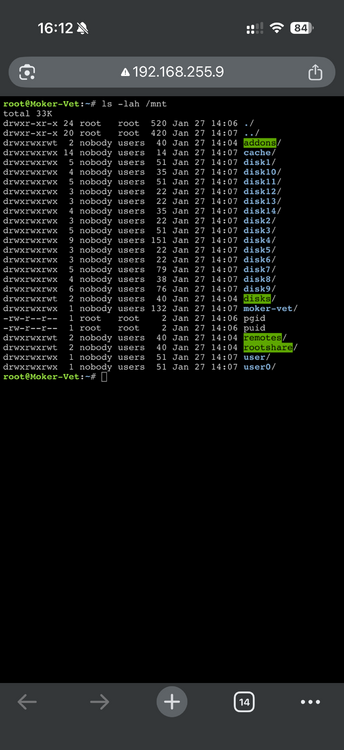
Good point, that i could try! I use my cache nvme disks to store my docker containers and databases.my array only has 15tb in use. while my moker-vet pool has 86tb in use as a btrfs. is it an idea to move all data from array to moker-vet pool and then remove the array disks and add them to the moker-vet pool? then i would work with a btrfs pool instead of an xfs array.It is to much data to fully backup for me as of now, i have to think on how to do this, roughly 100tb i would need to store somewhere. and then i would have 3 pools i think, 1 cache, 1 array, and one pool for ssd only. is that correct?I assumed xfs / unraid was not able to handle hdd with more capacity then 10tb. but thats good news! i prefer to have 1 storage pool/arrayroot@Moker-Vet:~# lsblk NAME MAJ:MIN RM SIZE RO TYPE MOUNTPOINTS loop0 7:0 0 651.3M 1 loop /usr loop1 7:1 0 173.4M 1 loop /lib loop2 7:2 0 100G 0 loop /var/lib/docker/btrfs /var/lib/docker sda 8:0 1 7.5G 0 disk └─sda1 8:1 1 7.5G 0 part /boot sdb 8:16 0 931.5G 0 disk └─sdb1 8:17 0 931.5G 0 part sdc 8:32 0 931.5G 0 disk └─sdc1 8:33 0 931.5G 0 part sdd 8:48 0 1.8T 0 disk └─sdd1 8:49 0 1.8T 0 part sde 8:64 0 3.6T 0 disk └─sde1 8:65 0 3.6T 0 part sdf 8:80 0 3.6T 0 disk └─sdf1 8:81 0 3.6T 0 part sdg 8:96 0 3.6T 0 disk └─sdg1 8:97 0 3.6T 0 part sdh 8:112 0 3.6T 0 disk └─sdh1 8:113 0 3.6T 0 part sdi 8:128 0 3.6T 0 disk └─sdi1 8:129 0 3.6T 0 part sdj 8:144 0 3.6T 0 disk └─sdj1 8:145 0 3.6T 0 part sdk 8:160 0 14.6T 0 disk └─sdk1 8:161 0 14.6T 0 part sdl 8:176 0 12.7T 0 disk └─sdl1 8:177 0 12.7T 0 part sdm 8:192 0 3.6T 0 disk ├─sdm1 8:193 0 2.4G 0 part ├─sdm2 8:194 0 2G 0 part └─sdm5 8:197 0 3.6T 0 part sdn 8:208 0 3.6T 0 disk ├─sdn1 8:209 0 1M 0 part ├─sdn2 8:210 0 15M 0 part └─sdn3 8:211 0 3.6T 0 part sdo 8:224 0 3.6T 0 disk ├─sdo1 8:225 0 1M 0 part ├─sdo2 8:226 0 15M 0 part └─sdo3 8:227 0 3.6T 0 part sdp 8:240 0 20T 0 disk └─sdp1 8:241 0 20T 0 part md1p1 9:1 0 3.6T 0 md /mnt/disk1 md2p1 9:2 0 3.6T 0 md /mnt/disk2 md3p1 9:3 0 3.6T 0 md /mnt/disk3 md4p1 9:4 0 3.6T 0 md /mnt/disk4 md5p1 9:5 0 3.6T 0 md /mnt/disk5 md6p1 9:6 0 3.6T 0 md /mnt/disk6 md7p1 9:7 0 3.6T 0 md /mnt/disk7 md8p1 9:8 0 3.6T 0 md /mnt/disk8 md9p1 9:9 0 3.6T 0 md /mnt/disk9 md10p1 9:10 0 1.8T 0 md /mnt/disk10 md11p1 9:11 0 3.6T 0 md /mnt/disk11 md12p1 9:12 0 3.6T 0 md /mnt/disk12 md13p1 9:13 0 3.6T 0 md /mnt/disk13 md14p1 9:14 0 3.6T 0 md /mnt/disk14 sdq 65:0 0 12.7T 0 disk └─sdq1 65:1 0 12.7T 0 part sdr 65:16 0 3.6T 0 disk └─sdr1 65:17 0 3.6T 0 part sds 65:32 0 3.6T 0 disk ├─sds1 65:33 0 2.4G 0 part ├─sds2 65:34 0 2G 0 part └─sds5 65:37 0 3.6T 0 part sdt 65:48 0 3.6T 0 disk ├─sdt1 65:49 0 1M 0 part ├─sdt2 65:50 0 15M 0 part └─sdt3 65:51 0 3.6T 0 part sdu 65:64 0 3.6T 0 disk └─sdu1 65:65 0 3.6T 0 part sdv 65:80 0 20T 0 disk └─sdv1 65:81 0 20T 0 part /mnt/moker-vet sdw 65:96 0 14.6T 0 disk └─sdw1 65:97 0 14.6T 0 part sdx 65:112 0 18.2T 0 disk └─sdx1 65:113 0 18.2T 0 part sdy 65:128 0 3.6T 0 disk ├─sdy1 65:129 0 2.4G 0 part ├─sdy2 65:130 0 2G 0 part └─sdy3 65:131 0 3.6T 0 part sdz 65:144 0 3.6T 0 disk └─sdz1 65:145 0 3.6T 0 part sdaa 65:160 0 3.6T 0 disk ├─sdaa1 65:161 0 1M 0 part ├─sdaa2 65:162 0 15M 0 part └─sdaa3 65:163 0 3.6T 0 part sdab 65:176 0 14.6T 0 disk └─sdab1 65:177 0 14.6T 0 part sdac 65:192 0 18.2T 0 disk └─sdac1 65:193 0 18.2T 0 part sdad 65:208 0 3.6T 0 disk └─sdad1 65:209 0 3.6T 0 part sdae 65:224 0 3.6T 0 disk ├─sdae1 65:225 0 2.4G 0 part ├─sdae2 65:226 0 2G 0 part └─sdae3 65:227 0 3.6T 0 part sdaf 65:240 0 3.6T 0 disk ├─sdaf1 65:241 0 1M 0 part ├─sdaf2 65:242 0 15M 0 part └─sdaf3 65:243 0 3.6T 0 part zram0 252:0 0 0B 0 disk nvme1n1 259:0 0 931.5G 0 disk └─nvme1n1p1 259:1 0 931.5G 0 part nvme0n1 259:2 0 931.5G 0 disk └─nvme0n1p1 259:3 0 931.5G 0 partWhen i added a 22tb hdd to my xfs array it became a 10tb. i was not talking about parity in my example because i tested it without a parity. but i dont want my 22tb hdd to be shrinked.that i can do, it will take some time because i would have drag and drop alot of video files hahaHi!, i have created the moker-vet pool out of neccasairity because my 20tb hdd where shrinked to 10tb when added to the array. my intention was to add them to the array but i would lose to much terabytes by doing that. And then i had to chose between btrfs and zfs. i chose btrfs because i have worked with btrfs before and not zfs. i couldnt really determine if zfs was the right choice for me. the naming of the pool and the share was just because i needed a name and i liked moker-vet. - the array is using my 4tb drives. -the moker-vet pool is using my 4tb ssd's, and 14tb+ hdd's both storage pools are used for the same purpose -> storing video files. i use mover between them to prevent them from getting full. its not ideal but its the solution i found while trial and error this issue. the reason why my share is named moker-vet is simply because i liked the name and its my production storage share for my video files.moker-vet-diagnostics-20260130-0906.zipHi Trurl! I appreciate your help, apologies it took awhile for me to reply. i have done as you asked and i noticed indeed the Media and media folder was present in several containers. i also noticed the PGID and PUID was for 1 container set to 0. i have changed those to 99 and 100. after that i deleted the media and Media folder and i deleted the PGID and PUID file in the mnt. i ran the fixcommon problems again and it didnt showed the issue. i think we are ready to move to the next pointsSee attached image. I also have found that my plex media server container is very slow loading in libraries. But i dont know if that is related or not..
 47, i dont use all but 27 of them are usually runningi restarted and generated new diagnostic logs moker-vet-diagnostics-20260127-1407.zipOke thank you for your assistance! im sorry if i messed up. restarting nowHi there, fix common problem detected /var/log is getting full (currently 100 % used). i cannot find the rootcause of it. please help Greetings, Arie diagnostics-20260127-1248.zip


