





Macca
Members
-
Joined
-
Last visited
-
Emby won't even load now. All my drives also appear almost full where i had at least 4tb free yesterday and definately did not add that much.
-
I just completed a check of disk 4 as requested - it advised of no errors
-
tower-diagnostics-20251125-1506.zip
-
I have moved all the appdata however due to my cache size bits are still on the disks rather that the cache
-
Anything else I can do? It's very frustrating having to move files to other drives in order to watch anything. Thank you for all your help!Done. Anything else I can do to get the drive scanning and loading?Attached as requested
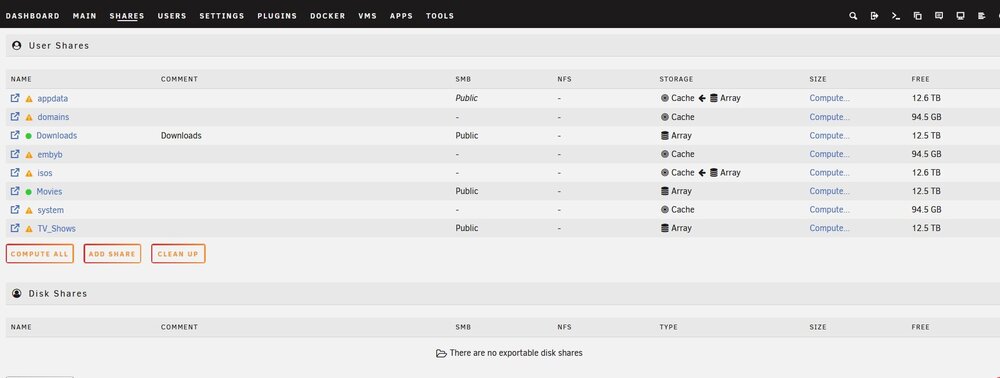 I have moved the appdata as requested. I have also set new permissions for disk 4. I ran unable library scan on emby and still no good. I see it scanning 5 drives but its still missing disk 4 tower-diagnostics-20251109-1510.zipthanks. I am really new to all of this - how do i do as you suggest?Hi, I have recently noticed an issue with one of my drives on my Unraid NAS server which utilises Emby as the docker. Recently my tv shows have failed to load onto Emby (this includes new episides of shows already on as well as new series). Movies load fine. Both movies and tv shows are shared on all 6 drives but it appears that everything on drive 4 is failing to be loaded. I have troubleshooted potential hard drive issues including a file system check which came up clear, replaced the sata cables with no issues and replaced the hard drive all failing to fix the issue. If anyone is able to help it would be greatly appreciated. Thanks tower-diagnostics-20251109-1115.zip


Account
Navigation
Search
Configure browser push notifications
Chrome (Android)
- Tap the lock icon next to the address bar.
- Tap Permissions → Notifications.
- Adjust your preference.
Chrome (Desktop)
- Click the padlock icon in the address bar.
- Select Site settings.
- Find Notifications and adjust your preference.
Safari (iOS 16.4+)
- Ensure the site is installed via Add to Home Screen.
- Open Settings App → Notifications.
- Find your app name and adjust your preference.
Safari (macOS)
- Go to Safari → Preferences.
- Click the Websites tab.
- Select Notifications in the sidebar.
- Find this website and adjust your preference.
Edge (Android)
- Tap the lock icon next to the address bar.
- Tap Permissions.
- Find Notifications and adjust your preference.
Edge (Desktop)
- Click the padlock icon in the address bar.
- Click Permissions for this site.
- Find Notifications and adjust your preference.
Firefox (Android)
- Go to Settings → Site permissions.
- Tap Notifications.
- Find this site in the list and adjust your preference.
Firefox (Desktop)
- Open Firefox Settings.
- Search for Notifications.
- Find this site in the list and adjust your preference.