kamehamehaNudel
Members
-
Joined
-
Last visited
Everything posted by kamehamehaNudel
-
Great. Enabled docker and everything works as expected. Thanks for the support 🙌
-
Thanks for the help. I see your point with the "Main" drive. I did the setup a while ago without much insights/planning. I've left it as is now tho. Ran the steps, as you have instructed. Mover has completed, and here is the diagnostics zip. mediaserver-diagnostics-20251109-1343.zip
-
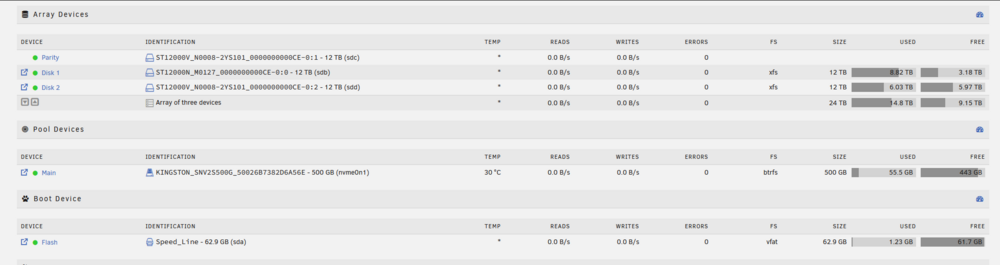
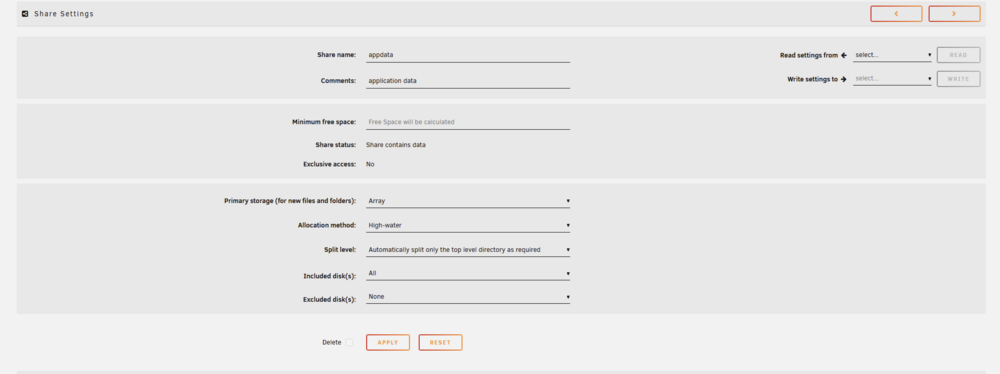
Hi, so I've read a bunch of threads on how to do this already, but i am having a hard time following so i hope someone here might be able to explain the process a little. I am an Unraid noob and unsure if i even understand my current setup correctly. I am running Unraid 7.2.0. So i have a set up with array with 3 hdd's (1 for parity). Then i also have an SSD already installed in my system. It is currently set up as a "pool" device. I think the SSD is not being utilized at all so far. So setup looks like this: Shares setup look like this: So "appdata" seems to be stored on the Array, rather than the "Main" SSD. In the Docker configs, the the "AppData Config Path" is set to for example /mnt/user/appdata/Plex-Media-Server So if I understand it correctly, its being stored on the slow HDDs which is obviously not ideal. How can i can about moving all the appdata, so that it is stored on "Main" SSD. In the appdata share settings, i can see that i can change the "primary storage" to the "main". But i'm unsure what actually happens in that case? (current unchanged settings) There is this "mover" i keep reading about but i am unsure if its what i need and how to use it. I'd very much appreciate some insigths and tips on how to "correct" this setup, so that the ssd is used where appropriate. Thanks in advance.