





Wazzy
Members
-
Joined
-
Last visited
-
I have two drives: One seagate Ironwolf Pro and one WD Red Pro. I've noticed recently that after booting up my system (or spinning up my drives), the seagate drive makes a loud woodpecker-like noise for a second, then goes back to sounding normal. This hadn't been happening for a while and has only started following a rebuild when another seagate drive failed (details here). Considering both drives are from the same batch and one of the two seagate drives already failed, I'm concerned that this second one might also be failing. The RMA replacement for the previous failed Seagate drive doesn't make that sound either. Should this be a cause for concern? Diagnostics and audio both attached (noise at ~10 seconds) Seagate startup sound.mp4 babel-diagnostics-20260323-1632.zip
-
For anyone reading this later: My drive was slowly failing until it finally failed during one of the rebuilds. Drive was RMA'ed and the replacement works perfectly fine
-
babel-diagnostics-20260308-1847.zip Should be fixed - Appdata only exists on cache, and that second share exists only on the disk. Diagnostics attached
-
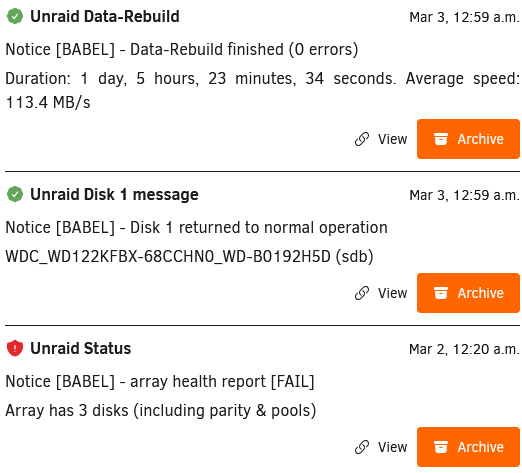
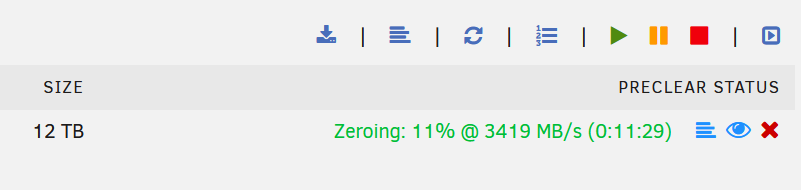
Good news: The new drive arrived last week, and I was able to rebuild successfully with the new drive, so it's confirmed the old drive died. It is a helium drive so I suspect a slow leak was the cause? Anyways When I tried preclearing the old drive, it showed as zeroing at over 3000 mb/s 😅 Few concerns: 1. This error showed up during the rebuild: Notice - Array health report [FAIL], Array has 3 disks (including parity & pools) - see screenshot. From this post apparently this is intended, but I'm bringing it up along with diagnostics just in case (and because of concern #2) 2. I ran an extended SMART test, and there was a very loud noise coming from the new hard drive when the SMART test was near the end. It lasted about 10 minutes, and stopped once the Extended SMART test was complete. I have uploaded a video with the noise. Diagnostics also attached, however the server seems to be running smoothly without any issues. Thank you for your help! 20260225_234329.mp4 babel-diagnostics-20260305-2202.zip
-
I confused myself with expanding the array with another smaller drive vs. replacing the drive. I have ordered a 12TB drive (WD Red Pro) to figure out what's going on.
-
I have already changed the cables twice (first time was with extra Aliexpress junk cables, second time with proper Startech cables). In terms of SATA ports on the motherboard itself, I have changed ports before already without any improvement. If by port you mean the actual slot the hard drive is plugged in to (the bays), I have moved the drives around multiple times. Moving "disk 1" to a 3rd slot didn't fix the issue. Swapped the slots between parity and the other disk (now parity is in the 3rd slot, "disk 1" in the 1st slot), and the parity drive still works fine and is able to perform a short SMART test without any problems. So the bay isn't the issue, nor is the SATA cable (both the new cables and the Aliexpress junk) I've found a relatively cheap (by today's standards) 4TB drive which is enough to test a rebuild, will have an answer in ~24 hours to test if a rebuild successfully works (assuming it is still in stock tomorrow) Forgot to add: SMART test on the affected disk 1 still doesn't work. Diagnostics attached babel-diagnostics-20260220-0015.zip
-
Preclearing seems to be going extremely slow. I am at 40 mb/s, and 5% complete after around 4 hours 40 min. When I initially set up the server, at this point the preclear was about 6x fast, around 250mb/s (falling below 200mb/s towards the end of the preclear cycle). Additionally in the logs this error constantly pops up: Feb 19 20:35:27 Babel kernel: I/O error, dev sdc, sector 1384611712 op 0x1:(WRITE) flags 0x104000 phys_seg 168 prio class 2 (and over and over again for many sectors) In the disk log specifically, I get this: Feb 19 15:57:22 preclear_disk_ZRT2F5W4_1023928: blockdev: ioctl error on BLKRRPART: Input/output error The preclear keeps running though, so I'll let it run overnight unless anyone recommends otherwise. But at this rate it will probably take a week to complete one cycle! (I skipped the pre-read). If this helps, originally the rebuild failed after ~8 hours, attempt 2 failed after 2-3 hours, and subsequent attempts failed within minutes. Diagnostics attached in case that would help babel-diagnostics-20260219-2049.zip
-
I don't have another drive for rebuild (I have a 26TB external drive used for backups, and I was able to successfully back my critical files overnight without issue via Krusader). I have formatted the drive and am currently preclearing it again from the beginning to see if that resolves the issue.
-
I can't run the SMART test at all; when I click to run it, the button greys out for a split second then goes back to orange. Running it in the command line (smartctl -t short /dev/sdc) says "Read SMART Data failed: scsi error aborted command". The disks are spun up this time so I'm not making the same mistake as before. And now the drive sometimes doesn't show up at all in the Dashboard and only reappears after a reboot. Rebuilding on it fails after minutes instead of after a few hours. I think the writing is on the wall and I'll be starting an RMA on the drive. It's odd because I got the drive about 3 months ago and would've expected it to last longer
-
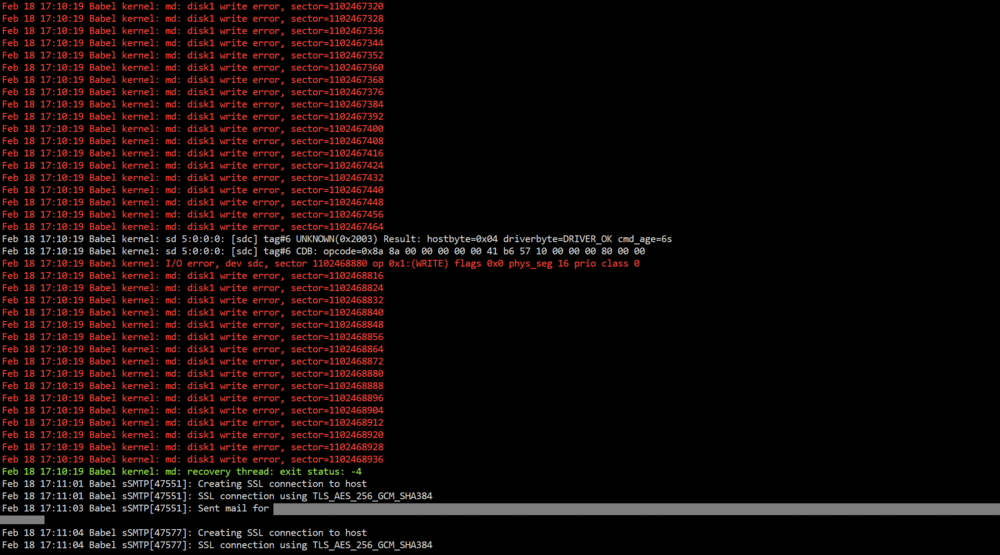
Rebuilding on top constantly fails. I have changed the SATA cables again, using Startech instead of Aliexpress stuff, and the rebuild failed via the linked directions. Also, the disk dropped off the array completely as if it were removed from its bay. So I tried again, changing the bay the affected hard drive was in, in case there was an issue with the SATA backplane. Same issues as before, with the rebuild failing. Diagnostics attached along with a screenshot of the log after the second rebuild attempt failed. I am not sure where to proceed as I have replaced all SATA cables with brand-name stuff, changed ports on the motherboard (I have 6 SATA ports), and reseated all other cables. Is it time to RMA the drive? It's making a different noise than usual upon startup, with more clicking than usual. babel-diagnostics-20260218-1712.zip
-
babel-diagnostics-20260213-2128.zip I disabled the VMD controller in the BIOS. I never touched this setting beforehand so it seems to have been turned on by default during the initial setup. All cables were reseated, including power, fans, SATA cables etc. New diagnostics attached, this time with the array started.
-
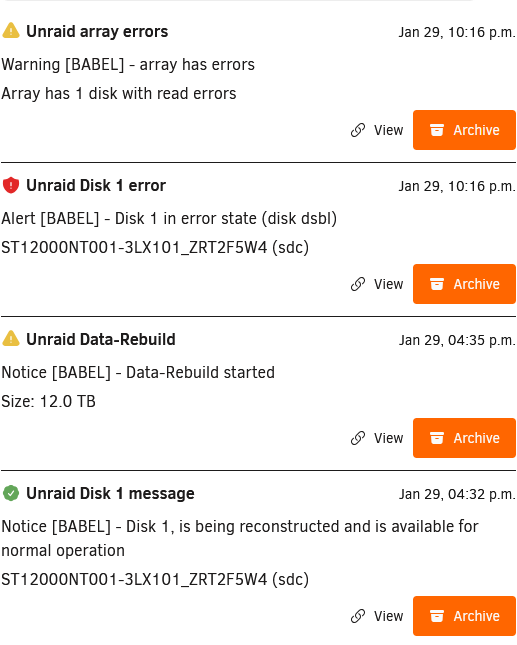
Is it time to RMA the drive? More read errors were encountered while rebuilding on the same disk. From the logs, example: Jan 29 22:15:25 Babel kernel: md: disk1 write error, sector=10097871664 Everything critical is backed up so I'm not worried if the parity (from the same batch of drives) also happens to fail. Diagnostics (maintenance mode) attached babel-diagnostics-20260129-2224.zip
-
In case the SMART data doesn't show up again, here's a direct screenshot from the GUI
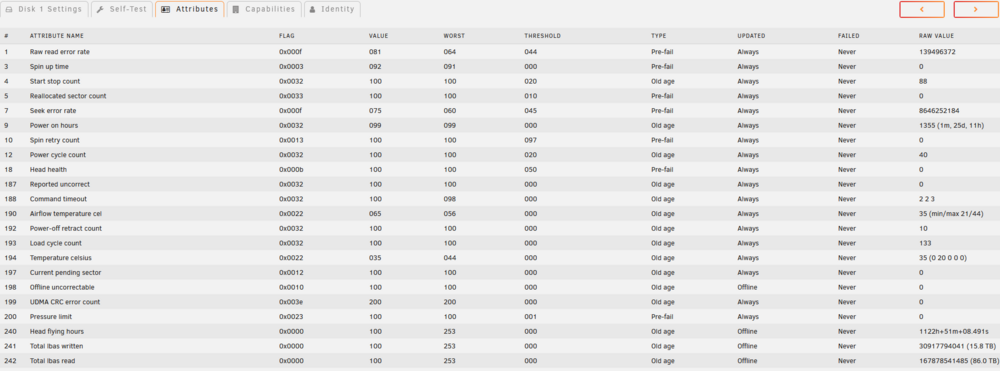
-
Extended SMART test returned no errors. This time I have started the array not in maintenance mode (which I presume to be "normal mode"), and I can see SMART info through the GUI on the affected disk. Diagnostics attached. Thanks in advance babel-diagnostics-20260129-1611.zip
-
I realized the error I was making - I thought the errored disk was spun up by default (because hovering over the red x said that clicking it would spin the drive down). I manually spun the drive up and I'm currently running an extended SMART test on it. A short SMART test ran without errors. In the meantime here's the actual diagnostics. I noticed that when booting up the server, the hard drives made a different sound than normal (there were some clicking sounds), which disappeared after a few seconds. babel-diagnostics-20260128-2129.zip

