





vincentmakes
Members
-
Joined
-
Last visited
-
[1.31.0] - New Features | https://github.com/vincentmakes/cv-manager Multi-language variant support of the same CV (selectable both admin side and public side) Versioning management now properly implemented in the backend (rather than free text) Open / Save menu replaced by a single CV Manager modal, redesigned to cater for the two changes above Active CV Banner redesigned and enriched with better control / info
-
[1.26.0] - New Features | https://github.com/vincentmakes/cv-managerStatic site export: download your CV as a standalone static website (HTML, CSS, JS, JSON) that can be deployed to GitHub Pages, Cloudflare Pages, Netlify, or any static hosting provider — no server required Documentation with step-by-step deployment guides for GitHub Pages, Cloudflare Pages, and Netlify is here https://docs-cv-manager.verdet.me/guide/static-site/ Logos can be added to certifications (same as Work experience and Education) Various UI improvements and ATS optimization
-
Updates v1.23.0 - (main changes since v1.13.0) | https://github.com/vincentmakes/cv-manager ATS-friendly PDF document generator: generate clean, structured, tagged PDFs (with StructTreeRoot) optimized for Applicant Tracking Systems using pdfkit (no Chromium required) ATS-friendly content block now included in pretty PDF print output Open to Work badge: toggle in profile editor to display a green "Open to Work" badge on your public CV header (hidden in print) Education logos: upload and display institution logos next to education entries, with the same modal and features as experience logos (upload, reuse, propagate across matching institution names) Migrated all UI icons from inline SVGs to Google Material Icons font Additional Experience layout type for custom sections: create experience-like entries (job title, company, dates, location, highlights, logo) in custom sections Additional Picture layout type for custom sections: display pictures in 1, 2 or 3x Grid format. Useful for QR code, or mini artwork portfolio Work experience logos: optional setting to display company logos alongside experience entries (disabled by default)
-
Only the option to force flatten the timeline haha The different layouts would require a major architectural rework so unlikely to happen to be honest. The custom sections themselves have different layout but that as far as I will get. They are other similar solutions in the Unraid app store if you are looking after different templates but I don’t think they offer the mini website option or the timeline generation
-
No worries :) Cheers
-
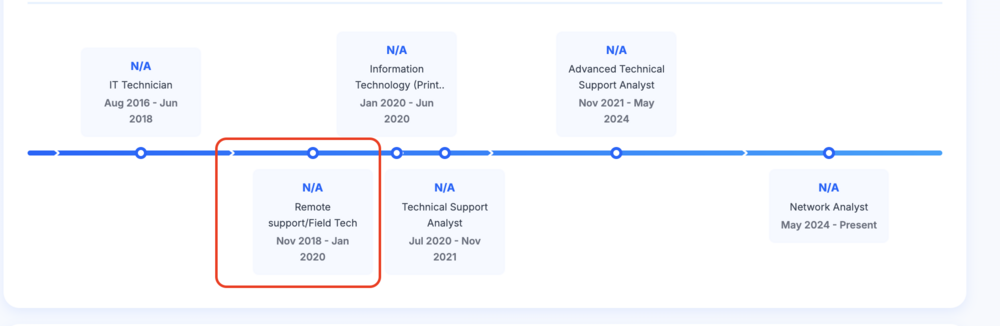
No, they are not causing the bridge. The experience right before that is causing the split because it overlaps with those two - check your dates carefully: December 2020 is after Jan 2020, not before. This is what I believe is correct (you can put December or even October 2019 as end date for that one, doesn't matter < edit : in case the need is to have a flat timeline whether there are parallel positions held or not, I have pushed an update which has a toggle in Advanced setting to flatten the timeline regardless.
-
Yes the one ending in December 2020: it ends after you started the following position in Jan 2020. Guessing you meant it ended in December 2019 :-)
-
Yes that’s normal: the experience prior to those two on the branch is extending into them (ends October 2020). So that means you had two positions in parallel, hence the branch being created
-
New version is out with a patch to fix the floating dot and other similar issues. Parallel branch will happen for positions overlapping more than 2 months. Some explanation about the branching logic: https://docs-cv-manager.verdet.me/guide/timeline/#parallel-jobs-timeline-branching
-
Do you mean no overlap ? Asking because the timeline looks a bit strange from a practical pov: Putting it in a Gantt, that looks like this If that's the case, that's fine - I just need to rework the branch detection logic a bit. There's still a bug regardless.

-
Thanks - looking at it now. One pointer might be you have an overlapping experience ending in Oct 2020 (2nd from bottom) while the next starts in Jan 2020.
-
Even with two months overlap that shouldn't happen. Would you mind to share an anonymized json export ? Just the experience sections with all the dates - job title can be the same everywhere. The new feature is following a request to have parallel branches for people having two activities at the same time.
-
Could you please share the dates used in that case ?
-
Update 28.02.2026 : added localization for 8 languages in total (en, fr, de, es, it, pt, nl, zh)
-
Update 11.02.2026 - Version 1.6.0 is out, with lots of new features and options as well as a better handling of current / published and alternate cv versions. Changelog: https://github.com/vincentmakes/cv-manager/blob/main/CHANGELOG.md


