





Anti-Matt-er
Members
-
Joined
-
Last visited
-
Ok, instructions followed. I was able to change it back and set the IP. Now the port variables I was told by the PiHole team should be -p are back to -e. Is that correct? I'm not seeing the errors I was previously so I'm hoping the config is correct, even if it differs from what they recommended.
-
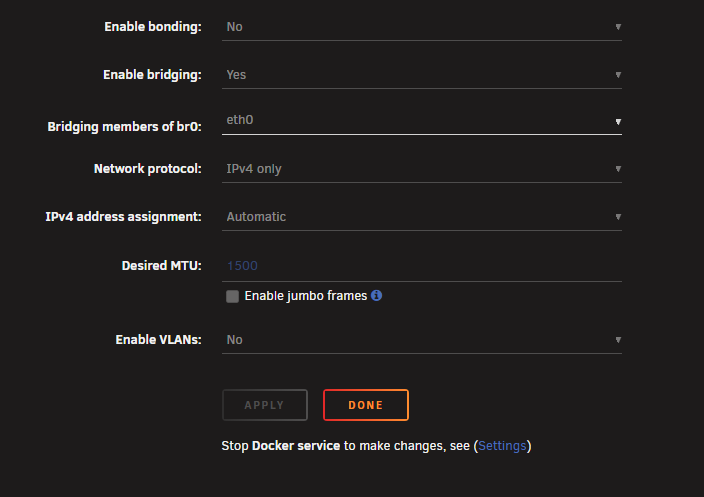
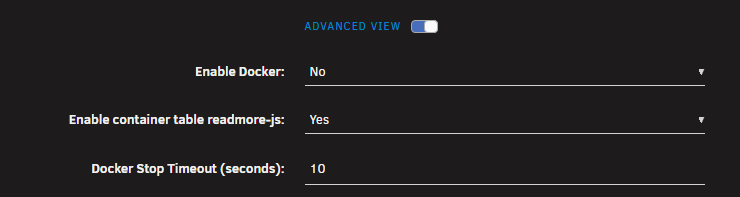
Trying to adjust network settings but it says I need to stop docker. No problem, go to docker tab and switch from enable to disable and apply. That looks successful as my docker tab is now gone. Go back to network settings and the same message shows up. Cant edit any of the settings. I also tried stopping the array, but it doesn't make a difference. I have docker stopped, array stopped, and I still can't change the network settings. Any suggestions?
-
I think I want the PiHole on it's own IP with no mapping, but I don't know how to set the IP for the container. There was an IP field previously, but with the settings you recommended it disappeared. Is there a variable that I can add? I tried a few things but all of them failed at run. Thanks!
-
Cool, that confirms what I hard read previously regarding how multiple DNS servers are used. Since I posted, I ended up buying another Pi to use as the primary DNS. Going to try setting that up this weekend. I was still hoping to use the Unraid server as a secondary DNS, but I absolutely CANNOT get the PiHole container in Docker to utilize it's own IP with the MACVLAN network setting. There is simply nowhere I can find to set the IP, nor am I able to set it with extra parameters. I tried IPVLAN too, but my router may have had trouble with it sharing a MAC address with the Unraid server itself. Tried the container support thread too, with mixed results. Unfortunately, PiHole on Docker in Unraid has been a fail for me 🙁 so far.
-
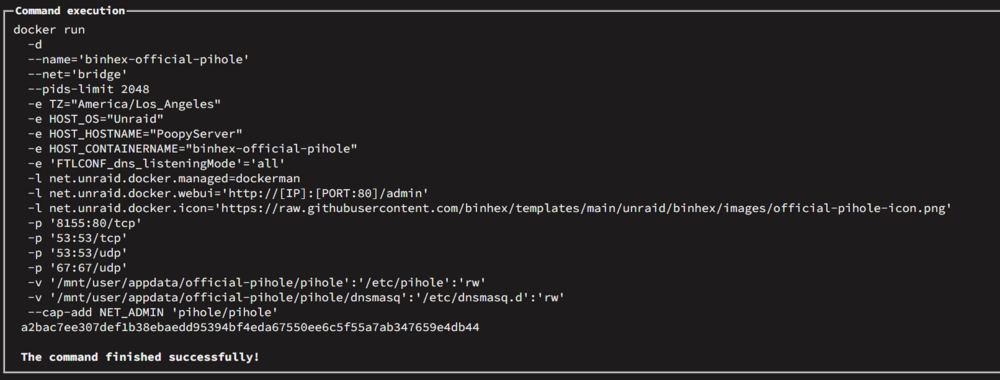
Ok, I switched to bridge network and the correct port settings do appear! Thanks for explaining. How I can set the PiHole IP now? The option is not available in bridge mode. Is switching to the FTLCONF_dns_listeningMode: 'ALL' variable is correct in the run command below?
-
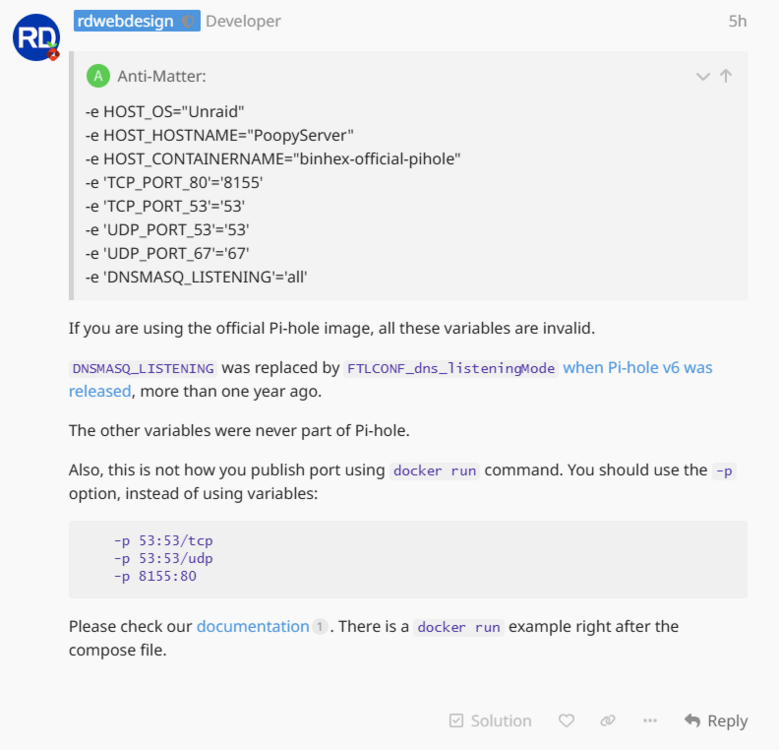
Tried MACVLAN and now it won't run. Still have the save variable errors too. Any support to update the container with the recommendations from the PiHole dev? Any other changes I should make my my settings? docker run -d --name='binhex-official-pihole' --net='br0' --ip='192.168.1.5' --pids-limit 2048 -e TZ="America/Los_Angeles" -e HOST_OS="Unraid" -e HOST_HOSTNAME="PoopyServer" -e HOST_CONTAINERNAME="binhex-official-pihole" -e 'TCP_PORT_80'='8155' -e 'TCP_PORT_53'='53' -e 'UDP_PORT_53'='53' -e 'UDP_PORT_67'='67' -e 'DNSMASQ_LISTENING'='all' -l net.unraid.docker.managed=dockerman -l net.unraid.docker.webui='http://[IP]:[PORT:80]/admin' -l net.unraid.docker.icon='https://raw.githubusercontent.com/binhex/templates/main/unraid/binhex/images/official-pihole-icon.png' -v '/mnt/user/appdata/official-pihole/pihole':'/etc/pihole':'rw' -v '/mnt/user/appdata/official-pihole/pihole/dnsmasq':'/etc/dnsmasq.d':'rw' --cap-add NET_ADMIN 'pihole/pihole' cfa1725acb41e03622699321593681a6080788da9f20ec5f9b3032b5c9d3943b docker: Error response from daemon: failed to set up container networking: failed to create the macvlan port: device or resource busy Run 'docker run --help' for more information The command failed.
-
I had it setup as a custom bridged network with fixed IP. As I mentioned in the post above, I had used the IPVLAN for docker as I read on another post that it was required. I can switch to MACVLAN and try again this weekend, if that's what's recommended.
-
First issue is frequent inability to connect to the PiHole dashboard from my iPhone. During this time I can still connect from two different Windows PCs. I am always able to connect to the NAS server via its IP. Note that this is an intermittent fault. Sometimes I'm able to connect from the iPhone. Unsure if this is related, but I can never see the PiHole server in the Unifi (router) dashboard under it's own IP. I can always see the NAS server. Next issue is the intermittent failure to load web pages. Looking into the query log I see a large number of failures to get a response from the upstream server. I'm also seeing a few connection errors. This happens on multiple devices (basically all) and prevents me from accessing these sites. I think I'm being told that I need to switch to MACVLAN from IPVLAN on the PiHole forums. If that is confirmed then I will try again this weekend. I wanted to post here as they also said that the container configuration was old/invalid. Query log error (this happens to most client devices): Query Status: Forwarded to 192.168.1.1#53 Reply: No reply received Issue log error (this pops up occasionally): CONNECTION_ERROR Connection error (192.168.1.1#53): TCP connection failed (Operation in progress)
-
Thanks. I posted in the other thread so hopefully I'll get some traction there. I also had issues with their Gluetun release as well so I'm hoping they respond. Might buy another RPi for running PiHole tho. I could make that the first DNS and keep the NAS as backup.
-
Trying to get PiHole working. Developer on the PiHole forum listed several issues with the Unraid application (out of date or incorrect variables), but couldn't elaborate more. Can anyone help clarify what needs to be done to fix? Thanks!
-
I was debating buying another Pi or putting it on one I already have running Home Assistant. I figured this server should be fine since I leave it on, but it's looking like another board would simplify things. I read that the router will bounce between DNS servers rather than exclusively use the first until it needs to fall back on the second. If another DNS is listed, traffic will route around the PiHole in normal operation. Are you saying that's incorrect?
-
Ok... so there could be any number of official templates for a single image? I could see it make sense in that context.
-
Pretty new to Unraid and Docker and I'm a bit confused. I see Docker apps listed as "official" and tagged with blue marks, but when I try to use them it turns out that they are third party apps and unsupported by the original development team on Unraid. In this specific case I tried to use the binhex-official-pihole container. I ran into several issues and posted on the PiHole forums. Apparently many of the variables are specified incorrectly, and others are out of date. I can't get help with this container there as it isn't supported on Unraid. At that point I started looking here and there is no container support thread for this one. How is it in any way "official" if the dev team isn't supporting it, and neither is the Unraid team? Do I just pick a different release and move on? Thanks!
-
Yeah, they do. I think there was an issue with the gluetun container and qbit not syncing. I fixed that and they all start/stop now... except the qbit port forwarder.
-
Stop all works. Start all doesn't.

