Leviathan_sama
Members
-
Joined
-
Last visited
-
I did an install of Ubuntu server before swapping to Unraid. Idk how it goes there. It worked well for 2 weeks until i did a reboot
-
root@Tower:~# sfdisk /dev/nvme0n1 Welcome to sfdisk (util-linux 2.41.2). Changes will remain in memory only, until you decide to write them. Be careful before using the write command. Checking that no-one is using this disk right now ... OK Disk /dev/nvme0n1: 1.82 TiB, 2000398934016 bytes, 3907029168 sectors Disk model: Samsung SSD 990 PRO 2TB Units: sectors of 1 * 512 = 512 bytes Sector size (logical/physical): 512 bytes / 512 bytes I/O size (minimum/optimal): 512 bytes / 512 bytes sfdisk is going to create a new 'dos' disk label. Use 'label: <name>' before you define a first partition to override the default. Type 'help' to get more information. >>> 2048 Created a new DOS (MBR) disklabel with disk identifier 0x20321956. Created a new partition 1 of type 'Linux' and of size 1.8 TiB. Partition #1 contains a vfat signature. Do you want to remove the signature? [Y]es/[N]o: n /dev/nvme0n1p1 : 2048 3907029167 (1.8T) Linux /dev/nvme0n1p2:
-
Sure, here : root@Tower:~# fdisk -l /dev/nvme0n1 Disk /dev/nvme0n1: 1.82 TiB, 2000398934016 bytes, 3907029168 sectors Disk model: Samsung SSD 990 PRO 2TB Units: sectors of 1 * 512 = 512 bytes Sector size (logical/physical): 512 bytes / 512 bytes I/O size (minimum/optimal): 512 bytes / 512 bytes
-
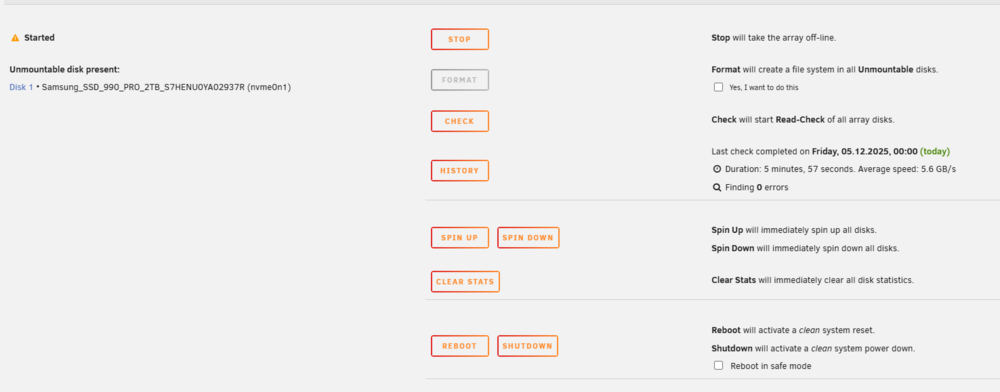
Hello, Last time i did a reboot of my server, my disk appears to be unmountable. I'm not sure what i'm supposed and how i could recover my data. tower-diagnostics-20251205-1048.zip