Rubi
Members
-
Joined
-
Last visited
-
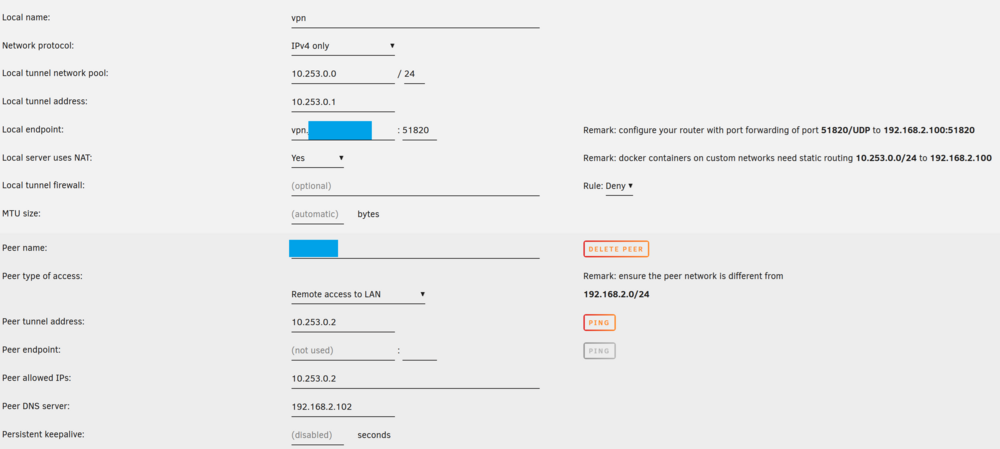
Hello, I need some help configuring my network so I can use my local dns and reverse proxy while I'm connected to my home network with wireguard. When I'm directly connected to my home network everything works fine, but when I try to use my dns while being connected with wireguard it fails. In this case I'm unable to reach any website at all and can only reach my docker containers using ip + port. My current setup: Router: 192.168.2.1 Unraid: 192.168.2.100 DNS: 192.168.2.102 - Dnsmasq, br0 docker network; listening on port 53 and points to 192.168.100 (reverse proxy) R-Proxy: 192.168.100 - Caddy, bridge docker network; listening on port 80 and 443 (I moved the default unraid GUI ports) Unraid built-in wireguard enabled. Forwarding in router for udp 51820 enabled Domain at cloudflare and api token for dns challenge for certificates Dnsmasq config (Removed real domain) Caddy config (Removed real domain) Wireguard config Docker container This works well when I'm directly connected. If I set my dns server on windows to 192.168.2.102 (dnsmasq container) I get forwarded from app1.example.com to 192.168.2.100:8085 Using a address that does not match will point me to my router dns (192.168.2.1). Now when connected to my home network through wireguard it does not work anymore. My guess is that the traffic does not find its way back to me. I'm not sure if this is a problem with me using bridge + br0 docker network, if it's the NAT setting in wireguard or anything else. When dnsmasq is configured as dns while I'm connected I can no longer reach any website and I get no response from app1.example.com I can only reach my internal containers by using IP + Port (f.e. 192.168.2.100:8085) Any help is appreciated.