





ranco12r
Members
-
Joined
-
Last visited
-
besten Dank für eure Antworten. Ich finde weder falsche Zeichen bei den IP's, noch sind diese vergeben. Hier mein Stand: installiert habe ich nach dieser Anleitung: https://crydteam.de/2025/02/18/paperless-unraid-setup/
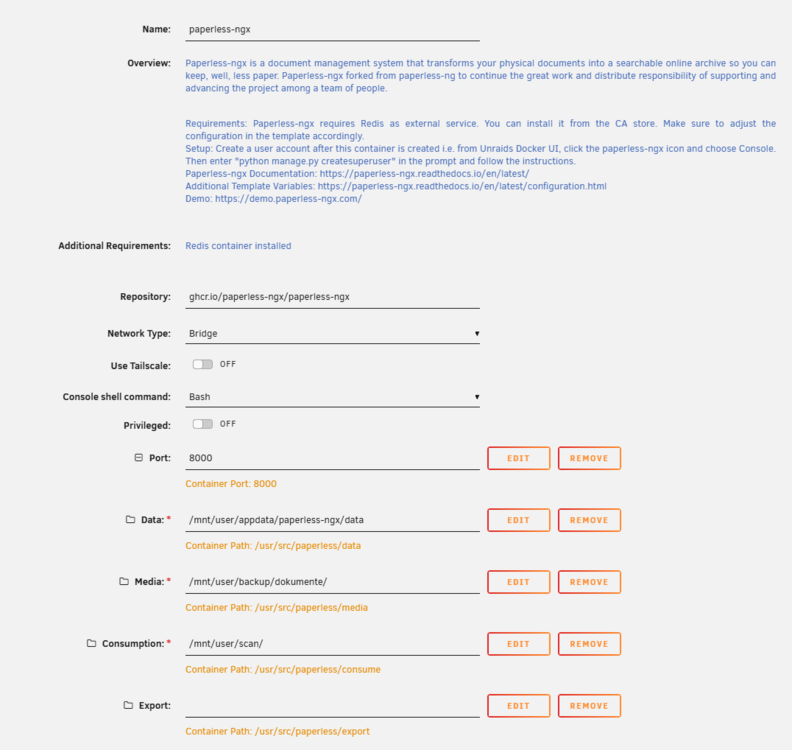
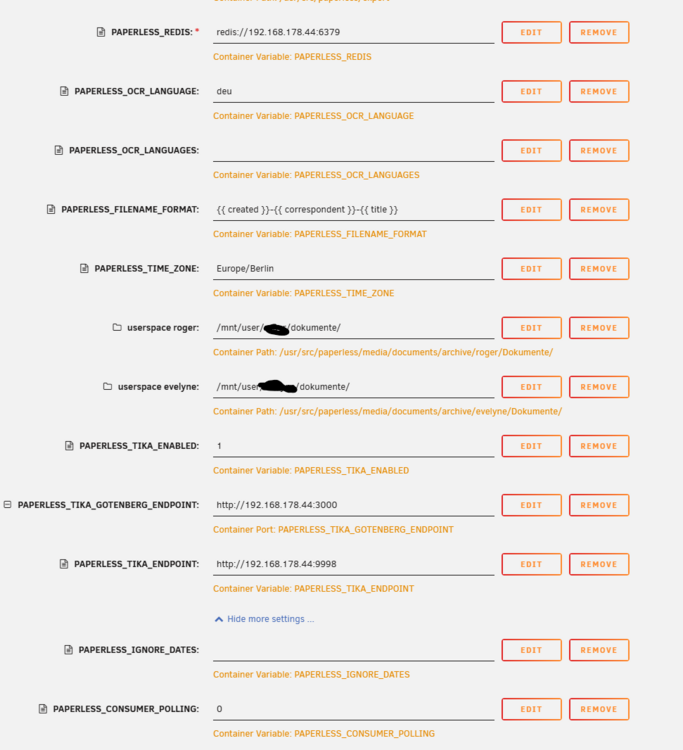
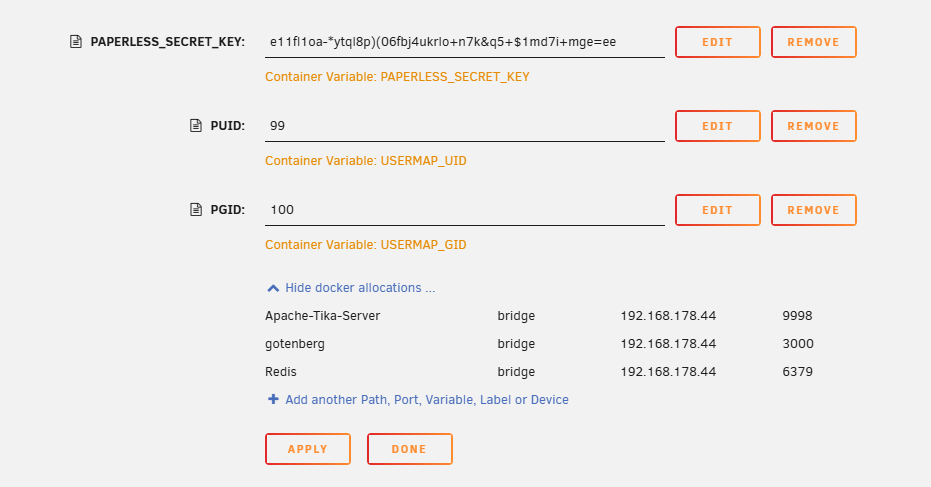
-
Hallo Forum Da ich neu bei Unraid bin, benötige ich bei einem Problem mit der Paperless-Installation eure Hilfe. Die Installation endet mit dem Fehler docker: invalid IP address: http://192.168.XXX.XX. docker run -d --name='paperless-ngx' --net='bridge' --pids-limit 2048 -e TZ="Europe/Berlin" -e HOST_OS="Unraid" -e HOST_HOSTNAME="Home" -e HOST_CONTAINERNAME="paperless-ngx" -e 'PAPERLESS_REDIS'='redis://192.168.XXX.XX:6379' -e 'PAPERLESS_OCR_LANGUAGE'='deu' -e 'PAPERLESS_OCR_LANGUAGES'='' -e 'PAPERLESS_FILENAME_FORMAT'='{{ created }}-{{ correspondent }}-{{ title }}' -e 'PAPERLESS_TIME_ZONE'='Europe/Berlin' -e 'PAPERLESS_TIKA_ENABLED'='1' -e 'PAPERLESS_TIKA_ENDPOINT'='http://192.168.XXX.XX:9998' -e 'PAPERLESS_IGNORE_DATES'='' -e 'PAPERLESS_CONSUMER_POLLING'='0' -e 'PAPERLESS_SECRET_KEY'='e11fl1oa-*ytql8p)(06fbj4ukrlo+n7k&q5+$1md7i+mge=ee' -e 'USERMAP_UID'='99' -e 'USERMAP_GID'='100' -l net.unraid.docker.managed=dockerman -l net.unraid.docker.webui='http://[IP]:[PORT:8000]' -l net.unraid.docker.icon='https://raw.githubusercontent.com/selfhosters/unRAID-CA-templates/master/templates/img/paperless.png' -p '8000:8000/tcp' -p 'http://192.168.XXX.XX:3000:PAPERLESS_TIKA_GOTENBERG_ENDPOINT/tcp' -v '/mnt/user/appdata/paperless-ngx/data':'/usr/src/paperless/data':'rw' -v '/mnt/user/backup/dokumente/':'/usr/src/paperless/media':'rw' -v '/mnt/user/scan/':'/usr/src/paperless/consume':'rw' -v '/mnt/user/XXX/dokumente/':'/usr/src/paperless/media/documents/archive/XXX/Dokumente/':'rw' -v '/mnt/user/XXX/dokumente/':'/usr/src/paperless/media/documents/archive/XXX/Dokumente/':'rw' 'ghcr.io/paperless-ngx/paperless-ngx' docker: invalid IP address: http://192.168.XXX.XX. See 'docker run --help'. Im Terminalfenster wird Folgendes angezeigt: Error response from daemon: No such container: paperless-ngx Apache-Tika-Server, gotenberg und Redis sind installiert und laufen. Die Ports stimmen Vielen Dank für eure Hilfe


