




Skip to content
View in the app

A better way to browse. Learn more.

Unraid

A full-screen app on your home screen with push notifications, badges and more.

To install this app on iOS and iPadOS
  1. Tap the Share icon in Safari
  2. Scroll the menu and tap Add to Home Screen.
  3. Tap Add in the top-right corner.
To install this app on Android
  1. Tap the 3-dot menu (⋮) in the top-right corner of the browser.
  2. Tap Add to Home screen or Install app.
  3. Confirm by tapping Install.

KHult

Members
  • Joined

  • Last visited

Everything posted by KHult

  1. Thank you both very much!! That did the trick and I'm up and running. Much appreciated.
  2. The diagnostics are attached. Thank you for your help hultnas-diagnostics-20260102-0700.zip
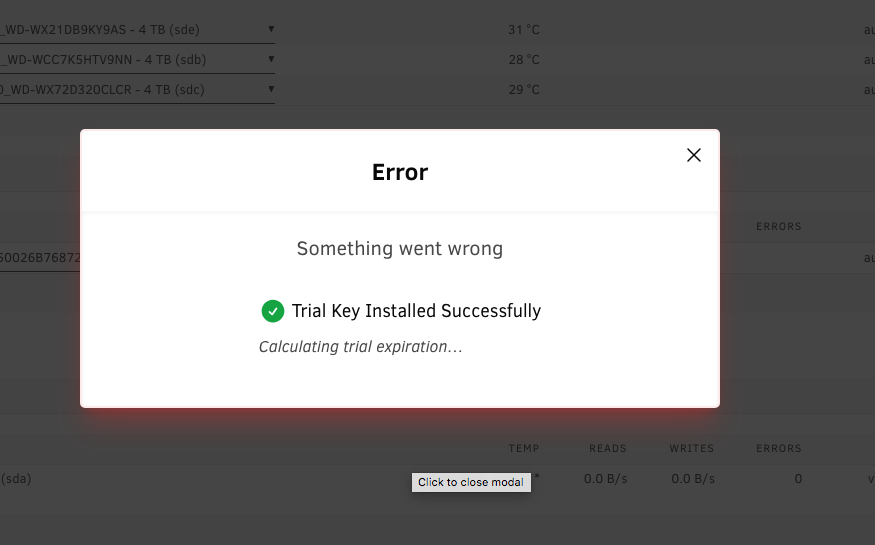
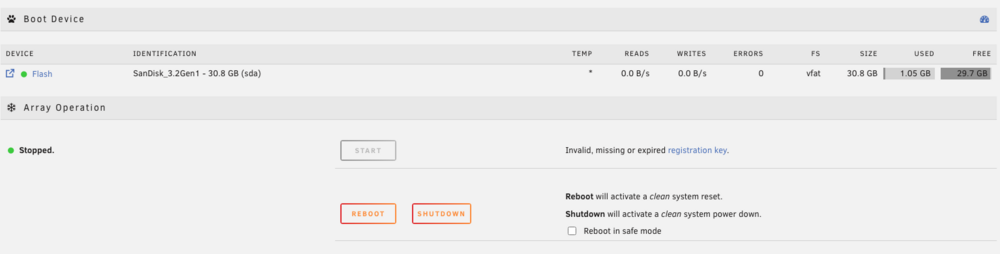
  3. TerraMaster F4-424 Time is set correctly in the NAS BIOS and within Unraid via NTP server. Drives all show up properly and are configured, but the array 'START' button is grayed out. Multiple reboots and reinstalls. Safe mode does not change the behavior. Brand new SanDisk 32 GB USB3.2 drive used for boot. I'd love to try it out, so I'll appreciate any help with the very first step here.
Account

Navigation

Search

Search

Configure browser push notifications

Chrome (Android)
  1. Tap the lock icon next to the address bar.
  2. Tap Permissions → Notifications.
  3. Adjust your preference.
Chrome (Desktop)
  1. Click the padlock icon in the address bar.
  2. Select Site settings.
  3. Find Notifications and adjust your preference.
