




the_capn
Members
-
Joined
-
Last visited
-
This worked! As soon as I ran the command, wget started working, and Seerr was able to find Radarr/Sonarr. Thank you so much for the help, I would have never figured this out on my own.
-
Thank you for the quick response. I connected my phone to my dmz vlan, and validated I could connect to both the temporary nginx at 8099 and radarr at 7878. I did my best to run the scripts you provided, hopefully everything is correct. As to putting radarr on my main network via ipvlan/br0, my hope was to keep my docker containers separated from my internal network where possible. But then again, my understanding of netsec is pretty shoddy, so I might be chasing down a goal that doesn't even provide a real benefit. Oh, one other thing. curl isn't included in the Seerr container, so I have been using wget --tries=1 --timeout=5 http://10.1.1.2:7878 to attempt to connect instead. Not sure if that makes a difference. ct-after.txt ct-before.txt ns-after.txt ns-before.txt merlin-diagnostics-20261029-1506.zip
-
Hi all. I hope this is the correct forum for this question. While I reference container names, I don't think my issue is container specific. I've been attempting to get a DMZ vlan running on my home network, but have running into a problem where a container on the DMZ vlan cannot communicate with a port published by docker to my server's ip on my main vlan. After coming up empty searching the internet, I tried turning to an ai agent. The ai had me run some diagnostics, but was not able to provide a solid conclusion about why this issue could be happening. I've asked it to generate a short summary that I could post here in hopes a real person might be able to help me understand my flaw (other than trusting a computer). The summary is below: Setup Unraid 7.3.4, host IP 10.1.1.2 on br0 (UniFi gateway at 10.1.1.1). VLAN 30 with IPv4 address assignment None. Docker network type: ipvlan. “Host access to custom networks”: off. (Author note: It seems like a commonly suggested solution to other issues is to enable this. I don't think it should need to be enabled for my case based on my understanding of the setting, but I tried enabling it just in case and did not experience any change in behavior.) Seerr on the br0.30 ipvlan network (10.1.30.14). Radarr is on a user-defined bridge with published port 7878. A firewall rule allows 10.1.30.14 → 10.1.1.2:7878, and the flow log shows it allowed. Problem From Seerr’s network namespace, curl http://10.1.1.2:7878/ times out with 0 bytes received. The TCP handshake completes, but no data is ever accepted afterward. What works from the same container Internet access. Home Assistant VM at 10.1.1.20:8123 (also reached from a second ipvlan container). A native host service (Unraid web UI, port 80). A native listener on the host (busybox httpd -p 8099, --net=host). What fails A fresh test container (nginx:alpine, -p 8099:80 on the user-defined bridge), with a firewall rule for the port. So Docker-published ports fail while native host ports work. Diagnostics Host capture: the SYN arrives, and the SYN-ACK and reply leave on br0 and return on br0.30. Capture inside the container’s namespace: the replies arrive on eth0 with valid checksums, but the container keeps retransmitting as if it received nothing. ss -tin shows segs_in:1, bytes_acked:1. Inside the container: rp_filter = 0, all drop and checksum counters = 0, only the nat iptables table present. On the host: rp_filter = 0, no route for 10.1.30.0/24, no address on br0.30. Questions Is there a known reason a Docker-published (DNAT’d) port would fail for an ipvlan container on a VLAN while native host listeners work? Does Unraid 7.x treat this traffic differently (VLAN set to None, br0.30 as the ipvlan parent, Docker’s published-port rules)? I apologize for the wall of ai, but I'm pretty out of my depth here trying to diagnose this issue. Any help is much appreciated!
-
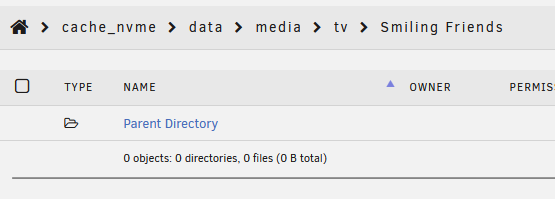
I just ran mover with mover-tuning for the first time in a while, and I noticed it resulted in empty folders being left on my cache drive. It seems to be top level TV show folders created by Sonarr. I didn't have any movies moved, so I don't know if Radarr folders would act the same. I did some digging in the logs and found this as an example: It deleted the Season 01 folder, and correctly did not delete the media folder, but it didn't delete the top level show folder (.../tv/Smiling Friends/) like I would have expected. In unraid, the folder is empty. Am I missing something here? My clean empty folders setting is set to Top Folder, as shown: Thank you