Jens1973
Members
-
Joined
-
Last visited
-
Thank you, works like a charme! Thank you all !
-
Ok thanks for your explanation, understood. it works as you said! when copiing to /user the files end up on the cache. when copping to /user0, it uses disk2 as it should. Only for my understanding: "Mov" is set to use array only. Why is the cache used? Can I solve it somehow that as mentioned above disk1 has "no partitions"? will it be a problem sometimes later?
-
hm that's a good point, I copy to mnt/disk1/Mov. There are morelocations for "Mov" here: mnt/user/Mov, mnt/user0/Mov and mnt/cache/Mov. Which one is would be correct? I read that you shouldn't copy from share to user so the only place is mnt/disk1/Mov. I have to say that all shares have been created when there was only disk1. I added disk2 later but disk1 has been <50% full when I started copiing.
-
to "Mov"... I checked the disk informations and I saw that under "Partitionsformat" there is disk 2 (the empty one)"GPT 4KiB-Ausrichtung" disk 1 "no partitions" can that be a problem?
-
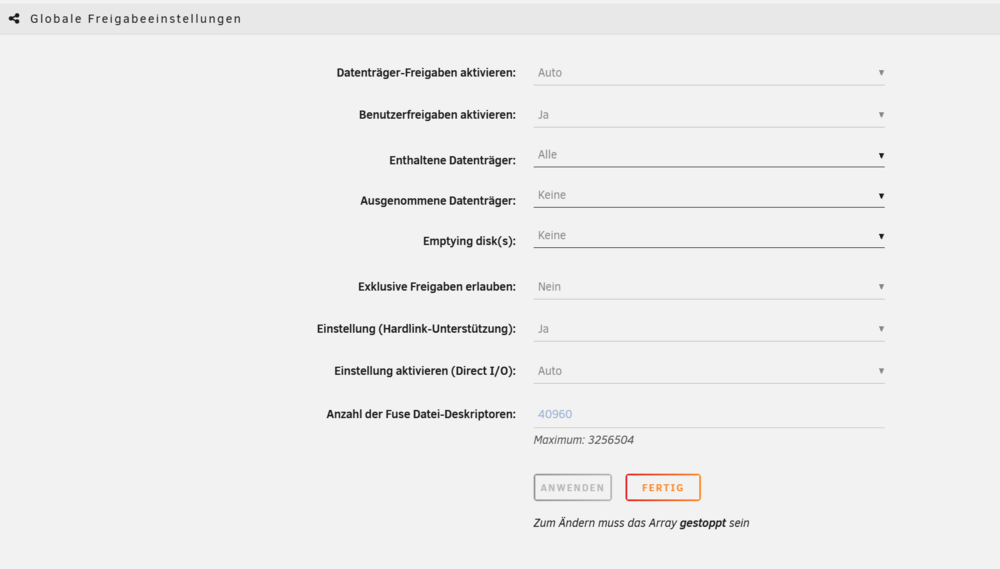
OK here are the shares and the global share settings. Anything strange there?

-
I mounted the Qnap share as SMB share and copied/moved via unraids filemanager to the unraid share..

-
OK forgot it - here it is, thanks homeserver-diagnostics-20260124-1735.zip
-
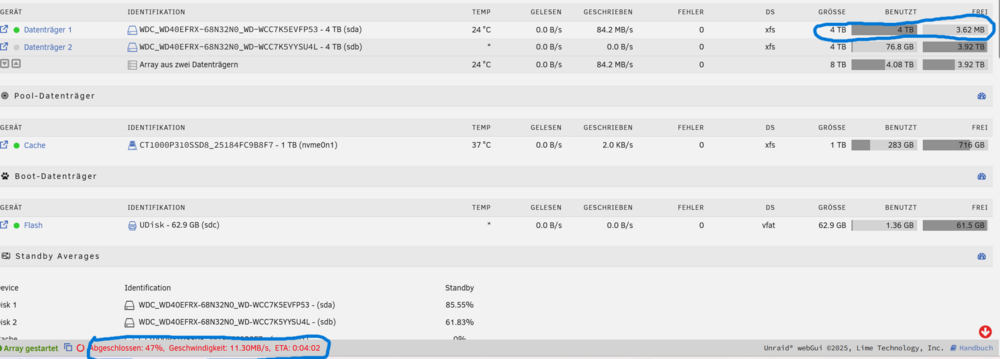
Hi this is my first post and I am relatively new to Unraid so please be patient I added a second hdd to my array. I use high water and automatic split for each share (this is what I found in the forums what solved problems for others). Then i added a lot of data from my Qnap NAS. As you can see in the screenshot disk1 is running out of space and disk 2 won't be used. At last I tried to transfer a single file but it stopped at 47% because disk 1 is full. Disk 2 won't even wake up (but it does when clicked). Hope someone can help me please... best regards Jens