




Skip to content
View in the app

A better way to browse. Learn more.

Unraid

A full-screen app on your home screen with push notifications, badges and more.

To install this app on iOS and iPadOS
  1. Tap the Share icon in Safari
  2. Scroll the menu and tap Add to Home Screen.
  3. Tap Add in the top-right corner.
To install this app on Android
  1. Tap the 3-dot menu (⋮) in the top-right corner of the browser.
  2. Tap Add to Home screen or Install app.
  3. Confirm by tapping Install.

dionmcneice

Members
  • Joined

  • Last visited

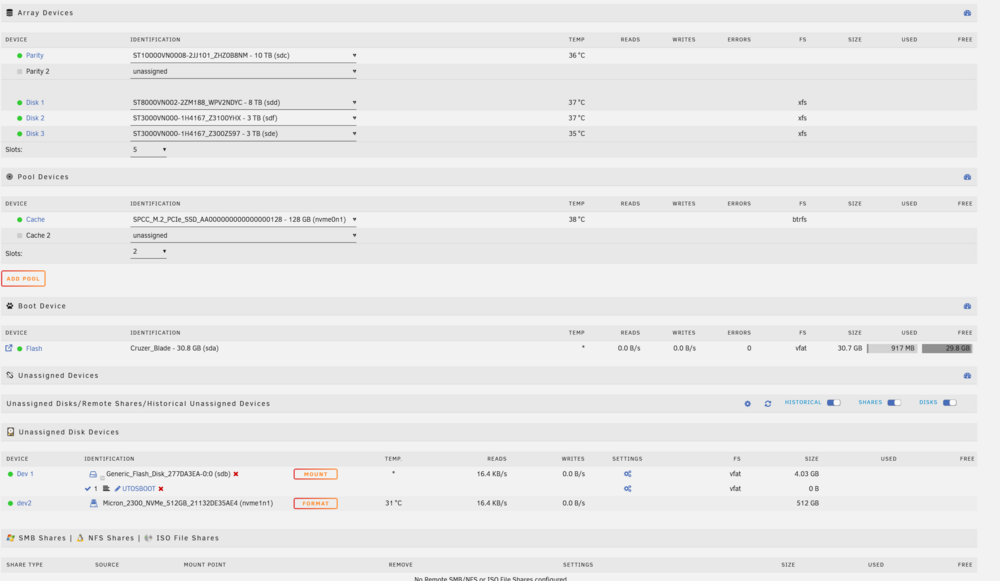
  1. Thing is I only have the one usb connected, the usb drive with unraid in it. I have no idea where this is. I'm using a Terra master f424. EDIT: Found the reason. theres an internal Terramaster TOS USB.
  2. So I have the starter Licence. I have 4 HDDs (3 drives, 1 parity), 1 NvMe as Cache, and the Usb with Unraid on it. I've attached a 2nd NvMe for Cache, and I'm getting the unraid device limit. Does the Usb count towards the limit? The other issue I have which ive never been able to figure out is in the Array size, the minimum i can select is 5 (cant go below 5), with 2 parity (1 of which ive left unassigned), and 3 disk drives. Is the problem the USB? or is it that the array size is 5 and counting it as such, even though i only have 4 drives there)?
Account

Navigation

Search

Search

Configure browser push notifications

Chrome (Android)
  1. Tap the lock icon next to the address bar.
  2. Tap Permissions → Notifications.
  3. Adjust your preference.
Chrome (Desktop)
  1. Click the padlock icon in the address bar.
  2. Select Site settings.
  3. Find Notifications and adjust your preference.