





ghzgod11
Members
-
Joined
-
Last visited
-
Yes, I merged it in the main branch. Sorry, I forgot to mention it.
-
Thank you. Not that I would do this because it's highly illegal, but what would stop someone from developing a plugin, getting it approved on the app store, and then putting malicious code into the plugin in a future update down the road? I probably should do my own research on this, but I hope that Unraid has some kind of failsafes for this or they have some auto checking capability. I feel like accomplishing this task like this is pretty trivial now that we have AI agents everywhere that could auto reject or flag updates for security protection.
-
Hey, sorry for the noob question. Any idea how to get this plug in on the Unraid App Store? I feel like I did all the right steps, but I still don't see it. Maybe they haven't had a chance to review it or something. Is it still working okay for you? And I appreciate all your help by the way. I never got to mention that.
-
You know, that's very smart because if you enable that setting, it would give every container the ability to access the host network, correct? And if there's a malicious update, (which I still don't understand if we're even checking for that stuff somehow), you would minimize the ability for it to pivot onto the network?
-
Awesome. I just added the ability for it to work in host mode, bridge mode, and custom IP address mode. Whenever you get a chance, please test that. And I appreciate your patience.
-
Also, you can update the plugin via the plugins page by clicking Check for updates. And if I push a new update it will show there.
-
I'll add that fix right now. I just found another bug that doesn't auto detect the port that the container's running on. So I'm fixing that as well.
-
I made a change, can you try again? Hopefully it works now
-
Remove the old plugin (if installed) and then reinstall with that link
-
When you get a chance, can you test this? https://raw.githubusercontent.com/ghzgod/signal-notification-unraid/beta/signal-notification.plg
-
So my readme has the requirement (ghcr.io/asamk/signal-cli with daemon --http mode). But I'm gonna modify the plugin right now to auto-detect which image the container using and auto switch over if possible. I'll report back soon.
-
Hey, just now seeing this, sorry for the late reply. Which version of signal CLI docker image are you running?
-
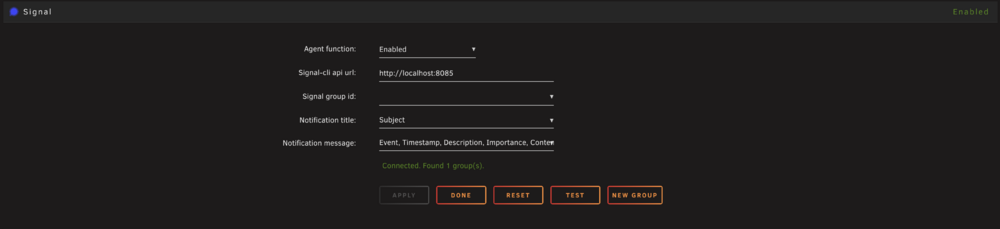
Here is a screenshot of it.
-
Hello everyone, made a plugin that integrates signal notifications into unraid notifcations page. You must have signal-cli installed somewhere either on the same system or elsewhere. - Plugin name: Signal Notification Agent - Repository URL: https://github.com/ghzgod/signal-notification-unraid - Plugin URL: https://raw.githubusercontent.com/ghzgod/signal-notification-unraid/main/signal-notification.plg - Support thread URL: (the forum thread you created) - Icon URL: your signal-notification.png I have like 3 unraid accounts but I cant login with just username anymore hence why this account is brand new. Been on unraid since 2015, and this is my first submission. Feel free to leave feedback. 2FA is enabled on my github account The support URL in the .plg points to this thread.

