funkyfedaykin
Members
-
Joined
-
Last visited
-
I tried to run the xfs repair via the terminal with same results. What will happen if I stick a new drive in now? Is there a way to tell it to attempt rebuild from parity?
-
Thanks, I have updated to 7.2.4 with same result. Seeing as it's in maintenance mode do i need to add any modifiers? Such as "To repair, remove the -n flag to allow fixes." (mentioned in Unraid Docs)? I can't see anywhere in the GUI to change the modifiers. Phase 1 - find and verify superblock... Phase 2 - using internal log - zero log... - scan filesystem freespace and inode maps... clearing needsrepair flag and regenerating metadata sb_icount 38912, counted 32 sb_ifree 178, counted 29 sb_fdblocks 127266174, counted 244071373 - found root inode chunk Phase 3 - for each AG... - scan and clear agi unlinked lists... - process known inodes and perform inode discovery... - agno = 0 - agno = 1 - agno = 2 - agno = 3 - process newly discovered inodes... Phase 4 - check for duplicate blocks... - setting up duplicate extent list... - check for inodes claiming duplicate blocks... - agno = 0 - agno = 3 - agno = 2 - agno = 1 Phase 5 - rebuild AG headers and trees... - reset superblock... Phase 6 - check inode connectivity... - resetting contents of realtime bitmap and summary inodes - traversing filesystem ... - traversal finished ... - moving disconnected inodes to lost+found ... Phase 7 - verify and correct link counts... SB summary counter sanity check failed Metadata corruption detected at 0x49d6d5, xfs_sb block 0x0/0x200 libxfs_bwrite: write verifier failed on xfs_sb bno 0x0/0x1 SB summary counter sanity check failed Metadata corruption detected at 0x49d6d5, xfs_sb block 0x0/0x200 libxfs_bwrite: write verifier failed on xfs_sb bno 0x0/0x1 xfs_repair: Releasing dirty buffer to free list! xfs_repair: Refusing to write a corrupt buffer to the data device! xfs_repair: Lost a write to the data device! fatal error -- File system metadata writeout failed, err=117. Re-run xfs_repair.
-
Hey folks, sorry to let the thread go cold. Just here to warm it up a bit. Thanks for all your help so far - I'm incredibly grateful for your time. Just to recap - I'm trying to get my array up and running with an emulated disk to try and recover the data from a dead drive. I did New Config Start array in maintenance mode with disk missing. Check File System - Fix Zero log Fix Now the output says "Fatal error" (see below). Is it just time to cut my losses, accept it lost and move on? Phase 1 - find and verify superblock... Phase 2 - using internal log - zero log... - scan filesystem freespace and inode maps... clearing needsrepair flag and regenerating metadata sb_icount 38912, counted 32 sb_ifree 178, counted 29 sb_fdblocks 127266174, counted 244071373 - found root inode chunk Phase 3 - for each AG... - scan and clear agi unlinked lists... - process known inodes and perform inode discovery... - agno = 0 - agno = 1 - agno = 2 - agno = 3 - process newly discovered inodes... Phase 4 - check for duplicate blocks... - setting up duplicate extent list... - check for inodes claiming duplicate blocks... - agno = 1 - agno = 0 - agno = 2 - agno = 3 Phase 5 - rebuild AG headers and trees... - reset superblock... Phase 6 - check inode connectivity... - resetting contents of realtime bitmap and summary inodes - traversing filesystem ... - traversal finished ... - moving disconnected inodes to lost+found ... Phase 7 - verify and correct link counts... SB summary counter sanity check failed Metadata corruption detected at 0x49c4e5, xfs_sb block 0x0/0x200 libxfs_bwrite: write verifier failed on xfs_sb bno 0x0/0x1 SB summary counter sanity check failed Metadata corruption detected at 0x49c4e5, xfs_sb block 0x0/0x200 libxfs_bwrite: write verifier failed on xfs_sb bno 0x0/0x1 xfs_repair: Releasing dirty buffer to free list! xfs_repair: Refusing to write a corrupt buffer to the data device! xfs_repair: Lost a write to the data device! fatal error -- File system metadata writeout failed, err=117. Re-run xfs_repair.
-
Ok so having pressed FIX the output is: Phase 1 - find and verify superblock... bad primary superblock - bad magic number !!! attempting to find secondary superblock .................. verified secondary superblock... writing modified primary superblock sb realtime bitmap inode value 18446744073709551615 (NULLFSINO) inconsistent with calculated value 129 resetting superblock realtime bitmap inode pointer to 129 sb realtime summary inode value 18446744073709551615 (NULLFSINO) inconsistent with calculated value 130 resetting superblock realtime summary inode pointer to 130 Phase 2 - using internal log - zero log... Log inconsistent (didn't find previous header) failed to find log head zero_log: cannot find log head/tail (xlog_find_tail=5) ERROR: The log head and/or tail cannot be discovered. Attempt to mount the filesystem to replay the log or use the -L option to destroy the log and attempt a repair. The button now says "Zero Log" with "Dirty Log Detected" Can I proceed with this? (Reminder: I'm in Maintenance mode)
-
Ok, did that and then checked FS. Here's the output: Phase 1 - find and verify superblock... bad primary superblock - bad magic number !!! attempting to find secondary superblock... .................................................found candidate secondary superblock... verified secondary superblock... would write modified primary superblock Primary superblock would have been modified. Cannot proceed further in no_modify mode. Exiting now.
-
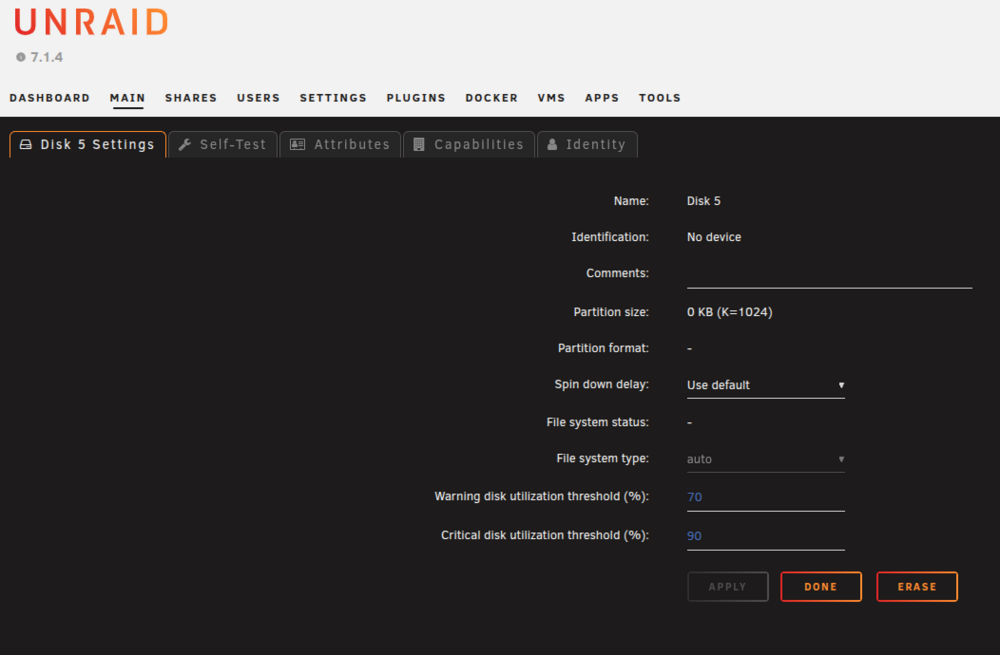
It is XFS, however on the missing drive on Main it says "auto"
-
Yes
-
There's no option for "Check file system" on the webUI. And Trying to check via command line doesn't seem to be working either.
-
It is a hardware failure - clicking and not registering as attached. I do have it. If I can't recover from parity data then it will probably be time to send it to some data recovery folk. I'm not 100% sure what was on it and if it is worth it, or whether I should just cut my losses (in the case the other efforts don't work).
-
Ok I have done as advised. The missing disk is being emulated according to the GUI. However it does not appear that the emulated disk has mounted. I can't see it under /mnt/. Should I proceed with adding the new drive so that it rebuilds it from parity? minasarnor-diagnostics-20260221-0823.zip
-
Thanks! So just to confirm: I should add the new disk (replacing the failed drive) for the maintenance mode start-up and then unassign it for the full start?
-
Thanks mate, appreciate it. minasarnor-diagnostics-20260219-1627.zip
-
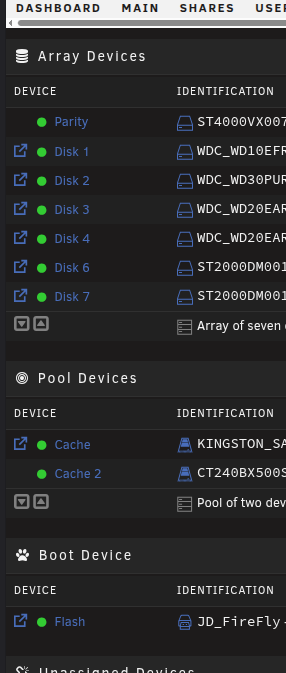
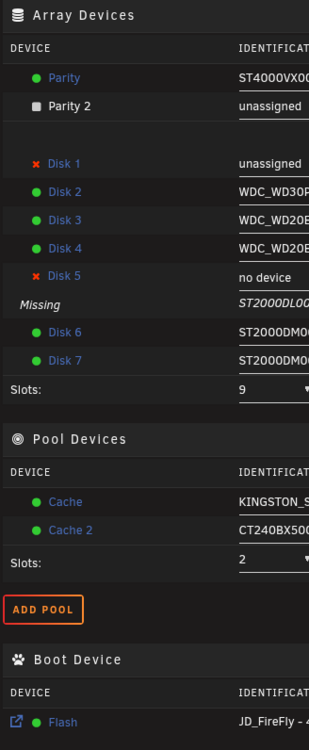
The ProblemI'm trying to emulate a failed disk to recover the data (and rebuild the array with a replacement disk). BackgroundI'm running Unraid 7.1.4 and I have 1 parity drive. The StoryI was trying to upgrade a disk with a bigger one, however during the drive swap the larger drive was faulty so it did not rebuild with the new drive. I tried to go back to the smaller drive but Unraid wouldn't allow it (I didn't know about New Config at this time). While i was trying to source a new larger drive the array kept running and another drive failed. Now I have two drives missing and the array won't start. Ordered a few brand new drives ready to go. I consulted 3 AI models on how to recover the array, two of which (ChatGPT & Grok) recommend using New Config to get the smaller drive back in the array and then use parity to replace the failed drive. I followed instructions and now I can't see an emulated drive and don't know what to do next. What have I done?I popped the smaller drive back in the machine. I did New Config with keeping all devices assigned, I checked that all the drives were still in the same slots with the failed drive "unassigned" Started the array in maintenance mode with "parity is valid" however it showed no "missing drive". Rebooted the machine and started the array normally, still no "missing drive" My QuestionsAm I cooked? Is there any hope now of recovering that lost drive from parity data? Is there some way I can pop a new drive in and manually tell Unraid to rebuild it from parity? I also have no shares it seems. Is that normal for a New Config?