





moka939
Members
-
Joined
-
Last visited
-
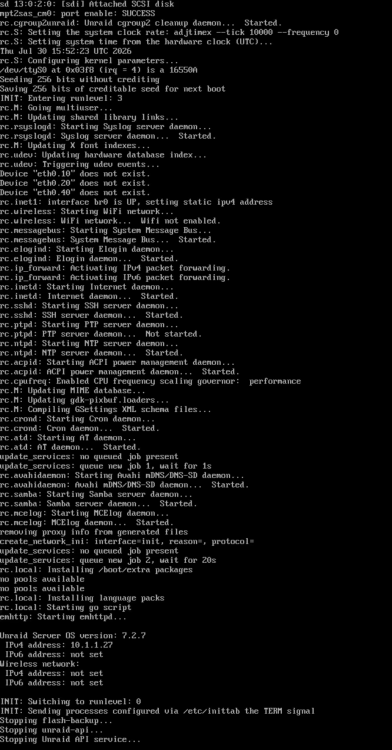
My KVM showed no signal from unraid, I hit the power button once and this is where it is stuck during the power down.
-
I keep providing diagnostic files and I'm not getting anywhere with them, just being told to rebuild docker or the diagnostics don't have contents because of a restart. My server is currently completely inaccessible again, I obviously can't get logs. I've: Blasted away duplicate docker shares Cleaned up remnant docker shares from disks (and appdata) This did speed things up with the UI in general, lots less loading screens when opening docker tab and such, dockers and commands respond very well now, not sluggish. Switched docker from virtual disk to direct to disk because I had to keep rebuilding the corrupt docker share, so far this has helped prevent me from having to rebuild Observations Server stays up about 24-72 hours before failing. Seems to happen overnight, fine during the day. It was ok after making some of the above docker adjustments for longer than it had been until I had a power outage, powered it off safely, and it has started the 24-72 hour crashing again. I still cannot grasp why UnRaid cannot protect itself from whatever is going on, let alone write some log files. Edit: I do appreciate all suggestions and assistance thus far, I've worked through some odd changes I made as a result of this crashing and it has helped the user experience for me, but it hasn't helped the failures.
-
And also, does setting RAM limits not prevent it from consuming the full memory on the system? Some of my containers are only allowed 512mb, I'm pretty intense with the limiting.
-
And also, does setting RAM limits not prevent it from consuming the full memory on the system? Some of my containers are only allowed 512mb, I'm pretty intense with the limiting.
-
And also, does setting RAM limits not prevent it from consuming the full memory on the system? Some of my containers are only allowed 512mb, I'm pretty intense with the limiting.
-
In this instance, no, no crash, just noticed the indicator in fix common probs. The 19th would've been a crash, for certain. You say "likely" so does that mean there isn't anything in the logs to prove that happened? It could've been an OS memory leak just the same?
-
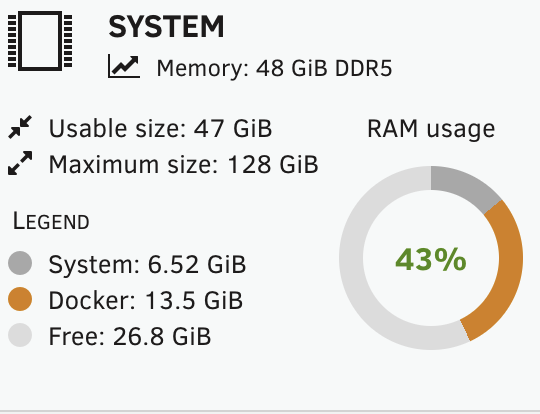
The fix things said to post this here, overall the RAM usage doesn't look wild to me. Which of these log files helps you help me? I started perusing, but didn't find much of anything useful in the few files I checked. Most memory intensive application is frigate. Almost all my docker containers are restricted to the RAM amount I specify, except some newer containers like paperless-ngx and redis. Frigate is allowed 20gb and is currently in at 16gb. Most of my cameras are running higher detection resolutions (and I have many) so this is expected, not misconfigured. Finally, why isn't there protective code in the Unraid OS? 99% of my issues would probably not be an issue if UnRaid would just kill things like docker if it was getting out of hand. Even better if it specifically kills a container with a log entry. Even better if there weren't 2-3 places to find the logs. It just baffles me that UnRaid doesn't protect itself, it just seems to go down with the ship. uhive-diagnostics-20260720-1009-outofMemory.zip

-
Confirmed this is no longer an issue after completely wiping out Docker share. the docker.cfg and Docker.cfg do not exist at all, just the new docker-direct.
-
I've cleaned it all up, I think. I'm only using my docker-direct folder now, totally blasted away Docker folder. We shall see if another crash happens. Can confirm they are not orphans.
-
I swear this thing keeps posting without my text and then I later see the text. Just in case it didn't, the gist is: the 8.3gb folders all appear to be rebuilt frigate containers with similar contents. I have many of these rebuilt appearing subvolumes for some crazy reason, see the 1.3gb, and I have 2x 5gb. I've not rebuilt since switching to direct to disk from docker.img, they've all come back up just fine. My reason for halting use of docker.img was constantly having to rebuild through previous apps. Not hard, but time consuming and happened frequently enough I decided to try something else. This has been more stable, but what's going on with these rebuilds?


-
This is still happening, server becomes totally unresponsive, not pingable. Unraid GUI sometimes kind of works, but sometimes doesn't. Same with shell. Right now I have gui and nothing is clickable. Most recent logs I was able to obtain attached. uhive-diagnostics-20260712-1210-PRE-RESTART.zipThanks! I ran that and it cleaned up something. I did some housekeeping, thanks for suggestions. appdata folder had the same issue so I cleaned that one up, but the Docker share cannot be deleted, and settings can't be changed (maybe it is required, I can't recall defaults). I'm unable to do anything with folder on disk2 and clearly unraid sees it as existing on that disk from the pic I sent even though it says it is on cache (shows protected whereas cache is not). Strange. Anyhow, I moved my docker disk contents to docker-direct which is what I originally intended (correctly shows unprotected and on cache). In terms of speed, it is fast as I initially expected (it was not fast before, downloads took ages). I'm concerned about Unraid lying to me on that Docker share. I doubt I'm out of the woods at the moment, so hopefully those logs reveal more about the cause of the crashing.Replying again since the text didn't send. The logs are from /boot/logs. Several logs in there, the one from 0712 doesn't appear to have been overwritten. The log attached is BEFORE the system was rebooted, copied to the new zip file. terminal was responsive on the unraid gui, but the FF ui was not. The server could not be reached when it was in this state. It did not respond to a restart command. To answer questions, Docker with cap D is set to cache, not disk, I don't know why you are seeing otherwise. The cache is a 1tb ssd with 256 used and I've not really seen more than about 256 usage on it. Yes, I stopped using vdisk because I had to rebuild it so frequently it wasn't worth it. Replying again since the text didn't send. The logs are from /boot/logs. Several logs in there, the one from 0712 doesn't appear to have been overwritten. The log attached is BEFORE the system was rebooted, copied to the new zip file. terminal was responsive on the unraid gui, but the FF ui was not. The server could not be reached when it was in this state. It did not respond to a restart command. To answer questions, Docker with cap D is set to cache, not disk, I don't know why you are seeing otherwise. The cache is a 1tb ssd with 256 used and I've not really seen more than about 256 usage on it. Yes, I stopped using vdisk because I had to rebuild it so frequently it wasn't worth it. Unsure why I can't see the body of my response unless I quote myself. Odd.


 uhive-diagnostics-20260712-1210-PRE-RESTART.zip


