




-
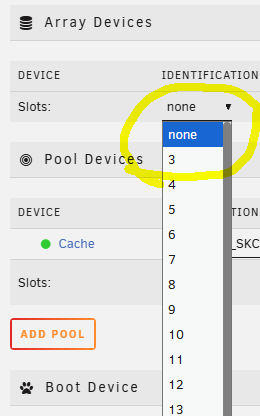
Vielen Dank für die Antwort! Das Terramaster-Laufwerk habe ich mal ausgebaut. Trotzdem ist die minimale Anzahl an Slots für ein Array 3, wovon immer 2 Slots für mögliche Parity-Laufwerke reserviert sind. Das war mir aus der Anleitung nicht klar geworden. Nun passt alles.
-
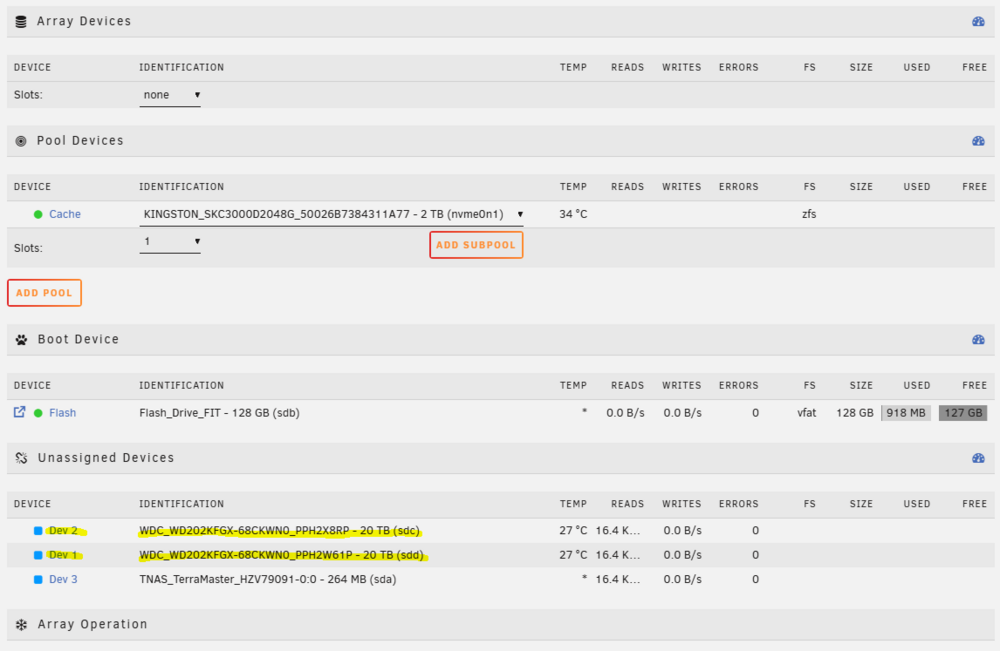
Hallo, vor kurzem habe ich mir ein Terramaster F4-425 plus gekauft. Ich möchte nun mit 2 HDD's (je 20 TB) und 1 NVME SSD (2 TB) starten. Folgende Übersicht zu den Platten: Nun möchte ich aus den 2 HDD's ein Array mit 2 Slots (1 Parity und 1 Daten) machen. Allerdings kann ich nur minimal 3 Slots auswählen: Mache ich etwas falsch oder ist es tatsächlich so, dass man für ein Array mindestens 3 Slots benötigt? Wenn ich 3 Slots wähle, müsste ich es so konfigurieren, indem 1 Parity-Slot "unassigned" ist: Oder stört das Terramaster-Laufwerk sda? Falls ja, kann man Laufwerke im Unraid unsichtbar machen? Vielen Dank für einen kurzen Tipp und Grüße!


View in the app
A better way to browse. Learn more.

