




Skip to content
View in the app

A better way to browse. Learn more.

Unraid

A full-screen app on your home screen with push notifications, badges and more.

To install this app on iOS and iPadOS
  1. Tap the Share icon in Safari
  2. Scroll the menu and tap Add to Home Screen.
  3. Tap Add in the top-right corner.
To install this app on Android
  1. Tap the 3-dot menu (⋮) in the top-right corner of the browser.
  2. Tap Add to Home screen or Install app.
  3. Confirm by tapping Install.

Codon

Members
  • Joined

  • Last visited

  1. In safe mode it works, so its one of my plugins then?
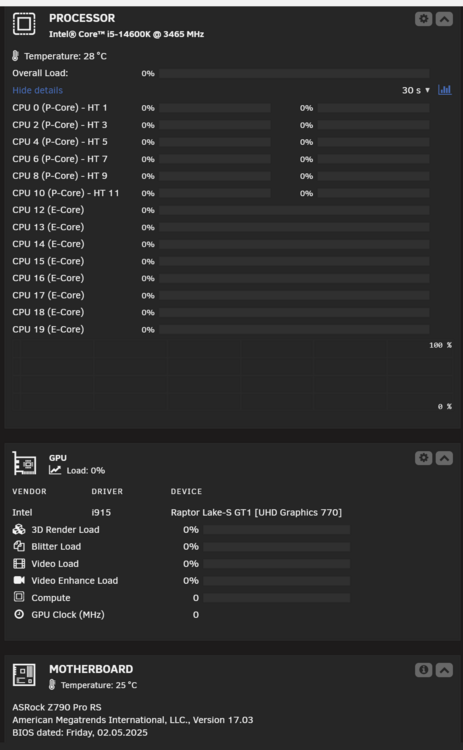
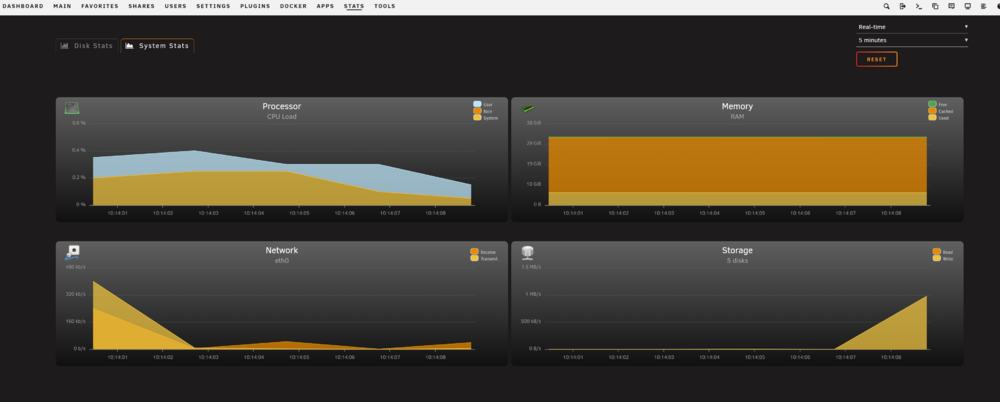
  2. Hi all, i am quite new to Unraid, figured out quite a lot so far and really enjoying it! One problem i still have is that my CPU load is not showing correctly on my dashboard (see picture below). The GPU is actually working, since when i use it to transcode videos it starts showing some loads. I have installed Dynamix System Information, Intel GPU TOP, and Dynamix System Statistics. I already tried installing the plugin freshly, but it didnt help. Also in the Stats screen from Dynamix System Statistics plugin the CPU load shows correct (see second picture). My motherboard is also nearly up to date (only one newer version is available). What can i do to fix this? Many thanks in advance!
Account

Navigation

Search

Search

Configure browser push notifications

Chrome (Android)
  1. Tap the lock icon next to the address bar.
  2. Tap Permissions → Notifications.
  3. Adjust your preference.
Chrome (Desktop)
  1. Click the padlock icon in the address bar.
  2. Select Site settings.
  3. Find Notifications and adjust your preference.