






pepprom
Members
-
Joined
-
Last visited
-
Guys, I need some help! 😅 I’m assuming this is something I need to do, but I’m a bit lost. After updating Unraid to 7.3.2 and Binhex PlexPass, I can no longer access my Plex Server. The server has also disappeared from all the devices where I normally use Plex. I’m guessing that somehow Plex has lost the login/account connection on the server. The problem is that I’m currently abroad, so I cannot physically access the server. I can connect to my Unraid server remotely using Tailscale, so I know I can reach the server. 👍 However, when I try to open the Plex Web UI, it only seems to be available through the local IP address, and I cannot figure out how to get to the Plex login page remotely so I can log back into my Plex account. The procedure described above is a bit too technical for me, and honestly, I’m not sure what I’m supposed to click or where I’m supposed to type the commands. 😅 Could someone please explain it in a very simple, step-by-step way, preferably with fewer acronyms and assuming I’m a bit of a dummy? 😂 Basically, I just need to know: How do I access the Plex Web UI remotely through Tailscale? How do I log Plex back into my Plex account? How do I get my server visible again on my other devices? Thanks in advance for your patience! 🙏😋
-
Dear @JorgeB I have done the parity. Before restarting the ARRAY, I have also format the CACHE (now xfs) and also upgrade the firmware of the BIOS. I already noted that the scan in Plex is better distributed on the CPU and seems a bit more responsive. I hope I don't get any other weird problem. Thanks again
-
Perfect. While I see only the CACHE disk is in such format type. What would you recommend? Format the CACHE in other format will NOT delete any data, correct? Thanks
-
I believe there is an issue with my Unraid configuration. After multiple parity checks since I first set up the server, I completed another one yesterday. As soon as it finished, I again had the same problem: my containers failed to start, so I had to reinstall Plex and rescan my entire library. This morning, when I checked the server, Plex had disappeared from the Docker tab. I decided to stop the array and restart the server, but the array would not stop and kept showing the message “Retry unmounting disk share(s)”. In the terminal I could see the same message repeating. Eventually I decided the shutdown of the server and restart, and now I am once again in an automatic parity check, which will take another 24 hours. pepperaid-diagnostics-20260515-0644.zip
-
Done as I wrote above too. Now the problem come back again. What I note that there is a link on when I got CPU at 100% working .........
-
I keep having an issue where sometimes the whole system gets stuck during shutdown. Even if I start a proper shutdown process, it does not power off, and I end up having to force the shutdown by holding the power button. When I turn it back on, Unraid always starts a parity check. At the moment it is running another parity check that will take about 16 hours, and I am worried that, once it finishes, I might face the same issue again with Plex not being accessible. I have also noticed another problem: when I restart the server and there is no keyboard or mouse connected, it does not seem to boot automatically. Is there any specific BIOS setting that would allow the server to start correctly even without any input devices connected? pepperaid-diagnostics-20260513-1524.zip
-
I install recently UNRAID, and I'm keeping having an issue that on restart that ask to make Parity, and once completed and all seems work, I launch the Plex app and I got this , and I don't understand what I can do, and how to avoid the issue. Looks like there’s a problem with this siteFirefox can’t connect to the server at 192.168.2.222:32400
-
@JorgeB I did as you suggest. The array started and I was able to start the array in normal mode without any Parity check. At same the issue with APP still persist, Plex and Krusader says : PLEX : Looks like there’s a problem with this site Firefox can’t connect to the server at 192.168.2.222:32400 Krusader : Failed connect to the server Note sure what is the best to do ...... pepperaid-diagnostics-20260508-1132.zip pepperaid-safemode-diagnostics-20260508-1107.zip
-
Yes, you are right. Asap finish this Parity, I will follow your previous recommendation, and let you know if something change. Thanks again
-
I had to force restart again, and again the PARITY CHECK ...... 15 hours to wait. APP during parity are NOT working. I leave down also the DIAGNOSTIC after the restart , with PARITY ongoing. pepperaid-diagnostics-20260507-0852.zip
-
I got definitely some issue in simply shoutdown the server with UNRAID. Not sure if at Workstation level , maybe some configuration missing in BIOS? At UNRAID level , maybe I'm too amateur to understand what I'm doing wrong? Maybe simply too many things run at same time , Krusader copying while Plex scanning ? I got 3 of the CPU constantly at 100%...... that seems weird. I hope someone can give a support on what is the issue here. pepperaid-diagnostics-20260507-0826.zip
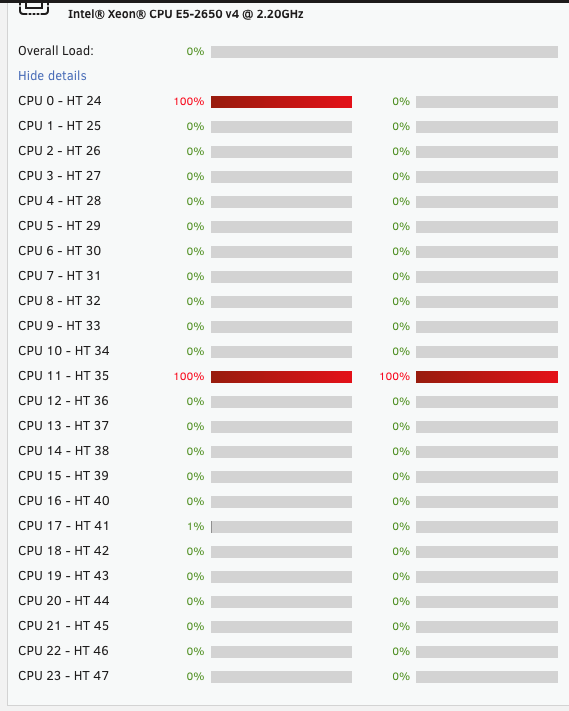
-
pepperaid-diagnostics-20260505-1738.zip
-
Not sure if mean anything , if I see the LOG is constantly writing : May 5 17:25:21 PeppeRAID emhttpd: error: get_key_info, 722: Invalid argument (22): stat: /boot/config/Trial.key May 5 17:25:22 PeppeRAID emhttpd: error: get_key_info, 722: Invalid argument (22): stat: /boot/config/Trial.key
-
@ConnerVT Now I have manage to get the Diagnostics file , while with parity ongoing I need to find a proper way to download it. I want wait for this parity to terminate , and then I will follow @JorgeB suggestion.
-
ENOVO 1030 , Version SDK0J40697 WIN 3305038539247 LENOVO, Version S01KT63A BIOS dated: Tuesday, 19-02-2019 2xIntel® Xeon® CPU E5-2650 v4 @ 2.20GHz RAM 96 GB 2x14 Tb WD Gold + 8Tb WD Gold + cache SAMSUNG SSD 512 Gb I have installed UNRAID version 7.2.5 , and when I shoutdown the system it will sort of not complete the shutdown..... I wait something like 1hour and I had to force shoutdown and consequently at switch on parity restarted (meaning 14-16 hours waiting). What I'm doing wrong? How to proper shoutdown the system? Moreover when doing PARITY the APP are not working, and already PLEX and KRUSADER also give error message once Parity completed. I need some help. Thanks

