howardb
Members
-
Joined
-
Last visited
-
I did the extended self-test which returned "Last SMART test result: Completed without error" Dashboard array section still shows "Array has 1 SMART error. " but i'll live with that for now, whilst i explore UnRaid. Many thanks to those who have answered my question. Every day is a school day!
-
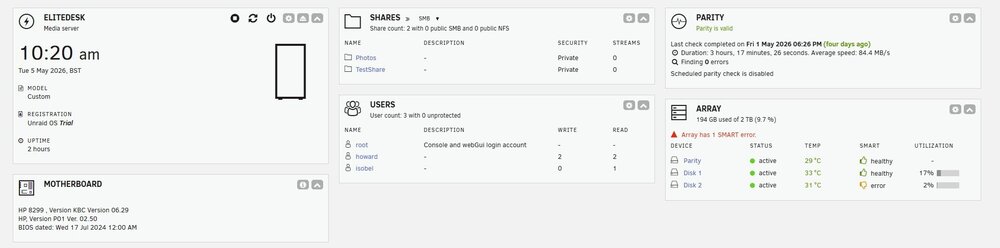
Many thanks for the replies. I attach the diagnostic file in the hope it means something? The allocation method was indeed "High water". I'm just finding my way around the system, so kept everything with the default settings. At the moment it works fine, but 'll look into the different options later. Ah, so i was getting confused comparing UnRaid to Raid. Would i benefit in anyway by adding a SSD drive for cache? elitedesk-diagnostics-20260505-1356.zip
-
Hello, I bought a HP EliteDesk 800 to try unraid on. I had two spare 1TB 3.5inch drives which i set for my main storage. I also bought a 1TB 2.5inch to act as parity. I do note that one of the drives is showing a SMART error, but as im only evaluating Im not too bothered as the files are backed up elsewhere. Should i be concerened long term with this? Ive set up some shares and started to put files into them, accessing over my network from different computers. However, im confused by the information im seeing relating to the array devices - Why is there not an equal split of used space on the array? If disk1 dies, can i expect to fully recover all the information if I install a replacement disk? I just cant get my head around the unequal split of data across the drives. Why is there no used space on the parity drive? How much storage space do i actually have? I was expecting 1TB but it would appear i have 2TB? With this basic system, which currently is just used to hold photos and documents, would i benefit from fitting a SSD for the cache? Thanks.