





Ricardo777
Members
-
Joined
-
Last visited
Everything posted by Ricardo777
-
For me it looks fixed. I rebooted a couple times after doing some work, and the plugin is still active and set. Thank you for the fix.
-
I had the same thing happening when upgrading unraid to the latest version. Exactly the same thing happend.
-
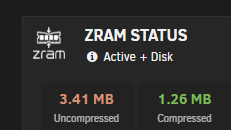
I tested the image by replacing it by hand in the plugin directory. In Unraid I use dark mode as theme, and with the new black icon this does not work nicely. Attached is a version for the dark mode theme, I don't know if you can swap them out checking the used theme in Unraid.

-
Thank you, will await the new update to try. Tried the master repo but this uses some private git.
-
Thank you for the quick reply. I also generated some images with AI, but removed the BG, here is a zip attatched with your orginal logo with removed bacground and also a vector file. And some other version, you may want to use if you like them more. Thank you for the plugin, hope my VM will now stay online. You can temporary download the files here: https://temp.sh/mYxTy/Zram.zip
-
Great plugin, testing it out on my limited ram Beelink nas. @johner One question, is there a particular reason the logo is with a white background? Is looks off in the dashboard comparing to all other icons.
