





johner
Members
-
Joined
-
Last visited
-
Hi bobokun, thanks for the report. You found a real fault, and I can see it on my own test server too. What it is: The plugin has a small web endpoint for linked Relay clients. It was saved as a .page file, but it is not a menu page and has no page header. Unraid reads every .page file whenever it draws a page, so it logged "Invalid .page format" each time. It is harmless, but it fills the system log. The fix: The endpoint is now a plain PHP file that the plugin loads itself, so Unraid no longer sees it. The update also removes the old file. I checked that the message stops after the update, and Relay linking is not affected. When: The fix will come with the next update. I'll post here when it is out. Until then: you can ignore the message, because nothing breaks. If you want the log quiet, you can delete /usr/local/emhttp/plugins/unraid-aicliagents/AICliRelayMcp.page. The message will come back after a reboot or a plugin reinstall, that step on a newer build than the public one, so please only do it if you are comfortable with it. Thanks again for the clear report.
-
Hi all, thank you for the reports and the patience. A new release is now in the Community Applications store: version 2026.10.01.04. It also includes the release before it (2026.09.30.04), so if you are still on 2026.09.15.08 you get everything in one update. Please update soon if you run Unraid 7.3.2. In the old version the home backup step did not write a backup file on that Unraid version. The plugin then refused to merge your home, and every save packed the live database instead. This is fixed. The backup is now written and checked before the plugin uses it. Other fixes for problems you reported Storage on /mnt/user is allowed, but the plugin now advises against it. It also uses the real pool path when the share is set to "cache only". A rebuild of the agent layers no longer switches the agent in the middle of the build. A build that would lose the agent program is now refused. Cache folders are left out of the compressed layer instead of being deleted from your live home. The installer shows its progress lines again. A workspace order in the drawer now stays after an update. A new workspace waits until it is ready before it loads its terminal. New A workspace can continue by itself after a temporary model error, and you can schedule a Continue for any workspace. Voice: you can set up natural voice and local dictation from Settings. Please tell me if anything still goes wrong after the update. It helps most if you say your Unraid version and which agent you use.
-
Thank you, this is fixed in the next release (shortly - lots of fixes and updates!)
-
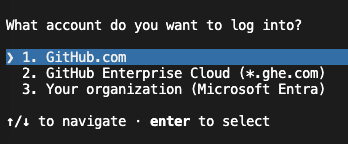
Hi, When you start the agent in a workspace, type /login, you'll then get a menu of options: Is this what you meant? Thanks John
-
Thanks, done: https://product.unraid.net/p/unraid-connections-new-plugin
-
Hi, I was dipping the toes into this as I didn't want to open people up to security risks by rushing in, I think this would be useful. I have a few defects to fix, I'll then focus on this idea - thank you!
-
Hi, I performed a fresh install on Unraid 7.3.2 from the app store, tested claude and codex, chrome and safari (both mac), all seems ok. Let me know if you were able to get more diagnostics. Thanks John
-
> Thanks > > ENOENT: no such file or directory, mkdir > /tmp/unraid-aicliagents/work/root/home/.cache/opencode/bin > > The current launcher already creates the required parent cache directory before OpenCode starts, so this is unlikely to be a simple missing-directory fix. It suggests either a timing race, a managed-home remount/sync occurring during launch, or an older launcher generation still being used. > > Before trying again, could you please provide: > > 1. The exact plugin and OpenCode versions. > 2. Whether both workspaces use OpenCode, and whether they use different workspace folders. > 3. Your configured agent-home/storage location — default, USB, pool, array, or Unassigned Device. > 4. Whether a backup, home consolidation, plugin upgrade, or storage-location change was happening around the same time. > 5. The relevant timestamp and debug-log lines covering the first workspace launch and the failed second launch. > 6. Whether pressing Enter to retry succeeds after the first workspace is closed. > > Please avoid repeatedly retrying if the server becomes unstable. The report that the host became unreachable after moving storage off USB is being treated as a separate host-stability concern
-
> Thanks for reporting this > > The confirmed problems are: > > - the Relay listener can survive an upgrade while still running old plugin code; > - Relay currently enables its external listener/key path too eagerly; > - workspace browsing can perform large directory scans through /mnt/user; (which can expose the Unraid shfs fuser hang issue I can't work around on Array style shares) > - agent workspaces also default to /mnt/user, which can put heavy filesystem pressure on Unraid’s user-share layer. > > Those last two are plausible contributors to the host becoming unreachable, although I cannot prove that from the report alone. I am treating them as high-priority stability work. > > To identify the remaining reports, could you please provide: > > 1. Plugin version, Unraid version, browser and browser version. > 2. For onboarding or JavaScript failures: the first browser Dev Tools Console error/stack and any failed Network request. > 3. For the terminal issue: which terminal is affected — the normal Unraid top-bar terminal, the AICliAgents terminal, or creating a new workspace — plus a screenshot/error and whether it works from the Dashboard in the same browser session. > > 4. If the server becomes unreachable again, please do not deliberately repeat it. After recovery, send the approximate time, Unraid Diagnostics, and /boot/logs/syslog-previous if available. > > That will let me separate browser/UI failures from the host-level filesystem issue and add targeted regression coverage
-
so a couple things, worth noting, if your Unraid host still boots off USB, the default settings are to install both the home and agents to a path on the USB, so any activity to bulk writ will be slow, such as agent upgrades, on home area consolidation. You can move these else where, ideally not on the array if you want it to function with the array offline - try an unassigned drive (see that plugin). I have added more onine feedback of status updates on home/agent activity (better progress tracking), that'll be available once I finish testing this new version. Also, I noticed agents that perform certain hard hitting commands against the \mnt\user paths it can block Unraids merged file system, this is a limitation of Unraid's fs as I understand it, abd so far I have a rule/memory line to tell the agent to use the underlying paths, such as \mnt\cache, or to be less aggressive with the find, grep etc. I might need some further context from you both, but let me see if claude can find anything suspicious in the code given the commentary. Thanks for being patient!
-
thanks for reporting, would you mind testing in the latest version please?
-
Hey @Squid , Would you mind checking out this plugin to see if it meets the criteria for the app store please?
-
I've updated the link, would you mind trying again please?
-
Sorry, didn’t get the diagnostics, and yes at one point I got it to group a ton of containers it was managing. It was a mix of auto and manual config.
-
only if you're still having issues with the new version, else skip it.
