photodyer
Members
-
Joined
-
Last visited
Everything posted by photodyer
-
No errors spawning. Rebooted, server came back up clean. Attaching diagnostics, but looks like back on stable ground. Now, I just need to devote some serious time to upgrading, reconfiguring, and in general learning to better manage this beast. Jorge...Thanks aren't enough. You rock and this community rocks. I'm sure I will be back as I start the journey in earnest! Best to you, Jerry Trapp tower-diagnostics-20260608-0902.zip
-
I reset the pool stats after the clear scrub, about the time of my last post. No new errors, at least up until I left for work 10 hours ago.
-
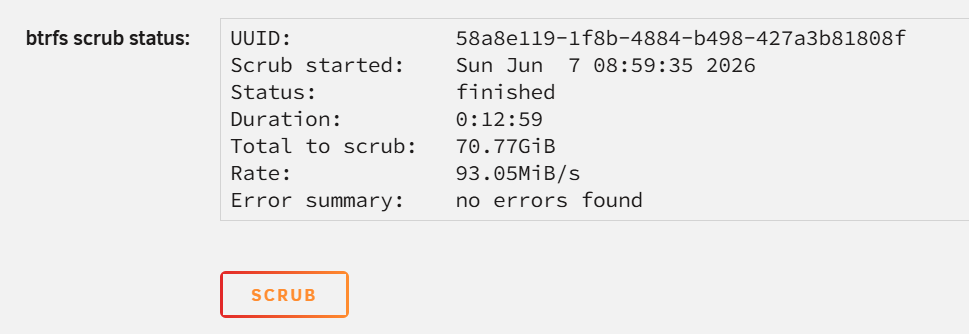
Found the source of this particular problem...again my error. I reinstalled the wrong Plex. Realized that when I saw the last action on the offending app was years ago, went back and found the correct one and it installed and worked right away. The uncorrectable error was .db file in the wrong install. Uninstalled the wrong Plex, deleted the uncorrectable file. Scrub is now clean. Sorry...Flipping back and forth on nights I missed that until now.
-
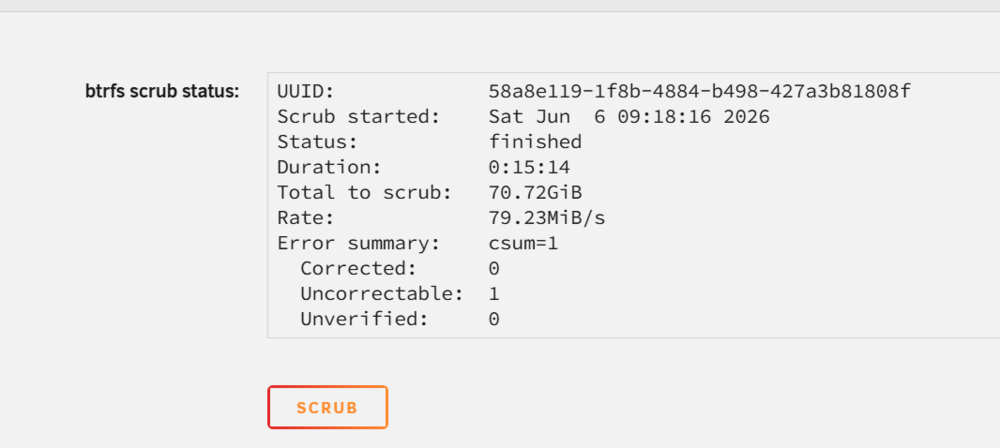
Memtest ran all night on one pair, all passes. Booted up without issue. But then here things go sideways again. Ran scrub on pool...which comes back with 1 uncorrectable error.
-
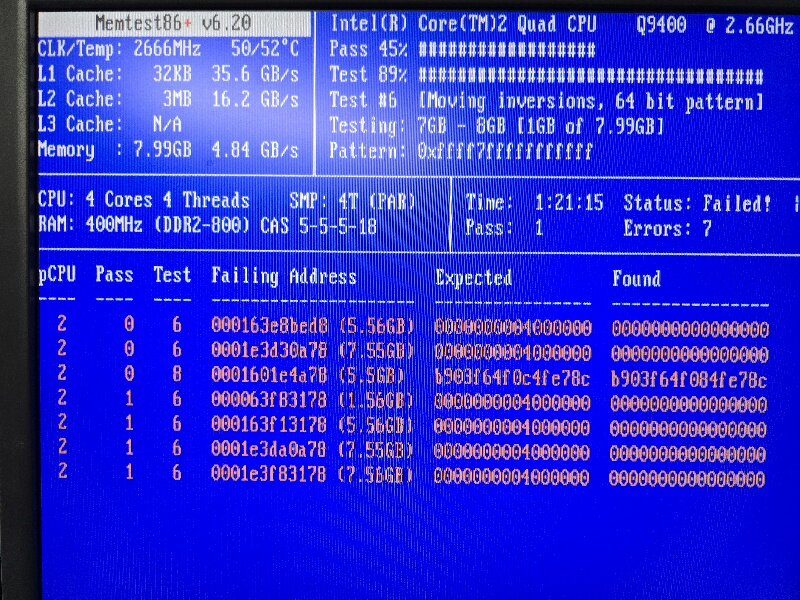
Took the server down, dusted it out again, checked all cable connections, pull all ram sticks and reseated them in reverse order to get all sticks in new positions and channels. Went into BIOS and noted that under "DRAM Performance Control", "Performance Enhance" was set to "Turbo" by default; changed setting to "Standard" just to rule out another variable. Saved BIOS config and went back into memtest, was running better but still eventually started throwing errors. Stopped system, pulled and numbered DIMMS. 1 and 3 are now running in slots 0 & 2 and have PASSED first pool cycle and running still. Will stop this before I leave for work and start DIMMS 2 and 4 in the same slots, expect fail. So assuming server can run on single pair for now, should be able to move forward.
-
Crap...it's throwing errors. I assume stop and try reseating/checking connections as a first step then run again?
-
Memtest v6.2 running as directed. Is it a finite test or do I need to stop it at some point?
-
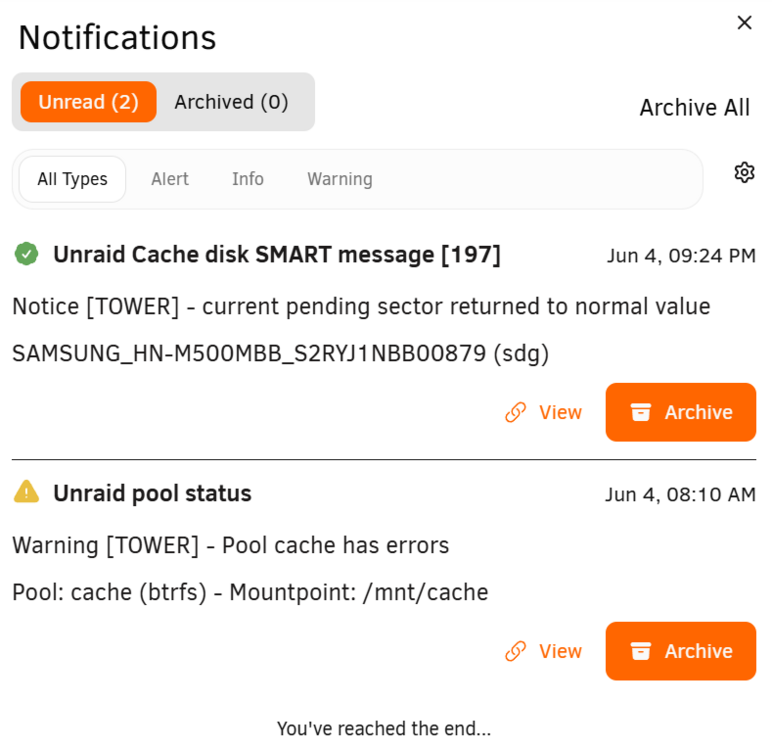
Not at all sure what's going on, but the CPU cores are redlining back forth working on something. Cache errors up to 3861. Plex still unable to open, same migration statement coming up. These are notifications from morning and evening:
-
New diag attached tower-diagnostics-20260604-1224.zip
-
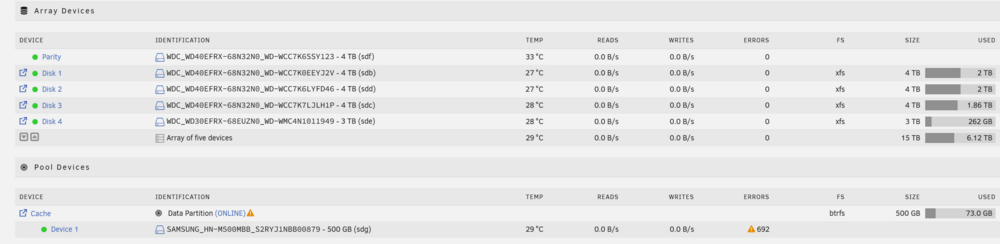
Plex migration still running, Cache is showing errors. And the number of errors is increasing.
-
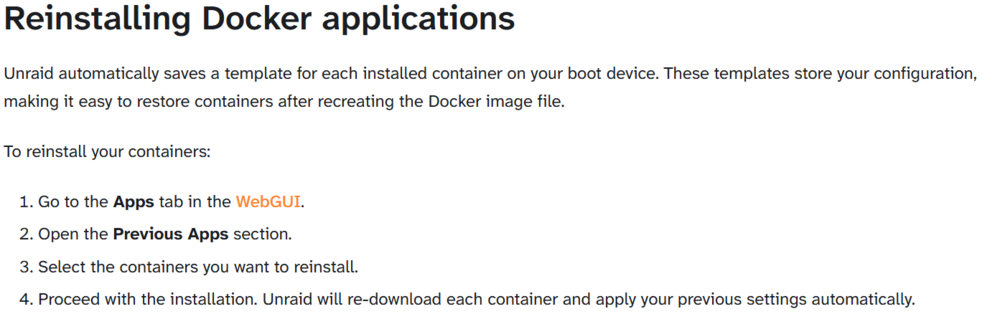
Followed first article. Had a little hiccup as there were multiple installs of "official" Plex listed and the last was evidently not the latest. Saw in log that it failed, and indeed that docker wasn't reinstalled. Went back in and did reinstall on the other Plex and it installed immediately. Can't check Plex yet as trying to open the WebUI gives "running data migration" code.


-
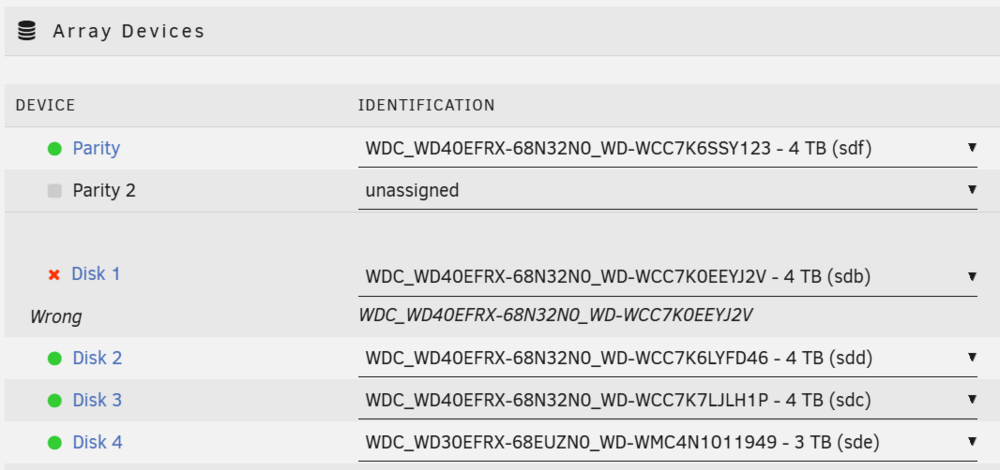
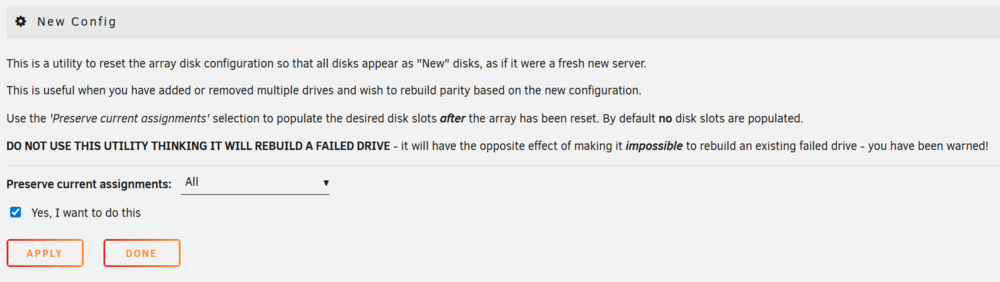
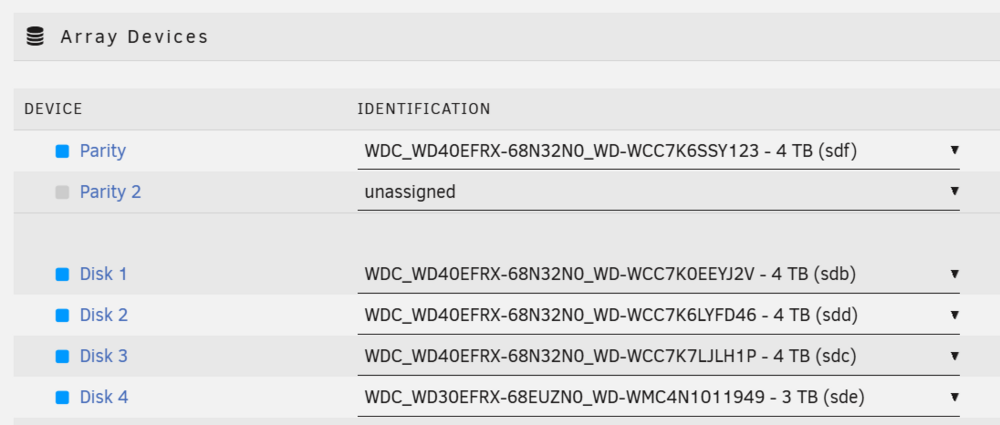
Command ran fine! Rebooted, Disk1 "wrong" as expected. New config, preserve ALL, apply. On main, all devices in proper assignments, blue dots present. Check "parity is already valid", Start array. Done. New diagnostics attached. tower-diagnostics-20260604-0714.zip



-
Rebooted, ran diagnostics, attached tower-diagnostics-20260603-2126.zip
-
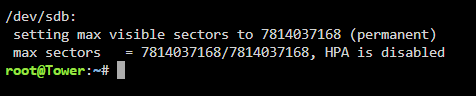
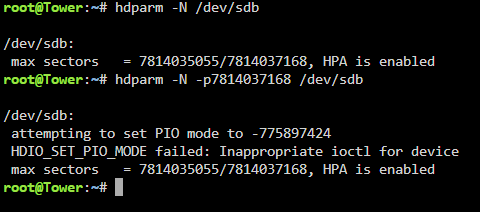
Ack, came back and found my error, typed -p not p Will now reboot and run diag.
-
Ran the command as directed, but it states it failed (see snip). Did not reboot yet given the fail message.
-
Updated BIOS to latest; regrettably no "HERE I AM" new setting in BIOS menus for toggling HPA. Been up for 20 hours...will run command provided [ hdparm -N /dev/sdb ] after a few hours sleep and post back. Many thanks for your patience and assistance.
-
Gigabyte had legacy BIOS updates online. The documentation for them is next to nonexistent, but will flash the last BIOS release this evening to see if it provides control for HPA.
-
And from reading the issue description post, if HPA is still being instituted by BIOS, then will disabling it to Disk1 cause the BIOS to potentially drop the HPA on the parity drive?
-
sdc or sdb? sdb is Disk1.
-
I'm not finding a setting in CMOS that resembles any of the suggested labels in the attached article. The only feature in BIOS I find related to drives is the toggle for HDD S.M.A.R.T. There is an Express Recovery 2 mentioned on the BIOS Splash, but hitting it tells me to install it from CD so guessing that's not what I'm looking for.
-
Array stopped. Fdisk as follows: -------------- root@Tower:~# fdisk -l /dev/sdb Disk /dev/sdb: 3.64 TiB, 4000785948160 bytes, 7814035055 sectors Disk model: WDC WD40EFRX-68N Units: sectors of 1 * 512 = 512 bytes Sector size (logical/physical): 512 bytes / 4096 bytes I/O size (minimum/optimal): 4096 bytes / 4096 bytes Disklabel type: gpt Disk identifier: 6762BB78-CD20-4754-B782-107576AB0130 Device Start End Sectors Size Type /dev/sdb1 64 7814035021 7814034958 3.6T Linux filesystem ------------- New diagnostics run, attached. tower-diagnostics-20260601-1133.zip
-
Verified Disk1 still sdb. Ran command with this result: ------------------------- root@Tower:~# sgdisk -o -a 8 -n 1:32K:0 /dev/sdb Warning! Disk size is smaller than the main header indicates! Loading secondary header from the last sector of the disk! You should use 'v' to verify disk integrity, and perhaps options on the experts' menu to repair the disk. Caution: invalid backup GPT header, but valid main header; regenerating backup header from main header. Warning! One or more CRCs don't match. You should repair the disk! Main header: OK Backup header: ERROR Main partition table: OK Backup partition table: ERROR **************************************************************************** Caution: Found protective or hybrid MBR and corrupt GPT. Using GPT, but disk verification and recovery are STRONGLY recommended. **************************************************************************** The operation has completed successfully. ------------------ Rebooted. Disk1 does not show as "wrong" as it did at the beginning of this issue, rather has the same message on Main of "Unmountable: wrong or no file system". Array auto-started without including Disk1. Stopped here to clarify whether this is what I should be seeing before doing New Config.

-
Array stopped, fdisk run. root@Tower:~# fdisk -l /dev/sdb Disk /dev/sdb: 3.64 TiB, 4000785948160 bytes, 7814035055 sectors Disk model: WDC WD40EFRX-68N Units: sectors of 1 * 512 = 512 bytes Sector size (logical/physical): 512 bytes / 4096 bytes I/O size (minimum/optimal): 4096 bytes / 4096 bytes Disklabel type: dos Disk identifier: 0x00000000 Device Boot Start End Sectors Size Id Type /dev/sdb1 1 4294967295 4294967295 2T ee GPT Partition 1 does not start on physical sector boundary.
-
Array in maintenance stopped, restarted in running mode. Diagnostics run and attached tower-diagnostics-20260531-1034.zip
-
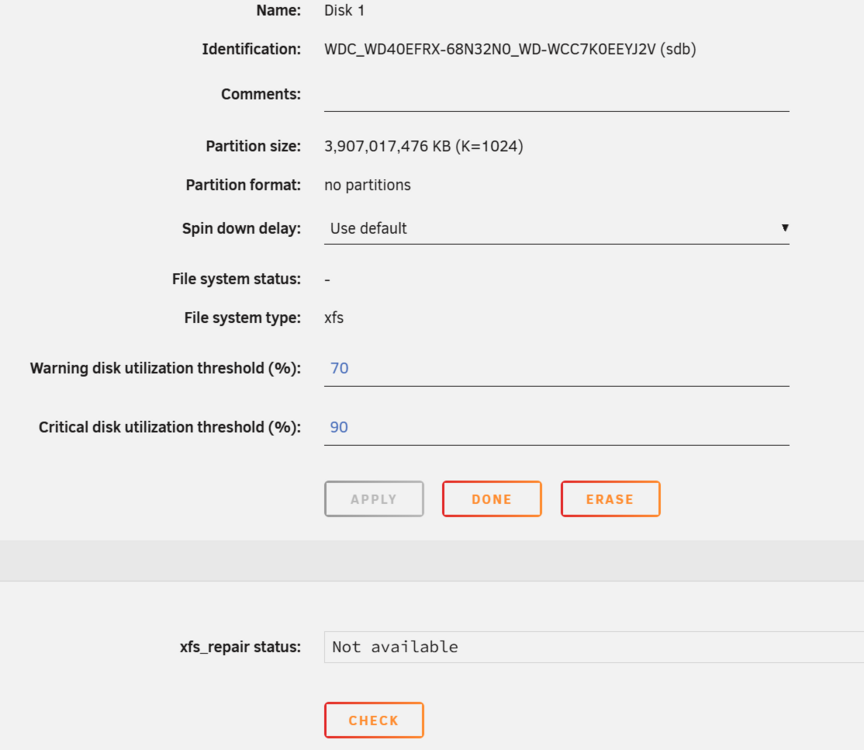
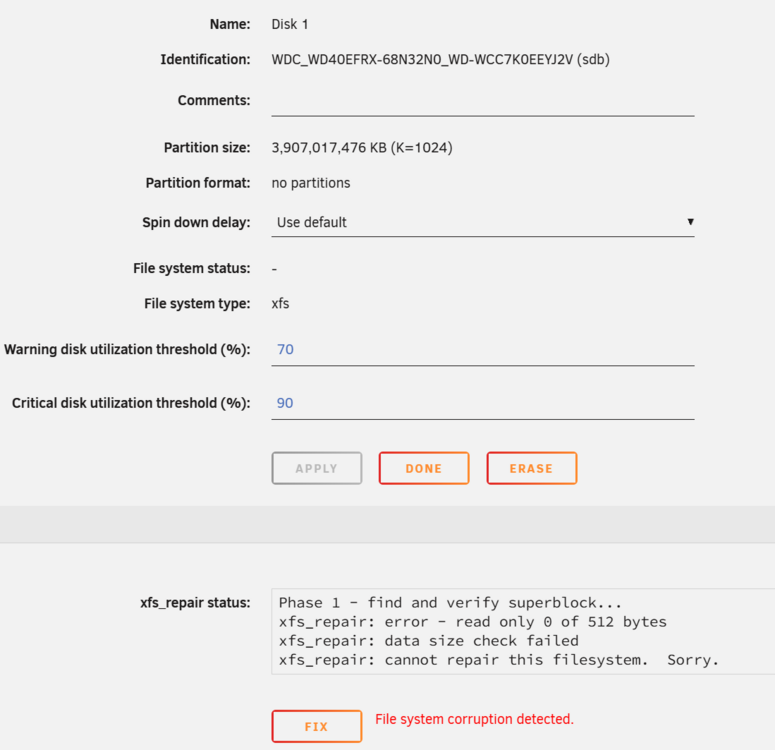
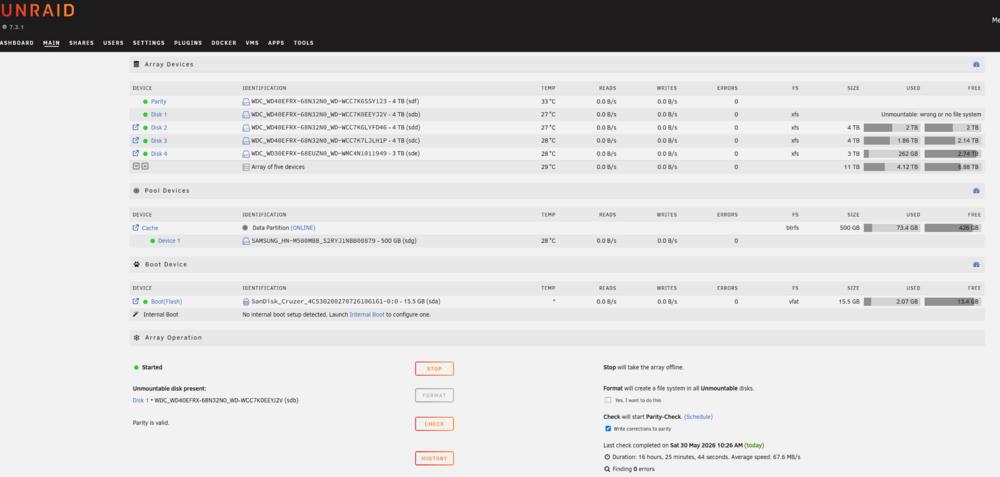
I will preface by admitting that I set up UnRaid server years ago and have not given it much focus since. I set it up to run a Plex server for my kids and me (single dad) , and have not done much beyond that other than catch up updates and troubleshoot small issues. I was in the process of better-acquainting myself with UnRaid in preparation to upgrade server drives when this all went sideways...Now trying to get back to functional so that I can work towards a more stable setup. In prep for disk upgrades, I figured it best to update "everything". Watched upgrade vid from AlienTech42 for stepwise prep. I backed up the boot drive, checked SMART on all drives (no errors), updated plugins and dockers, stopped the array, and ran update from 7.0.3 to 7.3.1. After update and reboot, server didn't come back up. Went to office and hardware rebooted, and knew there were problems when I heard an internal drive (the cache) trying to boot. Hard rebooted again and went into CMOS and found evidently CMOS battery was dead and boot config had been dropped so that it was trying to boot from cache drive rather than USB. Replaced CMOS battery, fixed boot order, and booted server back up. Booted up fine this time, but array did not start, pointing at my Disk 1 and saying the "replacement" drive was too small, though it was the same drive. Cache drive also had a error. Started array in maintenance mode, cache fixed seemingly without issue. However, Disk 1 would not fix with xfs_repair (watched SpaceInvaderOne fix video; it didn't directly address array disks, but got the gist that needed to r un repair tool). Tried running xfs_repair from cmd, same issue (no superblock found). Went ahead and synced parity, then checked parity, all without issue. But Disk 1 still shows unmountable. snips attached, again xfs_repair says it can't repair the file system. Disk 1 SMART short test comes back no errors. Also noted after reboot back in one last time to see if by chance it would fix that my dockers are gone. I only had Plex, filebot, and Jellyfin, but all are gone. I'm assuming it is likely an issue with how my appdata is set up; including a snip of drives info. Data in shares appears to be intact, though admittedly I did not get out to check every file directly. The server was running 15TB (4+4+4+3) plus single parity and was not yet at half capacity. So, question is can Disk1 be made remountable? If not, what is best process for going forward ? I know from documentation that I cannot simply replace Disk 1 in this state as the new disk would be unmountable as well due to lack of file system. I have in the wings right now 5 new 8tb drives that are planned for swap in as the box doesn't have enough room to house more drives (except maybe a 2nd cache). Next question is what have I done wrong (appdata?) up to now that caused my dockers to disappear and how do I correct it to best practice going forward?