





fatp1ngu
Members
-
Joined
-
Last visited
Everything posted by fatp1ngu
-
New Config worked so I have done this to get the Array back up and the Parity Check is running. Thank you for all your support
-
Diagnostics attached pingunas-diagnostics-20260616-1333.zip
-
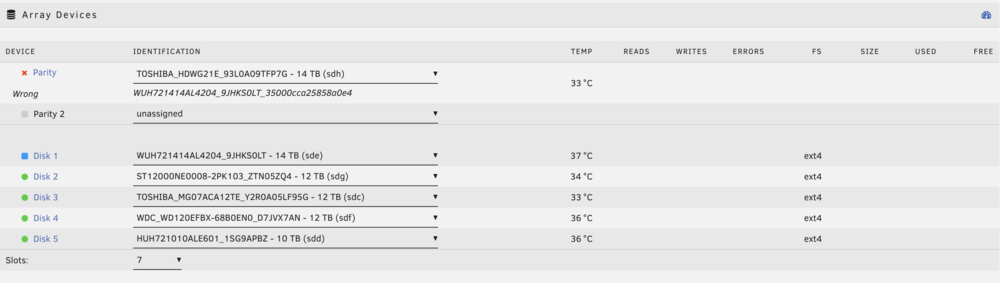
I set up the parity swap exactly as advised - Toshiba (the sector-64 disk) TFP7G to the Parity slot, old WD parity S0LT to Disk 1, all other disks unchanged. But no "Copy" button appears. The Parity row shows the Toshiba on top with the old WD serial underneath labelled "Wrong," and the array still says "Disk in parity slot is not biggest." So the swap isn't being recognised / the size check is still blocking. What am I missing - is the Toshiba's sector-64 partition also defeating the check in the parity slot? I started the array again with WD parity S0LT in Parity Slot 1 and Toshiba unassigned, then stopped array again and tried the steps as described (remove Unassign WD Parity drive, Set Toshiba to Parity Slot, Set WD to Disk 1) but there is again no copy showing. It just says 'Disk in parity slot is not the biggest' again. Appreciate any help
-
Thanks for testing that - really appreciate it. I don't have a spare 4Kn disk, so the Parity Swap looks like my route. Before I start: anything specific about the Parity Swap procedure I should watch for given the 4Kn parity, or is it the standard flow in the docs? Thanks again for all your efforts!
-
Thank you very much. I really appreciate any help / support that you are able to give.
-
Thanks - I've started the array with Disk 1 unassigned/emulated for now so I have access. For the permanent fix: hoping there is a safe procedure to rebuild Disk 1 back into the array with a standard 2048-aligned partition, and a way to confirm my parity is valid so the rebuild restores the emulated contents intact?
-
Correct - all these disks were migrated from OpenMediaVault (OMV 7) with their existing ext4 filesystems and partitions kept intact, rather than being freshly partitioned in Unraid. So Disk 1's sector-64 partition offset is a leftover from its prior Linux setup. Given that, what's the safe way to rebuild Disk 1 with a standard partition while preserving the emulated data via parity? And can you confirm parity is valid so the rebuild restores the contents?
-
Unraid 7.2.4. I'm stuck getting a disabled array disk to rebuild, and I'd appreciate a sanity check before I do anything that might risk parity. ***The system was migrated from an OpenMediaVault setup previously which is why the format of the drives is EXT4. I did this to preserve the data that was on the drives for the migration.*** - EDIT Sequence of events: Disk 1 (Toshiba HDWG21E, 14TB) became disabled (red X, contents emulated). Root cause was the drive briefly dropping off my LSI HBA - kernel showed device_block then mpt3sas_transport_port_remove, and it re-enumerated as a new device. So a connection/transport event, not a media failure. I confirmed the drive is healthy: SMART PASSED, 0 reallocated / 0 pending / 0 offline-uncorrectable / 0 CRC, and a full extended SMART self-test completed without error. I powered down and reseated the HBA, cables and card. Clean boot afterward - all disks present, no mpt2sas errors, Disk 1 correctly assigned and showing disabled/emulated, parity green. Starting the array did not trigger a rebuild (Disk 1 stayed disabled, no rebuild prompt). I then stopped the array, set Disk 1 to "No device", started (Disk 1 now missing/emulated), stopped, and reassigned the same Toshiba to Disk 1. Now the array won't start: "Stopped. Disk in parity slot is not biggest." The disks are the same size. fdisk -l shows both at exactly 14000519643136 bytes: Parity = WD Ultrastar WUH721414AL4204 (sde): 3,418,095,616 sectors × 4096-byte sectors Disk 1 = Toshiba HDWG21E (sdh): 27,344,764,928 sectors × 512-byte sectors Different sector sizes, identical byte capacity. They coexisted fine for weeks before this — the error only appeared after the unassign/reassign of Disk 1. HPA check is inconclusive on the parity disk. All my array drives are behind an LSI SAS2008 HBA (mpt2sas). hdparm -N: sdh (Toshiba): max sectors = 27344764928/27344764928, HPA is disabled - clean. sde (WD parity): SG_IO: bad/missing sense data and max sectors = 0/513, HPA is enabled- which looks like hdparm failing to query through the HBA rather than a real HPA. Questions: Is my parity still valid here, and is the emulated Disk 1 data safe? What's the correct way to get Disk 1 rebuilding without risking parity? (I have not touched New Config or moved any disk into the parity slot.) Is the "not biggest" being caused by the unassign/reassign rather than a real size/HPA issue, and if so how do I clear it safely? Diagnostics attached. Thanks - I'd rather get this confirmed than guess with parity involved. motherboard (MSI PRO B760M-P DDR4), CPU (i3-12100), the LSI SAS2008 HBA, and the array drives are all behind that HBA pingunas-diagnostics-20260606-0858.zip

