





dbe
Members
-
Joined
-
Last visited
-
Danke für eure Erklärungen :-) So langsam fange ich es an zu verstehen. Morgen beginne ich wieder mit der Einrichtung. Ich hoffe ich mache das jetzt richtig!!!! :-) Vielen Dank für eure Hilfe!!!! Ich freue mich schon sehr auf Morgen. Bin gespannt ob ich es jetzt schaffe es so einzurichten wie ich es mir auch vorstelle. :-))))
-
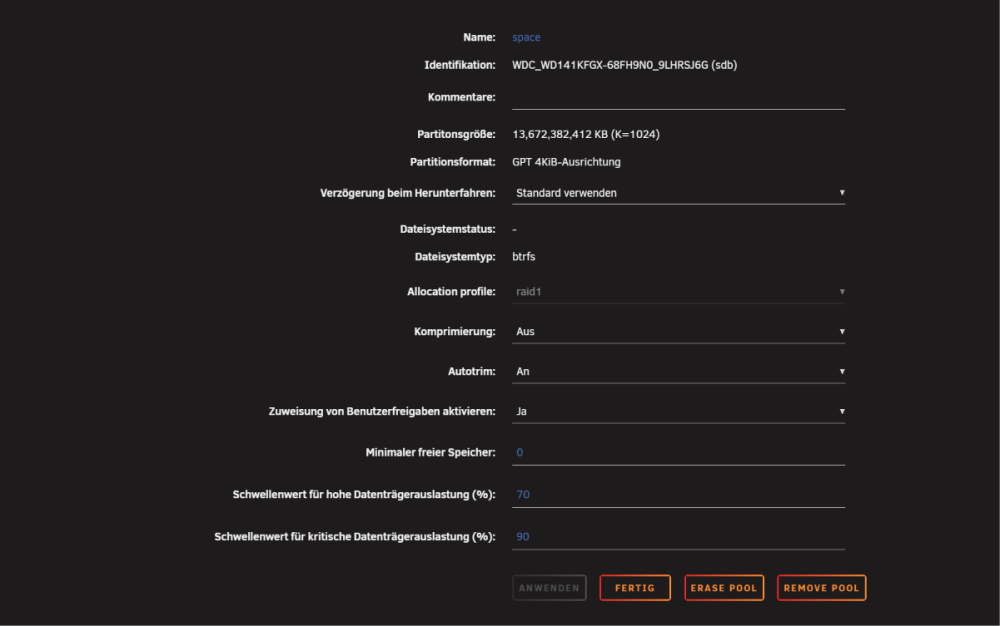
Vielen Dank für deine Antwort! Was für Probleme hört man denn von diesem Dateisystem (btrfs)? Mein DXP2800 hat 16 GB Arbeitsspeicher. Ich habe gelesen dass man für das Dateiformat xfs mindestens 32 GB Arbeitsspeicher benötigt. Des weiteren ist die Schreibgeschwindigkeit sehr langsam, wenn ich auf die Platten was kopieren will. Ich verstehe schon, daher den Cache einzurichten. Gibt es vielleicht noch einen anderen Trick die Schreibgeschwindigkeit zu erhöhen? Ich habe gehofft dass die Schreibgeschwindigkeit höher als 100MB/s sein wird, da das DXP2800 ja eine 2.5 GbE Netzwerkkarte verbaut hat. Meine Hardware, Router und der Switch 2.5 GbE unterstützen. Habe wohl nen Denkfehler. Ich würde nochmal mit der Arbeit beginnen. Möchte ja dass es vernünftig läuft. Ich hatte die Platten im Raid 1 Verbund im xfs Dateisystem als erstes. Dann merkte ich dass die Schreibgeschwindigkeit sehr langsam ist, als ich mit dem Übertragen der Daten angefangen habe. Also formatierte ich die Platten nochmal als btrfs. Habe dieses Dateiformat nur deswegen genommen weil die Schreibgeschwindigkeit eben schneller war. Mache ich dann etwas falsch oder müsste ich die geringe Schreibgeschwindigkeit (ohne Cache) akzeptieren? Wäre toll wenn du mir kurzfristig antworten könntest, denn ich habe gerade Urlaub :-)
-
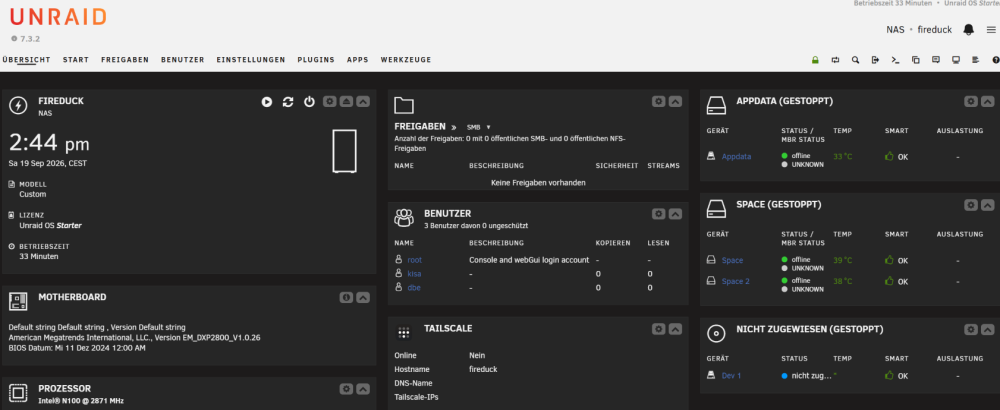
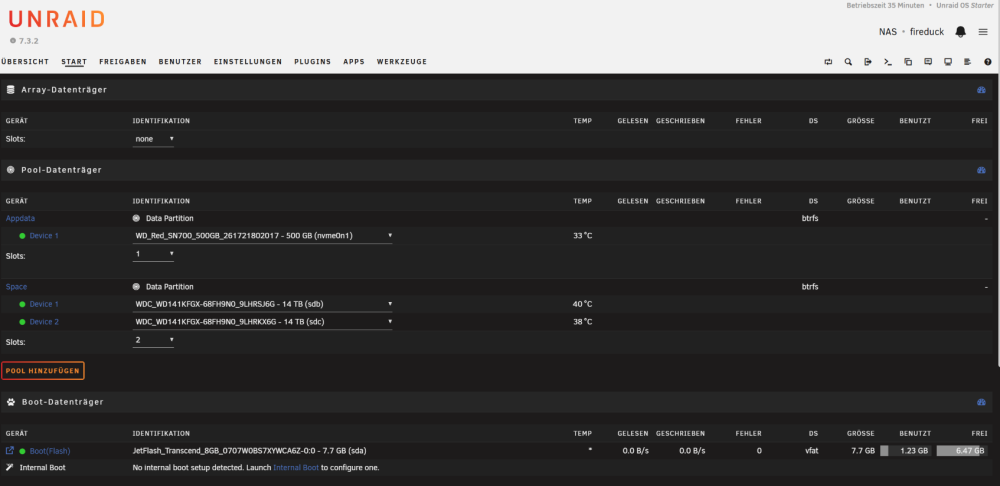
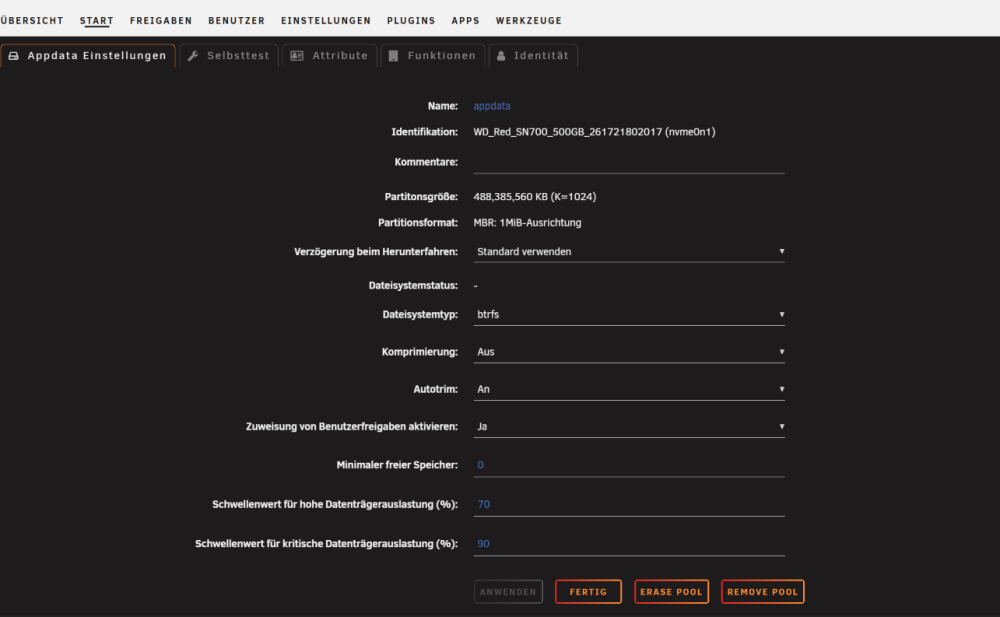
Hallo zusammen Ich hatte früher eine Synology NAS. Habe mir jetzt einen DXP2800 gekauft und will das Betriebssystem unraid benutzen. Bin also ein kompletter Anfänger was das Thema unraid betrifft. Ich schreibe mal was ich vor habe. Ich denke alle anderen Dinge kommen mit der Zeit. Ich habe zwei WD Red Festplatten mit 14 TB Speicher und eine WD Red M2 SSD Platte. Auf der SSD sollen die Docker Programme (Jellyfin, VPN, Pihole, usw) laufen. Auf den 14TB Platten ist meine Jellyfin Sammlung drauf und zusätzlich will ich ein paar Netzlaufwerke einrichten für Bilder Musik, Backup der Smartphones usw. Unraid läuft auf einem USB-Stick. Ich habe mit der Konfiguration bereits begonnen und ich glaube ich habe da etwas falsch gemacht und brauche jetzt dringend euren Rat :-)))))))) So wie ich verstanden habe müssen die zwei 14 TB Platten im Array eingebunden sein. Eine Platte ist die Datenplatte und die andere ist die Parität oder? Die WD Red SSD müsste im Pool eingebunden werden. oder? Denn aktuell habe ich alle drei Platten im Pool eingehängt. Die zwei 14 TB Platten sind im Raid1 Verbund und die M2 SSD als einzelne. (Siehe Bild im Anhang) So wie ich das Verstehe habe ich einen Mist gemacht und kann wieder alles löschen und von Anfang beginnen oder? Überall steht geschrieben dass die mechanischen Festplatten unbedingt im Array eingebunden sein müssen? Oder kann ich das alles so lassen wie ich das bis jetzt konfiguriert habe? Ich danke euch schon mal im Voraus!! Viele Grüße dbe
-
Thanks to everyone :-) That certainly wasn't the last question. :-) I will definitely have more questions.
-
Hello :-) i’m a complete beginner in this area. I have a question about the USB stick: Is an 8GB USB stick enough for the installation? This is plan how I would like to install Unraid: I use a sandisk MobileMate on a USB 2.0 Port with this card: https://de.transcend-info.com/embedded/product/embedded-memory-cards/usd400i It is a microSD MLC card. Many thanks in advance! Kind regards dbe



