





Howi
Members
-
Joined
-
Last visited
-
**Update — this turned out to NOT be an Unraid or storage problem** Closing the loop for anyone who finds this thread with the same symptom. After a very thorough investigation, I can now say with confidence this is **a Plex-internal bug, not an Unraid / storage / Docker issue**. Sharing what I ruled out on the Unraid side in case it saves someone else the time. **Symptom** Since a fixed date (for me 2026-08-30), Plex stopped generating **credits/intro skip markers** — zero new ones library-wide since then, despite the Butler running continuously. Everything else works: deep analysis completes for 100% of real movies/episodes, chapter thumbnails generate, BIF video-preview thumbnails generate. Only credits/intro markers stopped. **Ruled out on the Unraid / environment side (none of these were the cause)** - **Btrfs CoW fragmentation** — the library.db had ~29k extents; fixed it properly with chattr +C (NoCoW), fragmentation dropped to 2 extents. **No effect** on the bug. - **shfs /mnt/user FUSE) vs. direct pool mount** — moved Plex's appdata between /mnt/user/... and the direct /mnt/<pool>/... mount and tested both ways. **No difference.** - **Storage health** — both pools (boot + data) are healthy RAID1 mirrors, btrfs device stats all zero, SMART clean. - **Docker image** — migrated the container between plexinc/pms-docker and lscr.io/linuxserver/plex. **Same behavior on both.** - **Database integrity** — full PRAGMA integrity_check via Plex's own bundled SQLite came back ok; also did a full .recover rebuild and a restore from a clean backup — **identical failure after each**, so it is not DB corruption. - **Container limits / mounts / permissions** — CPU/RAM limits, bind mounts, ownership (99:100) all verified fine. **Also ruled out on the Plex side (for completeness)** - Plex version: the bug reproduces across ~11 months of PMS builds. Even the current beta (with a newer, CVE-patched SQLite 3.53.3) does **not** fix it. - All relevant Plex settings (per-library credits/intro toggles, VAD, the on-disk detection model file) — checked, all fine. - Reproducible clue: triggering the credits Butler task logs only Butler: Scheduling deep analysis for: <movie> and **never** Butler: Scheduling credits marker creation — the credits step itself never runs. That is internal Plex logic, nothing Unraid touches. **Conclusion** **If you are on Unraid and hit this: it is almost certainly not your Unraid setup.** I chased every storage/filesystem/Docker angle and none of them were it. The fix has to come from Plex. I have a detailed thread open on the Plex forums (search "Deep Media Analysis / Credits / Intro detection never persists") — better place to track it. Posting here mainly so the next Unraid user who searches for this does not waste days on storage theories like I initially did.
-
Update: Credits detection persistence issue extends beyond the corrupt file Follow-up to my earlier post about the corrupt file (moov atom not found) — after excluding that specific file, I found the problem is broader than I initially thought: • 3,889 media parts currently carry a pv:creditsDetectionErrorCount in extra_data but have never received a successful pv:credits marker. • The last genuinely successful Credits marker write (with real MediaPartMarkersArray data) was at 04:08 today — over 8 hours ago at time of writing. • Since then, every triggered Credits detection attempt (multiple, manually verified via DB queries) completes its scanner subprocess with no FFmpeg/parse errors at all, yet still fails to persist a result — only the internal pv:creditsDetectionErrorCount increments. • This affects entirely healthy, playable files (verified via direct file inspection), not just corrupted ones. This looks like the same underlying persistence bug that affects Deep Media Analysis, just also intermittently hitting Credits detection — not purely a “one corrupt file blocks the queue” issue as I first assumed.
-
Final update: Also tested this on an older major version (1.42.2.10156, ~11 months old) to see if downgrading past the 1.43.x line (where the FTS rebuild patch applies) would bypass ChuckPa's FTS-rebuild guard and let us test whether fixing the FTS corruption resolves the Deep Analysis issue. Turns out the guard isn't version-conditional at runtime — it's a blanket disable in the current DBRepair.sh release regardless of which PMS version you're running against, so we couldn't get a clean FTS rebuild either way. Ran the same Deep Analysis persistence test on 1.42.2.10156 anyway (with the DB in the same post-repair, FTS-still-damaged state): identical result — item completes, media_analysis_version stays at 0, no persistence. So across everything tested tonight (versions 1.43.3.10896, 1.43.3.10861, and now 1.42.2.10156; with/without the FTS corruption "fixed" as much as currently possible; full DB rebuild via .recover; fresh backup restore) — the exact same failure every time. About as thorough a bisection as I can do from the client side. Reverted back to the current release (1.43.3.10896) since there's no reason to stay on an 11-month-old build. Hoping this saves someone some diagnostic time if they hit the same thing.
-
Update: Ran the full ChuckPa PlexDBRepair.sh (v1.17.01) "auto" sequence (Check → Repair/Optimize → Reindex → FTS check) with Plex stopped, in an isolated temporary container. Found something concrete this time: all 4 FTS4 full-text search indexes in the main database are damaged — fts4_metadata_titles, fts4_metadata_titles_icu, fts4_tag_titles, fts4_tag_titles_icu — all reporting "Error: stepping, database disk image is malformed (11)". (The equivalent indexes in the blobs database are fine.) Notably, the tool itself printed: "Temporary Patch: FTS Rebuilding disabled as of PMS 1.43.x and Plex discussions until resolved." — so this appears to be a known, currently-unresolved issue specific to 1.43.x that's already being discussed with Plex directly. The rest of the repair (export/reimport/reindex of the main tables) completed successfully and reported clean. After restarting Plex on the repaired database and re-testing Deep Media Analysis on a fresh item: same result as every previous attempt — item completes, media_analysis_version stays at 0, backlog unchanged. So this doesn't appear to be the direct cause of our specific persistence bug (or at least, everything fixable by DBRepair being fixed didn't resolve it), but it's a real, independently confirmed corruption that Plex's own PRAGMA integrity_check doesn't catch, and ties directly to what sounds like a known open issue for this version. Wanted to document it here in case it's a useful data point for anyone else, or for Plex to connect the dots.
-
Update: Tested this directly — manually triggered GenerateIntroMarkers while Deep Analysis was frozen, and watched the Intro backlog counter drop from 2813 to 2811 in real time (2 items processed and persisted successfully). So Credits/Intro/Thumbnail generation genuinely still works right now, live — it's specifically Deep Media Analysis that's stuck. Re-enabled Credits/Intro generation, kept only Deep Media Analysis/Upgrade Media Analysis disabled. This narrows it down further: whatever's broken is specific to the Deep Media Analysis code path, not a general "nothing persists" database issue.
-
Update: One more data point — checked our other backlog counters (Credits, Intro, Chapter Thumbnails), and unlike Deep Media Analysis (completely stuck), those three are almost fully complete (Credits ~14,750 of 39,380 remaining, Intro ~2,800 remaining, Chapter Thumbnails only 5 remaining). These evidently did complete successfully over the weeks since our QNAP→Unraid migration, before whatever's currently broken set in. So this might not be a blanket "nothing ever persists" issue — could be specific to the Deep Media Analysis code path, or something that broke more recently after the other three had already mostly finished their backlogs.
-
Running Plex Media Server (official plexinc/pms-docker image) on Unraid 7.x with a large library (~39k media parts / 60k items). Deep Media Analysis, Credits detection, and Intro detection all run continuously via Butler — the scanner processes complete cleanly with no errors in their logs and consume real CPU — but the results never get written back to the database. media_analysis_version stays at 0 for every item, no matter how many times it's reprocessed. Backlog of ~20,800 items hasn't meaningfully shrunk over 8+ hours of continuous activity. Already ruled out (each independently tested): - Container restart — no change - CPU pinning (tried both unrestricted 20-thread and a reduced 12-thread cpuset) — no change - Read-only vs read-write media mount — no change - Downgrading to the previous Plex point release — same behavior - Full database restore from a known-good 1-day-old Butler backup — identical symptom reproduced immediately - A real PRAGMA integrity_check using Plex's own bundled SQLite binary — returned "ok", no corruption During a manual "Database optimization" run, the main log showed a concrete error for the first time: SQLITE3:0x80000001, 17, statement aborts at 63: [select * from metadata_items limit 1] database schema has changed (SQLite error 17, SQLITE_SCHEMA) Given how thoroughly this reproduces regardless of Docker/host config, I suspect it's a Plex-internal bug (possibly related to how many concurrent scanner subprocess connections it opens against one large library DB), but wanted to check: has anyone else on Unraid with a large library seen this exact "scanner completes but DB never updates" pattern? Any storage/filesystem-level angle I haven't considered? Full write-up with all diagnostics on the Plex forums: https://forums.plex.tv/t/deep-media-analysis-credits-intro-detection-never-persists-results-media-analysis-version-stays/942280 Setup: btrfs NVMe pool (not /mnt/user), CPU pinned 8-19, Docker with --device=/dev/dri passthrough for hardware transcoding.
-
Confirmed — restarting the array cleared the ERRORS badge. Everything’s fully healthy now. Thanks again for all the help throughout this whole thread, really appreciate you sticking with it!
-
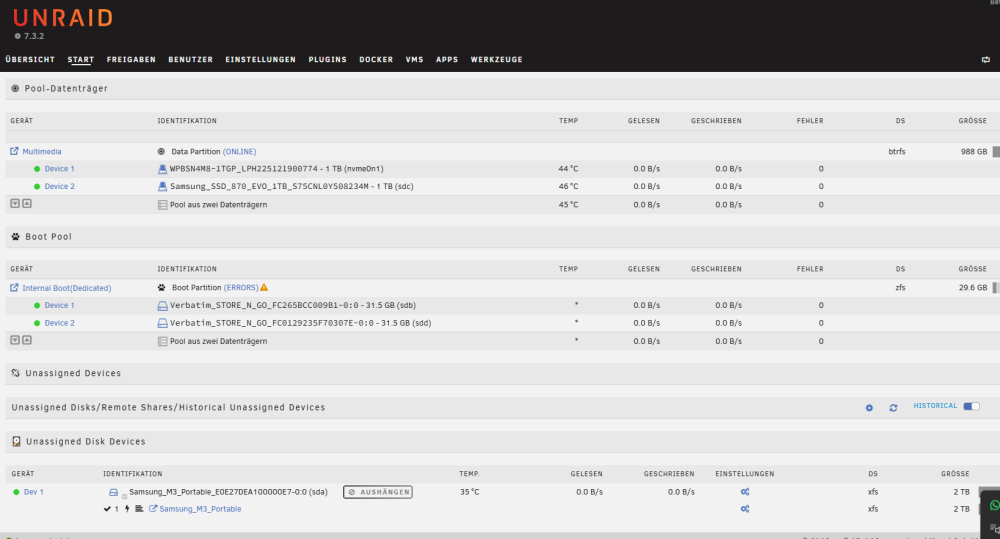
Thanks for confirming — makes sense that Slots is gated on the array being stopped, that explains the behavior perfectly. All resolved now with a working mirror on my end. One loose end still open if anyone has thoughts: the cosmetic “Boot Partition (ERRORS)” badge shown in my earlier screenshot even though the pool itself is fully healthy (0 errors both via zpool status -v and disks.ini). Not blocking anything, just flagging in case it’s a quick fix on your end. Thanks again for all the help getting this sorted!
-
Two more findings, following up on the successful mirror setup: BOOT_ELIGIBLE_FALSE / ENABLE_BOOT_TRANSFER_DISABLED: Re-running the Internal Boot wizard after already being on a dedicated boot pool is blocked entirely with these two checks failing — makes sense in hindsight, since a different flow ended up working (see below). What actually worked for adding the mirror: With the array stopped, the "Internal Boot" pool on the Main page unexpectedly showed a Slots dropdown (1/2) — which isn't visible when the array is started. Setting it to 2 and assigning my second device there (not through the wizard at all) triggered a proper zpool attach + resilver, which completed successfully with 0 errors. Cosmetic-only GUI bug: After the resilver finished, the Main page shows "Boot Partition (ERRORS)" on the pool, but zpool status -v reports 0 errors, and both devices show status="DISK_OK", numErrors="0" in disks.ini. Screenshot attached. Seems like the Slots-based "add device to dedicated boot pool" path isn't fully wired up to clear/update that status badge. Net result: fully mirrored, healthy ZFS internal boot pool — just wanted to flag these two rough edges in case they're useful for polishing this feature. Thanks a lot for all your help and patience with this one — really appreciate it! Passt so?Uploading Attachment...Uploading Attachment... nas01diagnostics202608242149.zip
-
Thanks — found the "Tools → Onboarding Wizard" reference in the 7.3.0 release blog. But I noticed a related thread (topic 199012, "Not possible to add a second internal boot device after already configuring internal boot") where it sounds like for an already-configured internal boot pool (which is our exact situation — single-device ZFS boot pool already in use), there's no direct "add mirror" path through that wizard, and the described workaround involves erasing the cache partition and reconfiguring boot from scratch, with the new device needing to match or exceed the existing device's size. Since this is a live production system, I want to be sure before touching anything: does the Onboarding Wizard actually handle adding a mirror to an already-configured internal boot pool cleanly, or does it require the destructive reconfigure path from that other thread? Want to make sure I don't lose the current boot config/license binding in the process.
-
Tried going through the actual GUI wizard (Add Pool → assign device → Start array → check "Format" confirmation → click Format) instead of the CLI, on a spare empty USB stick. Ran into a separate, reproducible UI issue though: no matter how many times I try — both via automation and by clicking through it manually myself multiple times — the format action never actually submits. Syslog only ever shows the periodic auto-mount-retry ("mount error: wrong or no file system"), never a real format command going through. Confirmed the array is started (Format isn't even offered when stopped, as expected). So I wasn't able to get further than the CLI reproduction — the diagnostics from that (cmdMakeBootable: not boot eligible) are still the most concrete data point I have. Happy to try anything more specific if you have ideas, but the wizard path itself seems to be silently failing to submit on this system before it even gets to the boot-pool logic.
-
Ran your suggested test again with fresh diagnostics attached (nas01-diagnostics-20260824-1029.zip). One thing I noticed: cmdCreatePool fails immediately with "not stopped" if the array isn't stopped first. With the array properly stopped, create+assign succeed, but cmdMakeBootable still fails — this time with a more specific syslog message: cmdMakeBootable: not boot eligible. Tested against a spare empty USB stick (not the production boot device), same result. Diagnostics attached from right after this failure. nas01diagnostics202608241029.zip
-
Thanks for confirming the general approach! One specific concern though: I have a confirmed, reproducible bug on this exact server where creating a new ZFS boot pool fails at the cmdMakeBootable step (500 Internal Server Error) — tested via both the GUI wizard and raw CLI/emcmd, across every combination of array/disk state. This happened when I originally tried to set up this system. Have you personally done this “remove + recreate” procedure recently on 7.3.x and had cmdMakeBootable actually succeed? Trying to figure out if that bug is specific to my system/setup, or something everyone doing this hits — want to avoid getting stuck mid-recreation with no working boot pool at all.
-
One more detail while I wait: if I go the “fully separate boot pool” route, would creating a fresh ZFS boot pool from two identical 32GB USB sticks (both brand new, from scratch, not attached to the existing NVMe/Multimedia setup at all) avoid this issue entirely going forward? Or does the same “not created correctly” risk apply regardless of which devices are used, as long as it goes through the same creation flow?
