





ASTM
Members
-
Joined
-
Last visited
-
Still struggling with part 1 unfortunately Jellyfin libraries are setup separately, so I usually make a copy from the shared folder to the share I want the file in. I've set data to /mnt/user/Jellyfin/ on the docker setup and /shared in the webui. This means my files should save to /mnt/user/Jellyfin/shared, right? When I add a torrent, the client knows what's in the torrent and starts, but it errors after a second or 2. If I try "set location" and the save path as /shared, it says that it cannot make save path
-
Hey, thank you! I got past this part. Stiill have some problems though :( Problem 1 - My data is stored in /mnt/user/Jellyfin/Shared, I set Path: /data to this location in the config. Now in the WebUI, the client says no files found :/ In the "downloads" tab of options in the WebUI, I have the default path as mnt/Shared...not sure if this is correct based on my data location? Problem 2 - New torrents willl not download. I've set my VPN (PIA) to wireguard and input/output ports as 1337.
-
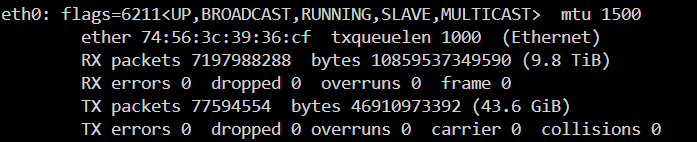
Argh. Made the mistake of updating my fully working docker container and the update has borked my config :( Hopefully someone can help me, first part im struggling with is Variable: LAN_NETWORK. I've tried ifconfig eth0 in terminal and get the following, but I don't think there's anything there of use?
-
Hey I'm having trouble getting this plugin to work properly and am hoping someone is able to help me. I have installed the plug in along with the ITE driver I have set all fans to PWM mode in bios and to run at 100% Smartfan finds the pwm controller and I can identify the fans After a couple of minutes (or 1 or 2 fan speed manipulations) the plugin loses the ability to control the fans anymore I had the same problem with dynamix fan control, which I have now uninstalled as this plugin is much cleaner and more developed. My motherboard is a Gigabyte b650 gaming x ax on the AM5 platform. Grateful for any help!
