Attck
Members
-
Joined
-
Last visited
-
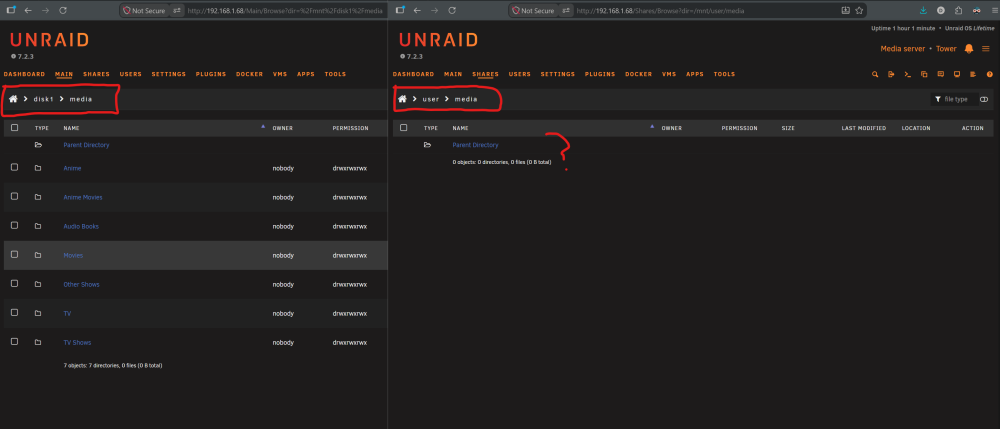
Yep, cache drive was the cause of the problem. Here's what I did. Might be useful for future people as well. Nothing in the cache was important so no need to keep it. I'll just have to set up the docker stuff again, no big deal. I added the community plugins: Unassigned Devices and Unassigned Devices Preclear. I stopped the Array. Moved the drive off the cache pool. Added it to unassigned, click the red x on the extra partion to delete it, confirmed that and let it work. I then cleared the drive using the same tool. I changed the filesystem to xfs I moved the drive back into the cache pool Now my webGUI -> Shares shows all the data as expected.
-
I'll attack that problem after resolving data issues if possible. I have 2 fresh drives I'm planning to add the machine after to expand it's capacity. What sort of distribution between parity vs Data disks would you say is reasonable for 4 HDDs and 1 nvme cache drive I was thinking 2x2 but I'm prolly misunderstanding parity drives
-
NAME MAJ:MIN RM SIZE RO TYPE MOUNTPOINTS loop0 7:0 0 651.6M 1 loop /usr loop1 7:1 0 173.4M 1 loop /lib loop2 7:2 0 20G 0 loop /var/lib/docker loop3 7:3 0 1G 0 loop /etc/libvirt sda 8:0 1 29.8G 0 disk └─sda1 8:1 1 29.8G 0 part /boot sdb 8:16 0 10.9T 0 disk └─sdb1 8:17 0 10.9T 0 part sdc 8:32 0 10.9T 0 disk └─sdc1 8:33 0 10.9T 0 part sdd 8:48 0 10.9T 0 disk └─sdd1 8:49 0 10.9T 0 part md1p1 9:1 0 10.9T 0 md /mnt/disk1 zram0 252:0 0 0B 0 disk nvme0n1 259:0 0 3.6T 0 disk ├─nvme0n1p1 259:1 0 2T 0 part /mnt/cache └─nvme0n1p2 259:2 0 546M 0 part
-
Here's the fresh diag tower-diagnostics-20260726-1101.zip
-
Attck changed their profile photo
-
Problem Description: I was doing a large transfer of content from another PC to my Unraid. Overnight something happened. In the morning I couldn't access the server via web or on the machine so I hard shutdown the server. After getting it to boot again I have some files and folders no longer showing in the share via the webGUI or via SMB however they show in disk1. Some of the missing files/folders weren't related to the transfer. The share I was copying to has cache as primary storage and array as secondary. What I've tried: Tried file system check for both the disk1 and cache drive, then restarted, No change Tried using the New Permission tool to reset permissions for the entire disk. No change. tower-diagnostics-20260726-0929.zip