Jabol
Members
-
Joined
-
Last visited
Everything posted by Jabol
-
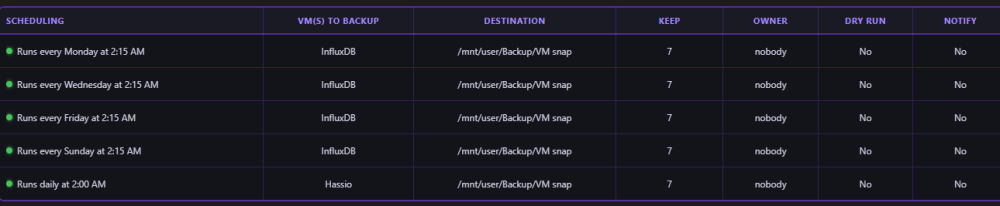
Hi everyone, I'm experiencing a frustrating issue with the VM Backup & Restore plugin. I have set up a backup schedule for two different Virtual Machines: The first VM is scheduled to be backed up every day. The second VM is scheduled to be backed up every 2 days. Unfortunately, the script completely mixes up what is defined in the schedule. The cron triggers at the correct scheduled times, but the plugin performs the backup on the wrong VM. When it's time for the second VM's 2-day backup to run, the process starts but takes a snapshot of the first VM (the daily one) instead. It seems that having multiple schedule entries causes the plugin to get confused, overwrite the assigned VM IDs, and ultimately back up the exact same VM twice while completely ignoring the other one.[2026-08-07 02:20:23] Backup session finished - Duration: 5m 21s No old backups need removed Finished backup for Hassio Changed owner of /mnt/user/Backup/VM snap/Hassio to nobody:users Backed up NVRAM /etc/libvirt/qemu/nvram/aa8a17e8-7f82-a58f-3ac8-bbdaea191089_VARS-pure-efi.fd -> /mnt/user/Backup/VM snap/Hassio/XXXXXX-7f82-a58f-3ac8-bbdaea191089_VARS-pure-efi.fd Backed up XML /etc/libvirt/qemu/Hassio.xml -> /mnt/user/Backup/VM snap/Hassio/20260807_021507_Hassio.xml /mnt/wirtualizacja/domains/HAOS/haos_ova-18.2.qcow2 -> /mnt/user/Backup/VM snap/Hassio/20260807_021507_haos_ova-18.2.qcow2 Backing up vdisk(s) Created snapshot for Hassio (no guest agent installed) Started backup for Hassio VM(s) to be backed up - Hassio [2026-08-07 02:15:02] Backup session started - Plugin version: 2026.05.27.01 -------------------------------------------------------------------------------------------------- [2026-08-07 02:05:39] Backup session finished - Duration: 5m 38s No old backups need removed Finished backup for Hassio Changed owner of /mnt/user/Backup/VM snap/Hassio to nobody:users Backed up NVRAM /etc/libvirt/qemu/nvram/aa8a17e8-7f82-a58f-3ac8-bbdaea191089_VARS-pure-efi.fd -> /mnt/user/Backup/VM snap/Hassio/XXXXX-7f82-a58f-3ac8-bbdaea191089_VARS-pure-efi.fd Backed up XML /etc/libvirt/qemu/Hassio.xml -> /mnt/user/Backup/VM snap/Hassio/20260807_020006_Hassio.xml /mnt/wirtualizacja/domains/HAOS/haos_ova-18.2.qcow2 -> /mnt/user/Backup/VM snap/Hassio/20260807_020006_haos_ova-18.2.qcow2 Backing up vdisk(s) Created snapshot for Hassio (no guest agent installed) Started backup for Hassio VM(s) to be backed up - Hassio [2026-08-07 02:00:01] Backup session started - Plugin version: 2026.05.27.01