





ChaliceLue
Members
-
Joined
-
Last visited
Everything posted by ChaliceLue
-
Hello, the work was successful. After I stopped selecting the timestamp, Bark was able to push normally. Thanks for your answer!
-
Thanks for help. Do you mean the agents option here? I've always had it all checked. I only turned on the Unraid system update and the array status check features. The bark-server log is as follows: 2026-11-05 00:20:09 INFO 10.0.0.110 -> [400] POST 80.653µs /:device_key => /xxx {"body": "Unraid Status 1793809201", "title": "Notice [ANGEL] - array health report [PASS]", "sound": "", "group": "Unraid通知"}Bark settings are as follows, I have hidden the bark puskurl. Thanks again for your help!
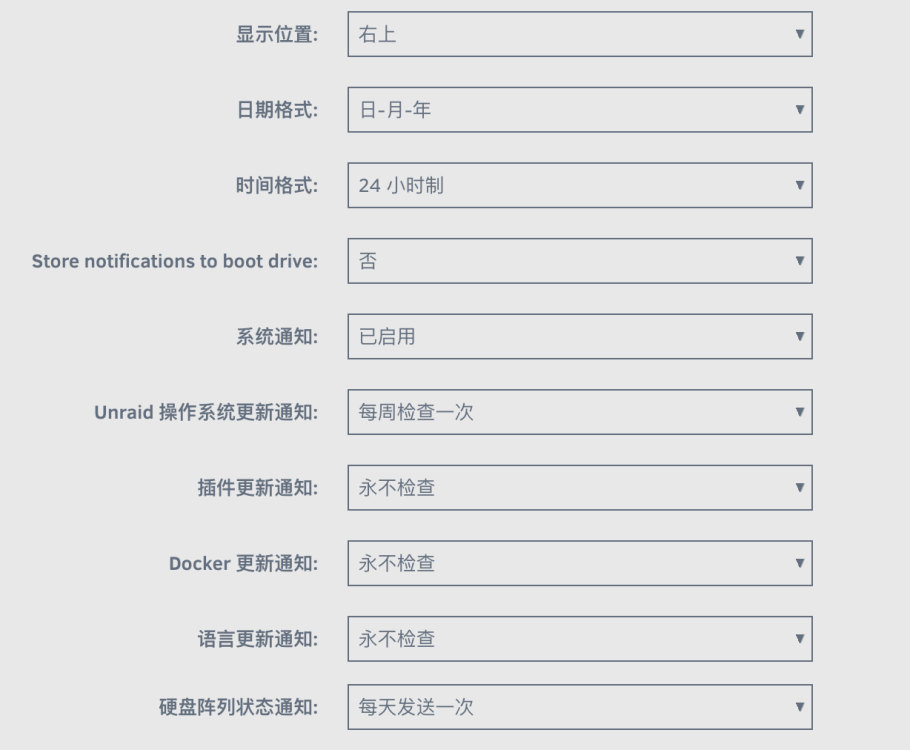
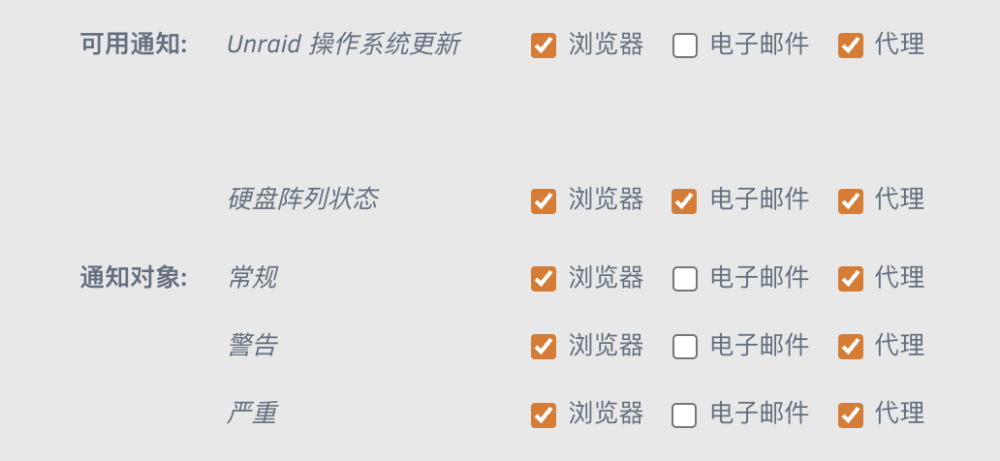
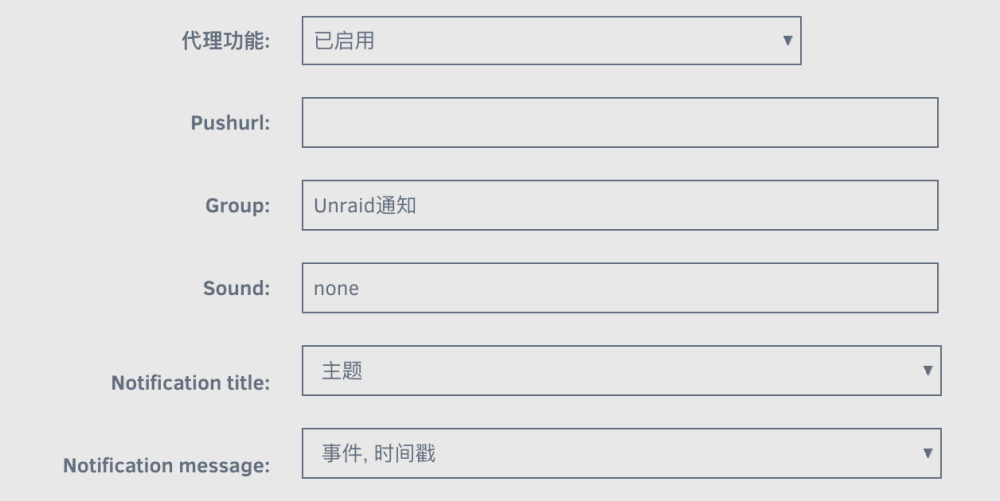
-
So I checked the unraid logs, and at the daily check time (12:20 AM), the logs only show email notifications being sent, with no bark-related actions executed. Nov 05 00:20:01 XXX sSMTP[638017]: Creating SSL connection to host Nov 05 00:20:01 XXX sSMTP[638017]: SSL connection using TLS_AES_256_GCM_SHA384 Nov 05 00:20:04 XXX sSMTP[638017]: Sent mail for xxx
-
Hello guys, recently I installed bark-server on my unraid and completed the related configuration. When I used the bark test button in 'unraid - Settings - Notification Settings,' it successfully sent the notification, and the bark-server log showed two entries: one [200] POST and one [200] GET.When I manually send a bark notification, I get the same result. But when the Unraid system was supposed to send a notification, I didn't receive it. Checking the Bark server logs, there was only one [400] POST at that time.I checked the website and found out that a 400 status means there's a syntax error. I manually ran the command 'bash /boot/config/plugins/dynamix/notifications/agents/bark.sh', and I could still receive the notifications.May I ask which part went wrong that caused me not to receive notifications from the unRAID system?
-
All right, thank you!
-
Thanks a lot for help. zfs list -t all NAME USED AVAIL REFER MOUNTPOINT cache 331G 2.23T 71.4M /mnt/cache cache/Code 215K 2.23T 215K /mnt/cache/Code cache/Photos 293M 2.23T 293M /mnt/cache/Photos cache/Public 4.25G 2.23T 4.25G /mnt/cache/Public cache/Videos 163K 2.23T 163K /mnt/cache/Videos cache/appdata 204G 2.23T 204G /mnt/cache/appdata cache/domains 51.6G 2.23T 24.4G /mnt/cache/domains cache/domains/Debian 140K 2.23T 140K /mnt/cache/domains/Debian cache/domains/DownloadMachine 140K 2.23T 140K /mnt/cache/domains/DownloadMachine cache/domains/DownloadMachineD 9.44G 2.23T 9.44G /mnt/cache/domains/DownloadMachineD cache/domains/GameMachine 140K 2.23T 140K /mnt/cache/domains/GameMachine cache/domains/GameServer 17.7G 2.23T 17.7G /mnt/cache/domains/GameServer cache/isos 13.8G 2.23T 13.8G /mnt/cache/isos cache/system 57.1G 2.23T 57.1G /mnt/cache/system cache/domains/Debian cache/domains/DownloadMachine etc. are the virtual machine directories mentioned above.
-
Yes, the domains folder is on a ZFS-based file system
-
Hello everyone, recently I ran into a problem. When I check the /mnt/user/domain directory, I find that the virtual machine directories I deleted before (such as "DM") are still there. I tried to use the rm -r DM command to delete it, but it prompted me device or resource busy . After checking multiple times, I found through mount | grep DM that Unraid mounted vdisk1.img under the DM directory at cache/domains/DM/vdisk1.img, which caused me to be unable to delete it. After I used umount /mnt/user/domains/DM/vdisk1.img to unmount it, I was able to delete the DM folder. Just when I thought the problem was solved, I found that once I restarted the array, unraid would automatically create the /mnt/user/domains/DM directory and /mnt/user/domains/DM/vdisk1.img file, and continue to mount it at the original location, even though I had already deleted the DM VM. I checked the files under boot, but couldn't find how to delete the mount settings. After using unraid, I created 8 virtual machines and deleted them all, and 4 of the virtual machines had the above situation. I want to ask what caused this situation? Thanks for everyone's help!



