arexils
Members
-
Joined
-
Last visited
-
I would also like to note the following. 1. Nothing except the keyboard and monitor is connected. 2. The same behavior occurs without the keyboard.
-
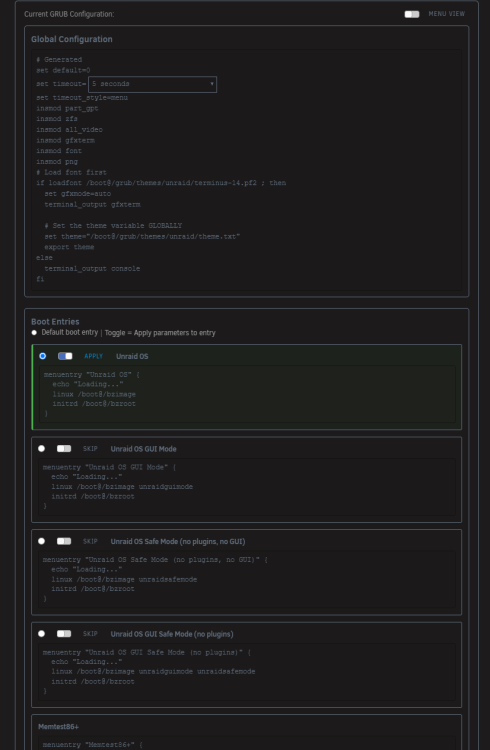
# Generated set default=0 set timeout=5 set timeout_style=menu insmod part_gpt insmod zfs insmod all_video insmod gfxterm insmod font insmod png # Load font first if loadfont /boot@/grub/themes/unraid/terminus-14.pf2 ; then set gfxmode=auto terminal_output gfxterm # Set the theme variable GLOBALLY set theme="/boot@/grub/themes/unraid/theme.txt" export theme else terminal_output console fi menuentry "Unraid OS" { echo "Loading..." linux /boot@/bzimage unraiduuid=1796939588860663645 initrd /boot@/bzroot } menuentry "Unraid OS GUI Mode" { echo "Loading..." linux /boot@/bzimage unraidguimode unraiduuid=1796939588860663645 initrd /boot@/bzroot } menuentry "Unraid OS Safe Mode (no plugins, no GUI)" { echo "Loading..." linux /boot@/bzimage unraidsafemode unraiduuid=1796939588860663645 initrd /boot@/bzroot } menuentry "Unraid OS GUI Safe Mode (no plugins)" { echo "Loading..." linux /boot@/bzimage unraidguimode unraidsafemode unraiduuid=1796939588860663645 initrd /boot@/bzroot } menuentry "Memtest86+" { linux /boot@/memtest }
-
Yes, I attached a screenshot to the message, and it's posted there.
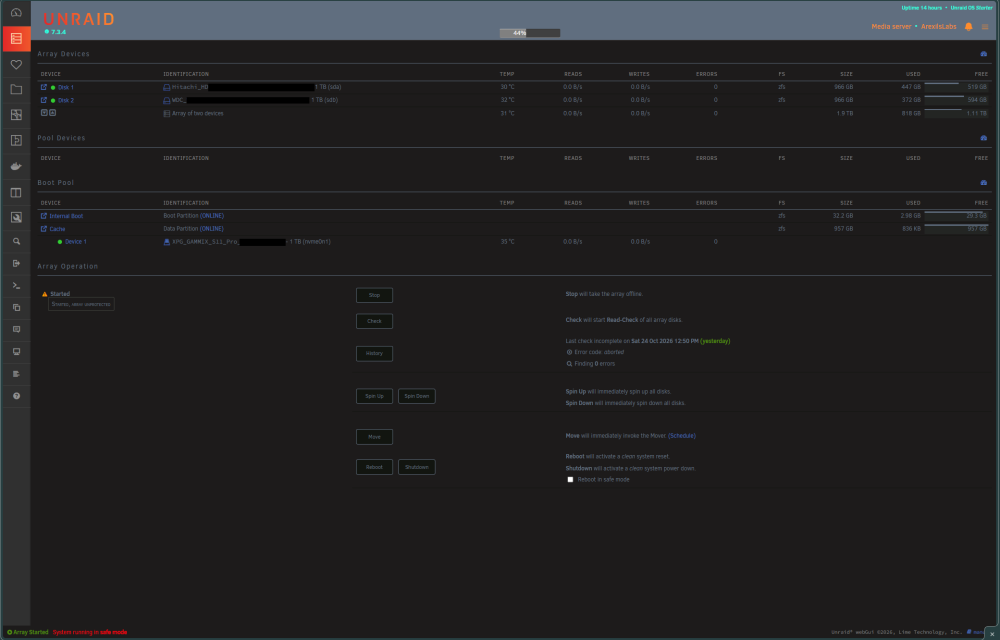
 arexilslabs-safemode-diagnostics-20261026-0209.zipHi everyone, I am facing an issue where my Unraid 7.3.4 server is permanently stuck in Safe Mode, and I cannot get it to boot normally. Because of this, all my plugins and the "Apps" tab are missing. Here is exactly what happened and what I've tried so far: How it started: I was experiencing motherboard/USB boot loops with my Type-C flash drive, so I decided to use the new Unraid 7 feature and migrated my installation to Internal Boot on my NVMe SSD. The migration process went fine, but the system booted into Safe Mode right after. What I've tried to disable it: Checked the main page: the array is started successfully, and the "Reboot in safe mode" checkbox is completely unchecked. Attempted multiple normal reboots, but it bypasses the setting and goes straight back into Safe Mode. The system web UI works, and my data drives are mounted, but since it is forced into Safe Mode, none of my custom plugins or Docker containers can start. I assume if I can find a way to break out of this Safe Mode loop, everything will appear back as normal. My Hardware: CPU: Intel Core i7-11700 Motherboard: MSI MAG B560 TORPEDO RAM: 16GB DDR4 Any help or ideas on what file or configuration switch might be forcing this behavior after an Internal Boot migration would be highly appreciated. Thanks!