ichochi
Members
-
Joined
-
Last visited
Everything posted by ichochi
-
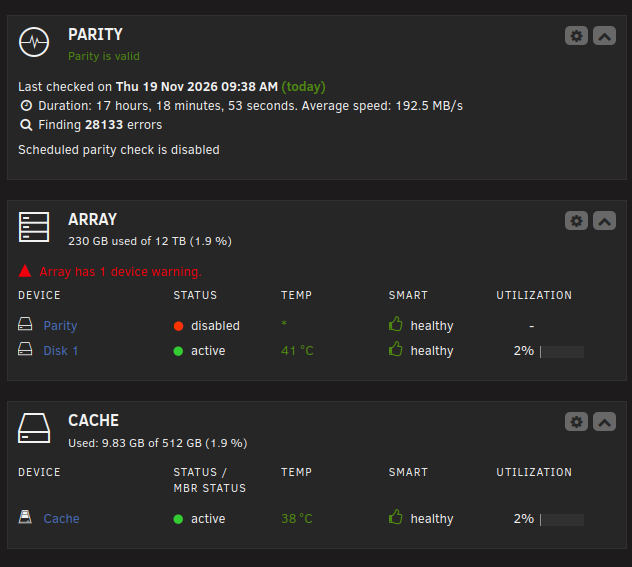
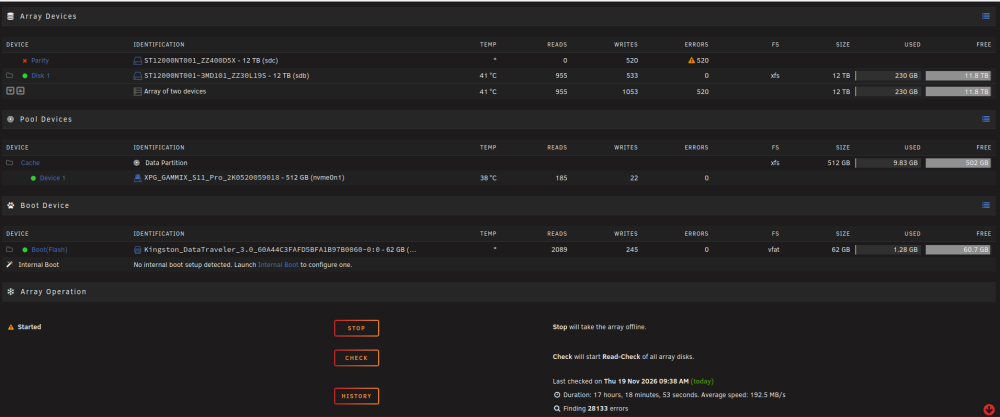
Hello! Having issues with a Parity Drive being disabled after setting a new server with brand new drives and setting up the array letting it run overnight i noticed my parity drive is showing "Parity Device Disabled, Click to spun down" yet on the dashboard it shows healthy and parity valid, so I tried a few things after researching through the forums: Tried running a SMART Diagnosis and it won't work but under Identity it shows SMART support enabled Tried stopping the array and starting it without the drive, stopping again and re-adding parity drive under the same slot, still shows Disabled Shutdown the system and tested using multiple SATA ports on the motherboard, even ones that are confirmed working along with different SATA Cables, didn't work Verified everything is connected properly with my power supply My setup is the following: x2 Ironwolf Pro 12TB Drives x1 M.2 SSD Cache A850GL MSI Power Supply Not sure if it matters but I did notice that this drive under Main does not show temperature like my other one which is the same type of drive, additionally it makes a weird electrical noise like a robot on startup, it eventually stops and stays silent, unsure if this sound or behavior is typical of this type of drive. Attaching Dianostics too, if it helps Any help would be greatly appreciated! fgserv-diagnostics-20261119-1206.zip