



Skip to content
View in the app

A better way to browse. Learn more.

Unraid

A full-screen app on your home screen with push notifications, badges and more.

To install this app on iOS and iPadOS
  1. Tap the Share icon in Safari
  2. Scroll the menu and tap Add to Home Screen.
  3. Tap Add in the top-right corner.
To install this app on Android
  1. Tap the 3-dot menu (⋮) in the top-right corner of the browser.
  2. Tap Add to Home screen or Install app.
  3. Confirm by tapping Install.

JPNYC81

Members
  • Joined

  • Last visited

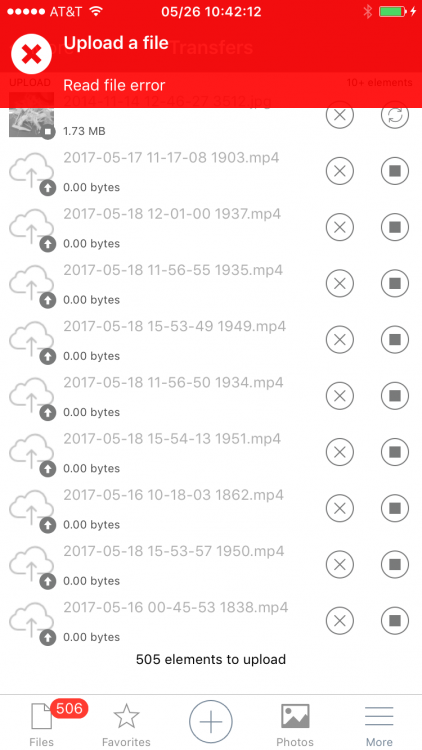
  1. Anyone else having issues syncing large files (videos: mov/mp4) from the iOS app? (Nextcloud v12.0.0, iOS app v2.17.3.00009) The app keeps throwing a Read File/File Not Found error, claims the file is 0 bytes, then creates a 0 byte file on the server. All other files seem to be doing fine. Under Setting > Additional Settings > File Handling > Maximum upload size is set to 16GB (which is probably overkill) and this is reflected under monitoring. Any ideas?
Account

Navigation

Search

Search

Configure browser push notifications

Chrome (Android)
  1. Tap the lock icon next to the address bar.
  2. Tap Permissions → Notifications.
  3. Adjust your preference.
Chrome (Desktop)
  1. Click the padlock icon in the address bar.
  2. Select Site settings.
  3. Find Notifications and adjust your preference.