





indy66
Members
-
Joined
-
Last visited
-
The rebuild finished, and so far everything looks ok, but I haven't had much time to take a good look. For some reason, I'm not getting the status email I used to twice a day, don't know what would have changed there. I tried the test button, but nothing came through, something else to look at...
-
Did a new config and all drives show up as new. Started the array and it's rebuilding parity. I'll report back when it's complete, probably 3 days...
-
I started by replacing disks 7 and 10 with 18TB drives. Started the rebuild, but shortly after saw errors on disk 9. I stopped the rebuild and shut the system down, re-seated cables and brought the system back up. At that point Unraid marked disk 9 as disabled and emulated and I started looking for solutions. One was the new config - once I did that Unraid marked drive 9 as new and I was again stuck looking for solutions, since I couldn't find any I decided to post. I also at that point replaced 7 and 10 with the original disks, hoping Unraid would be happy with them and let me do a rebuild on 9, even though nothing should have changed there. I don't know that anything on the drives has actually changed, I never did any writes to the array, so I am hoping I can somehow tell Unraid the 3 drives are good and just rebuild parity again.
-
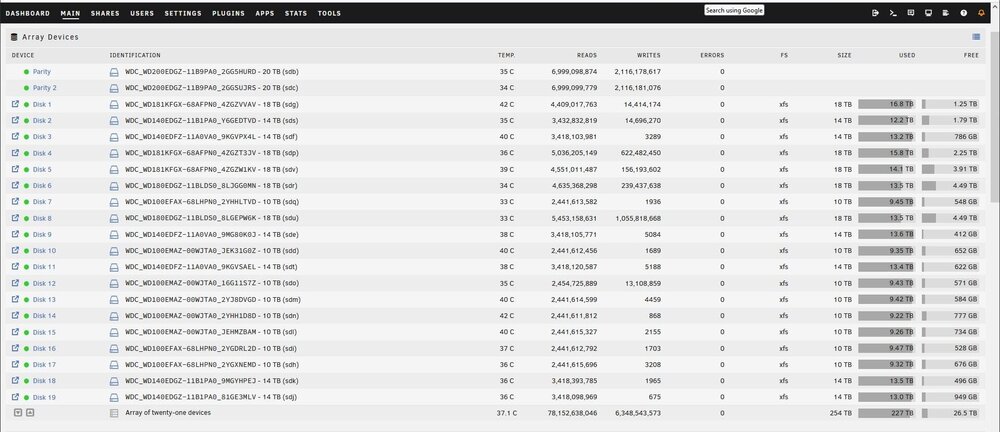
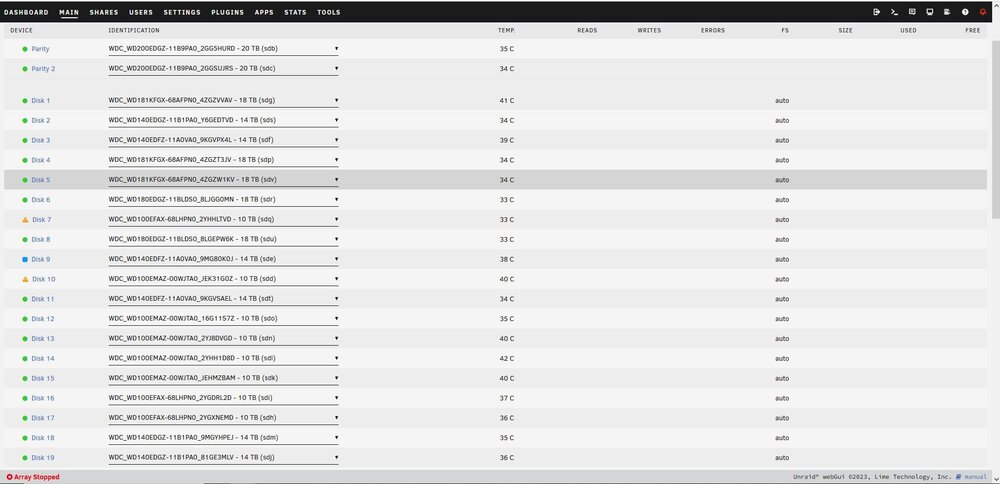
Yes, 7 and 10 are now back to the original 10TB drives, was trying to upgrade them to 18TB drives. Disk 9 is a 14TB that started throwing read errors shortly after the rebuild started. One suggestion was to create a new config, which is when disk 9 showed up as new. It was strange too because initially Unraid marked it disabled and emulated which gave me three drives in an emulated state, which shouldn't be possible with just two parity drives. After trying a new config, disk 9 when to new and Unraid said it then had too many wrong or missing disks. The data on the disks should still be valid, so if I could somehow get Unraid to accept the current configuration, I would think that I could rebuild parity based on the array disks. Attached are screen shots of the array before the upgrade, and the current state.
-
Not sure how that will help, but will attach. I'm was actually upgrading two drives, since i have two parity drives, I stated just one before since the situation would be the same. Currently I have replaced the upgrade drives with the originals, so the drives are all the same from before the attempted upgrade. If I could do a new config or mark the drives as active again, I assume I could just rebuild parity from the array, since nothing should have changed with the array drives. Thanks, Norm littleboy-diagnostics-20240926-1009.zip
-
Had this issue from time to time, but have never found a solution. While upgrading a data drive to a larger drive, another drive or more suddenly start throwing read errors, probably a cable issue. How can you force Unraid to mark the drives throwing errors as active again. It's now in a state where the drive to be upgraded is marked emulated, but the drive throwing errors is marked as new, and now it says too many wrong or missing disks. Reading and reading, this kind of thing seems to happen a lot, but there don't seem to be any solutions... If I could simply mark the "new" drive as active again, I could do a rebuild. Is there a utility or some way of forcing Unraid to reactivate the drive? Can I replace the upgrade drive with the old one and somehow make Unraid think the config is valid so I can then rebuild parity or just make it think everything is back to what is was before the attempted upgrade? Thanks for any help! Norm

