





captain_video
Members
-
Joined
-
Last visited
Everything posted by captain_video
-
It's been quite some time since I set it up so I've forgotten a lot of things since then. After looking at the FAQ it jogged my memory about some of the things I did before to get it working. Thanks for pushing me in the right direction.
-
I checked the Previously Installed Apps and it says No Matching Content Found. How would I map volumes to my media? I haven't changed anything in my setup that I'm aware of since I first installed Plex. I don't recall having any problems setting Plex up before. I installed the latest linuxserver Plex and disabled the limetech PlexMediaServer so they're both installed, but only the linuxserver Plex is running. I have the same issues with both versions of Plex.
-
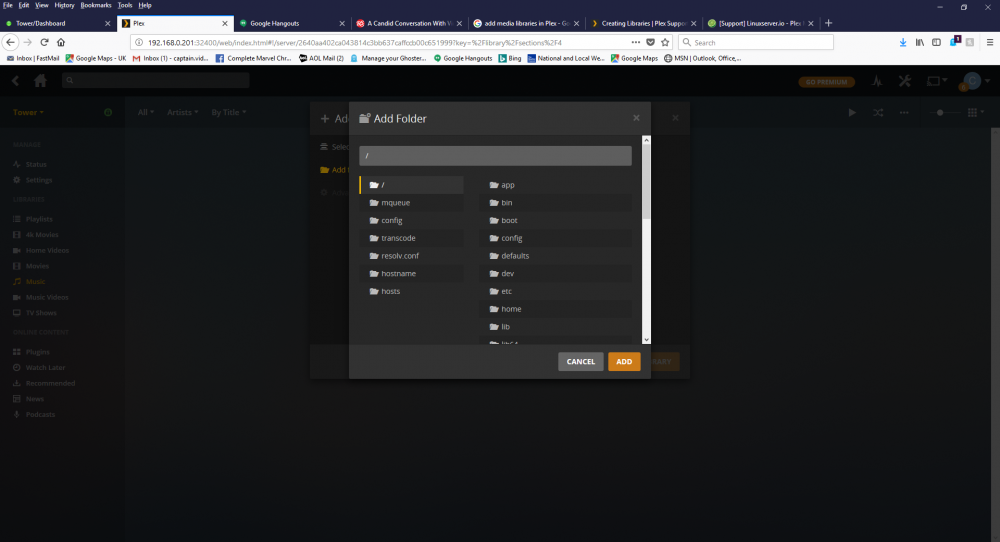
I had the linuxserver Plex running fine on my unRAID server and then I decided to swap out my cache drive for a larger one. I lost Plex in the process because the appdata folder was on the old cache drive. It tried reinstalling Plex, but I mistakenly installed the limetech PlexMediaServer version. I tried adding libraries using the web GUI with no luck. When I browsed for folders it displayed what you see in the attached image. I can't see any of the media files on my server. How do I get to the shares on my server?
-
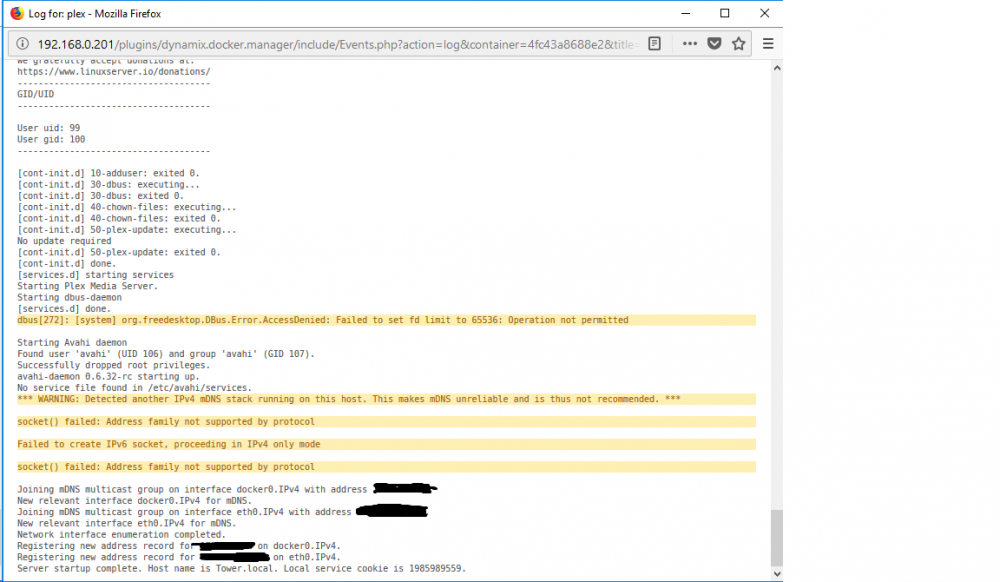
I've got the linuxserver.io docker installed on my unRAID server (version 6.3.5). I was able to get the libraries setup but my Nvidia Shield doesn't acknowledge the server as being online. The Shield shows the unRAID server in the Settings, but can't see it as being online. The Plex WebUI sees the Shield as being an available player, but it's not listed under the Devices tab. When I checked the Plex Docker log (attached) it shows an IPv6 error. I'm wondering if this is the issue. If so, how to I go about fixing it?
-
Sorry about the semantics. I'm so used to using preclear I forgot that the terminology changes once the drive is inserted into the array. I was unaware that the array isn't taken offline with the newer versions when clearing a disk. That simplifies things considerably and solves my problem, assuming there's nothing wrong with the drives themselves. I've really got to start reading the release notes when I upgrade my software. Update: I installed five disks in the external bays and assigned each one to a slot. I was presented with a warning that all data on the drives would be erased when the array was started. I started the array and the disks are currently being cleared while still leaving the array active and unaffected. I can access files and play videos from the server with no problems. This is exactly what I wanted to do so it's all good. Like I said, I hadn't read the release notes on any current versions of unRAID so I wasn't aware that it had been fixed to clear the drives and still allow the array to be used normally. I was so used to it being unavailable during the clearing process that it never occurred to me that the authors may have changed that functionality. Is it any wonder why I love this program? Been using it for over nine years now and it was the best money I've ever spent on a piece of software. It just keeps getting better.
-
Got it. I was hoping I wouldn't have to let the array preclear it because it takes it out of commission while the drive is being precleared. Thanks for all of the input. I appreciate all of the comments and suggestions.
-
All of the drives in question have been partitioned and formatted in unRAID so they will not be precleared automatically when added to a new slot. They were all new, blank drives that had been precleared prior to insertion into the array for the first time. I have never had an issue using the preclear plug-in or the old command line version on a new drive, only with drives that had been removed from the array and replaced. None of the disks in question had reported any errors. I agree that it is disconcerting about the drives that are not completing the preclear process. I intend to run a complete diagnostic on them to see if they're reporting any issues. This whole situation is confusing and quite perplexing. I've re-purposed drives from the array before and never had any issues.
-
OK, that makes sense about the rebuild with a replacement disk. Thanks for the clarification. However, that brings me back to my original predicament. I can't seem to preclear a disk that was already precleared and then had data added after being inserted into the array. I basically want to wipe it clean so I can install it as a new disk without affecting parity, as you mentioned. I've tried it with several different disks and the preclear function either fails, stalls, or is extremely slow. The last disk I tried to preclear was only 52% through the pre-read process before it stalled. That took 19 hours for a 1.5TB disk. Doesn't unRAID write the clear signature to the disk in an area that would be unaffected by a low level format or am I off base with my thought process? This is why I was asking whether a low level format would zero the disk and still allow unRAID to see it as a precleared disk. If the rest of the disk is zeroed out then wouldn't that basically be seen by unRAID as a new disk that had been precleared? I'm just trying to figure out how to make this work without having to do a parity rebuild or do a new configuration from scratch. In a nutshell, how does one install a drive in an unRAID array that been previously used in the same array but was replaced so it is no longer part of the current configuration? I'd like to clear whatever data is on the drive so unRAID sees it as a blank, precleared drive. Doing a preclear on the drive doesn't appear to be a workable option, at least not using the plug-in. I also tried running the command line preclear script but the drive does not show up as a candidate for being precleared, which makes sense since it had already been precleared previously. I don't really want to install it and do a new configuration because it would do a new parity build with duplicate data on both the old drive and the one that replaced it. I'm starting to think that I may have to install all of the drives in the new enclosure, start with a new configuration, and let it rebuild parity even if the drives contain data. Once the parity rebuild is complete I can access the individual drives and delete the data from the drives. Parity will be updated to reflect the deleted data. This would limit the system to a single parity rebuild and still allow me to access the data. Does this seem like the only scenario that will work or do I have other options?
-
Hmmm, OK. On a side note, I reinstalled one of the drives that failed the preclear attempt and it treated it like a new precleared drive and rebuilt the data from parity. The drive had been in the array previously in a different location and I replaced it with a new, larger drive. After it rebuilt the data on the new drive from parity I attempted to perform a preclear on the old drive to write all zeroes to it. The preclear got hung up and subsequent attempts to preclear it failed. I took a risk and swapped out the old drive with a smaller one in the array to see what would happen. I figured if it tried to rerun a parity check I'd just stop the array and replace the old drive and restore the original configuration and the perform a new parity check. Instead, it treated the old drive as a precleared drive and restored the data, even though the drive had data from it's former location. I assume the preclear wiped the MBR so it saw it as a blank drive and rebuilt the data from the old drive using parity.
-
The enclosure is a Supermicro CSE-M35T-1B 5-drive bay that has five discreet SATA inputs. I'm just sitting the enclosure on top of the server chassis and using extension cables for the power inputs and 36-inch SATA cables for the signal connections. My server board uses three Supermicro AOC-SASLP-MV8 8-port SATA controllers for the drives in the internal array and parity drive and a single dual-port SATA III controller (not currently connected to anything). The motherboard has six onboard SATA III ports, one of which is currently used for a 250GB SSD cache drive. I plan to use the five unused onboard SATA ports to connect directly to the enclosure so speed shouldn't be an issue. Doesn't a low level format write all zeroes to the disk? I'm using the HDD LLF Low Level Format tool from this site: http://hddguru.com/software/ The drives were healthy and working fine before I pulled them from the array. I only replaced them with larger drives for increased capacity.
-
I just picked up an external 5-bay disk enclosure I'd like to add to my 24-bay server. I have a bunch of smaller disks that came out of my unRAID array that I had previously updated and want to use in the external enclosure. I have been attempting to run a preclear on the drives and it either fails or runs painfully slow. I'm using the preclear plug-in on unRAID Server Pro version 6.3.2 with a 24-disk array (including a single parity drive and a cache drive). I have tried using both current versions of the plug-in. Do I even need to run a preclear on the drives? My main concern is that they still contain data that would be a duplicate of what's already on the replacement drives. If I add them to the array I assume that it will automatically rebuild parity with the data that's on the drives. I suppose I could stop the parity rebuild and then delete the data manually, but chances are I'd have to rebuild parity again from scratch since it's unlikely I could halt it in time. I'm trying to figure out the best approach to reintroducing drives with existing data that I would like to clear. Can I just run a low-level format and then insert them into the array without having to do another pre-clear?

